WordPress products
 Joomla products
 Support
 News
News Login
LoginHow to Use WP Media Folder AI to Improve Image Captions That Boost CTR

Image captions are often seen as a small detail, yet they can be a decisive factor in driving clicks. When visitors skim a page, clear, relevant captions help them understand an image's context and encourage interaction and deeper engagement with the content.
Imagine a page filled with compelling visuals, but with captions that are generic or even missing. Users may notice the images, but feel no reason to click or continue reading. With AI-driven captioning, captions are no longer just supporting text but an integral part of the user experience that feels more purposeful and guided—making it worth exploring how this approach can be applied effectively in your workflow.
- Image captions play a critical role in improving CTR and user experience, especially when they are clear, contextual, and aligned with user intent.
- WP Media Folder AI simplifies caption creation by generating relevant and engaging image captions based on visual and content context.
- Custom AI prompts help produce click-worthy captions, allowing teams to control tone, length, and SEO focus for better search snippet performance.
- AI-optimized image captions support SEO efforts, improving image discoverability and reinforcing page relevance when used consistently in WP Media Folder.
Table of content
What is the Impact of Image Captions on CTR?

Image captions play a subtle but powerful role in influencing user behavior. While often overlooked, the right caption can guide attention, clarify intent, and turn a quick glance into a meaningful click—directly impacting CTR.
- Help users quickly understand: A clear caption removes ambiguity and provides instant context, allowing them to grasp an image's message without extra time spent interpreting it.
- Reinforce the surrounding content: When captions align with the page content, they strengthen the overall narrative and make the information feel more cohesive and persuasive.
- Encourage interaction: Captions that highlight benefits or relevance naturally invite users to click, explore further, or take the next step.
- Support visual scanning behavior: Since many users scan pages rather than read them fully, well-written captions help capture attention and keep users engaged as they move through the content.
Supercharge your WordPress images with AI.
WP Media Folder Image AI helps you optimize images automatically, generate alt texts, improve SEO, and compress files in one click.
Upgrade your media workflow with intelligent automation.
Setting Up WP Media Folder AI for Caption Generation

WP Media Folder provides AI features that simplify image caption creation and optimization. Instead of manually writing captions for each image, you can configure the AI once and have it apply consistent captions across your media library. With the right setup, WP Media Folder AI helps ensure your image captions stay relevant, contextual, and aligned with your SEO content goals.
Accessing AI Tools
The setup process starts from your WordPress dashboard. Open the Settings menu, then navigate to WP Media Folder > Settings > AI Tools. This area serves as the main control panel for all AI-related features, where you can manage how the AI behaves and how it influences image metadata.

Inside this section, you'll find several global options that affect caption generation. Think of it as setting the rules before the AI starts working—by defining these preferences early, you ensure the AI produces captions that match your website's structure and purpose.
Enabling AI Image Captions
Once you are in the AI Tools panel, look for the option labeled "AI image caption". To enable automatic caption generation, check this option. This step tells WP Media Folder that image captions should be filled using AI whenever possible.
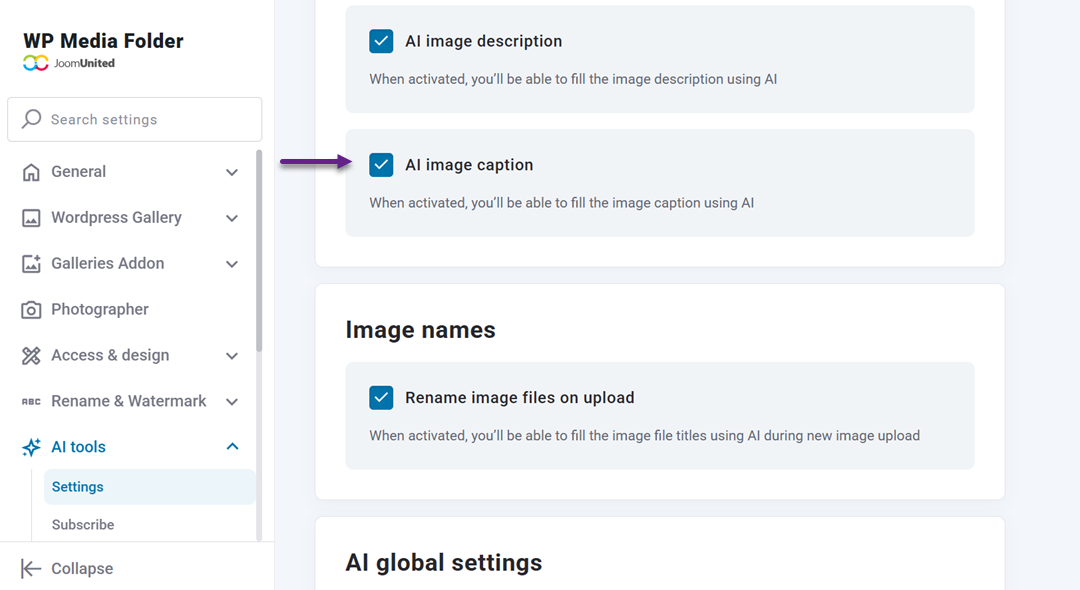
Once enabled, the AI generates captions based on your settings. From now on, you no longer need to manually write captions for each image; the system will handle them consistently across your media library.
Setting Caption Context
To avoid generic captions, WP Media Folder lets you define a clear context that guides how AI writes image captions. In the AI Tools settings, look for the System prompt (context) field. This is where you explain the overall theme of your website so the AI can understand how to describe images.
Inside this field, you can add a short and direct description. By filling in this context, you give the AI a reference point before it generates any captions.
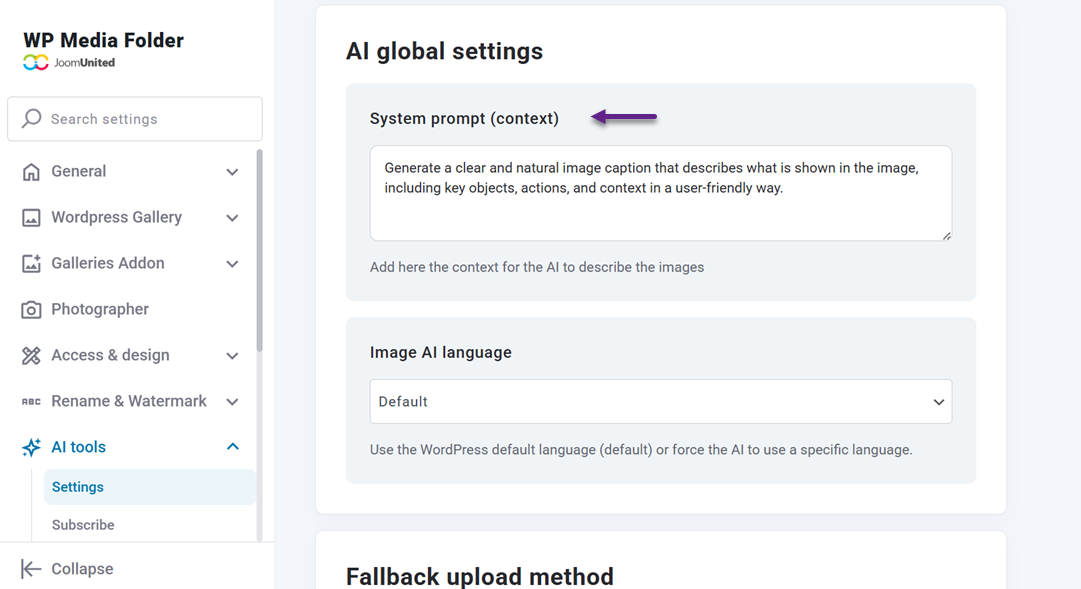
As a result, the captions become more relevant to your niche, avoid vague wording, and better reflect the purpose of your website—whether it focuses on travel services, e-commerce, or other specific industries.
Selecting Metadata & Language
The final step is choosing a language. You can also set the language used for caption generation, which is especially helpful for multilingual websites.

By combining selected metadata fields with the correct language setting, WP Media Folder AI can generate natural, accurate image captions that support both accessibility and SEO goals.
Example AI Prompts for Image Captions

This section explores how different AI prompts can be used to generate image captions with specific objectives. Each prompt type focuses on a different outcome—clarity, engagement, search visibility, or brand consistency.
Descriptive Image Caption Prompt
Descriptive prompts are designed to help AI clearly explain what is shown in an image. This type of caption focuses on accuracy and context, making it easier for users to immediately understand the visual without having to guess. It is especially useful for informational content, product images, and tutorials where clarity is paramount.
By providing clear descriptions, these captions improve accessibility and strengthen the connection between the image and the surrounding content. When users instantly understand what they are looking at, they are more likely to stay engaged and continue scrolling.
Example prompt:
"Generate a clear and natural image caption that describes what is shown in the image, including key objects, actions, and context in a user-friendly way."
Click-Driven Caption Prompt
Click-driven prompts focus on encouraging user interaction rather than just describing the image. Instead of stating what the image depicts, the caption highlights why it matters to the user, subtly guiding them to click, explore, or take action.
This approach works well for landing pages, featured images, and promotional content where the goal is to spark curiosity. A well-crafted click-driven caption can turn an image into a compelling entry point for deeper engagement.
Example prompt:
"Write an engaging image caption that highlights the main benefit of the image and encourages users to click or learn more, using a friendly and persuasive tone."
Search-Optimized Caption Prompt
Search-optimized prompts are intended to help captions support SEO without sounding forced. The goal is to naturally include relevant keywords while keeping the caption readable and useful for real users.
When implemented correctly, these captions help search engines understand image context while enhancing the user experience. This balance increases the chances of images appearing in search results and driving qualified traffic.
Example prompt:
"Create an image caption that naturally includes the primary keyword related to the page topic, while remaining clear, concise, and easy to read."
Brand-Consistent Caption Prompt
Brand-consistent prompts ensure that AI-generated captions match your brand's tone, style, and messaging. This is important for maintaining a cohesive experience across all visuals, especially on websites with a strong brand identity.
By guiding AI with brand-specific instructions, captions feel more intentional and aligned with your overall communication strategy. Users then experience a consistent voice, whether reading text or scanning images.
Example prompt:
"Generate an image caption using a [professional/friendly/casual] tone that aligns with the brand voice and avoids generic or overly promotional language."
Optimizing AI-Generated Image Captions for SEO

Once AI-generated image captions are in place, the next step is ensuring they truly support your SEO goals. Optimization is not about stuffing keywords or forcing search terms, but about helping search engines and users understand the image in a natural, meaningful way.
Using Keywords Naturally
Imagine a user landing on your page and reading an image caption that feels awkward or overly repetitive. Even if it contains the right keywords, it immediately breaks trust. Natural keyword usage means weaving important terms into the caption only when they genuinely fit the image's context and the story you are telling.
When keywords are used naturally, captions remain readable while still signaling relevance to search engines. This balance helps your images contribute to SEO without sacrificing user experience, making both users and search engines more comfortable engaging with your content.
Aligning Captions with Page Content
An image caption should never feel disconnected from the page it lives on. Think of it as a supporting sentence that reinforces the main topic, rather than introducing something new or unrelated. When captions align with the surrounding content, the overall experience feels more cohesive.
This alignment helps search engines better understand how the image supports the page's intent. At the same time, users experience a smoother reading flow, with images and text working together rather than competing for attention.
Search Visibility
Well-optimized captions increase the chances of your images appearing in search results, especially in image search and rich snippets. When search engines can clearly interpret what an image represents, they are more confident in showing it to relevant users.
From a user's perspective, clear and informative captions make search results more appealing. When an image preview is paired with a relevant caption, it sets clear expectations and encourages clicks from users genuinely interested in the content.
Calling all webmasters!
Save hours of manual image work with WP Media Folder Image AI. Auto-optimize images, generate alt texts, enhance SEO, and deliver lighter, faster-loading sites for your clients.
Supercharge your image workflow today!
Conclusion
Image captions may seem like a small element, but as this guide shows, they play a meaningful role in shaping user experience, encouraging clicks, and supporting SEO. When captions are clear, contextual, and aligned with page content, they help users quickly understand what they are seeing and why it matters—turning passive visuals into active engagement points.
By combining thoughtful caption strategies with AI-driven automation, you can streamline your workflow without sacrificing quality or relevance. If you want to generate consistent, SEO-friendly image captions at scale while keeping them aligned with your content and brand, WP Media Folder offers a practical solution to start optimizing your media library more effectively.
When you subscribe to the blog, we will send you an e-mail when there are new updates on the site so you wouldn't miss them.