WordPress products
 Joomla products
 Support
 News
News Login
LoginHow to Bulk Optimize Existing Image Metadata Using WP Media Folder AI

Optimizing existing image metadata with WP Media Folder AI is crucial for improving image SEO and accessibility across large media libraries. Without proper alt text and metadata, images can limit search visibility and create accessibility gaps, especially on content-heavy websites.
This article explains how to bulk-optimize existing image metadata using WP Media Folder AI via a streamlined, AI-powered workflow. Read on to learn how you can enhance SEO performance, improve accessibility, and save time by optimizing multiple images in one efficient process.
- Bulk optimize existing image metadata using WP Media Folder AI to improve image SEO and accessibility across large media libraries.
- Automate alt text, titles, and descriptions in one workflow while retaining full manual control for critical images.
- Save time and maintain consistent, SEO-friendly image metadata with an AI-powered optimization process built for WordPress.
Table of content
The Importance of Bulk Image Optimization

Bulk image optimization is essential for maintaining strong SEO and accessibility as your media library grows. When images are uploaded over time without consistent metadata, they can create missed opportunities in search visibility and user experience that are difficult to fix manually.
By optimizing image metadata in bulk, website owners can apply improvements at scale, ensuring every image contributes positively to performance, accessibility, and overall content quality.
SEO Impact
Search engines rely on image metadata, especially alt text and titles, to understand visual content. When images lack descriptive and relevant metadata, they are less likely to appear in image search results or support the SEO value of the surrounding content.
Bulk optimization helps standardize metadata across existing images, making them more discoverable and contextually aligned with page topics. This consistency improves image indexing and strengthens overall on-page SEO without requiring individual manual edits.
Accessibility Value
Alt text is a critical component of web accessibility, allowing screen readers to describe images to users with visual impairments. Images without proper alt text can create barriers that limit content accessibility and inclusivity.
By optimizing metadata in bulk, accessibility improvements can be applied across an entire media library at once. This ensures that all images convey meaningful descriptions, improving the user experience and ensuring compliance with accessibility standards.
Time Efficiency
Manually updating image metadata becomes increasingly inefficient as the number of images grows. Editing each image individually not only consumes time but also increases the risk of inconsistencies and human error.
Bulk image optimization streamlines this process by applying updates to multiple images in a single workflow. This enables teams to quickly improve large libraries, freeing time to focus on higher-value content and optimization.
Supercharge your WordPress images with AI.
WP Media Folder Image AI helps you optimize images automatically, generate alt texts, improve SEO, and compress files in one click.
Upgrade your media workflow with intelligent automation.
Preparing WP Media Folder AI

Before running bulk image optimization, WP Media Folder AI must be properly configured to ensure accurate, relevant metadata generation. These settings determine how the AI analyzes images, what metadata fields are generated, and how results align with your website's content and language.
A well-prepared configuration helps maintain consistency across image metadata while maximizing SEO and accessibility benefits during bulk processing.
Open AI Settings
To begin, access the AI configuration panel from your WordPress dashboard by navigating to Settings > WP Media Folder > AI Tools. This section serves as the control center for all AI-powered image optimization features.
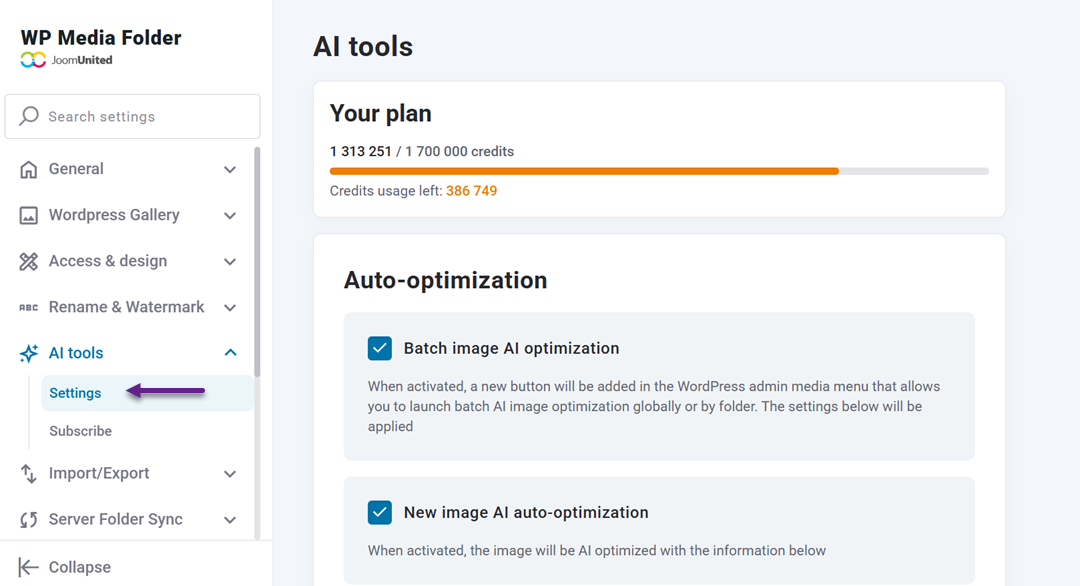
From here, you can manage AI-related options, monitor usage limits, and customize how the plugin generates metadata across your media library.
Enable Metadata Fields
Within the AI settings, you can choose which image metadata fields should be generated automatically. These typically include image titles, alt text, descriptions, and captions.
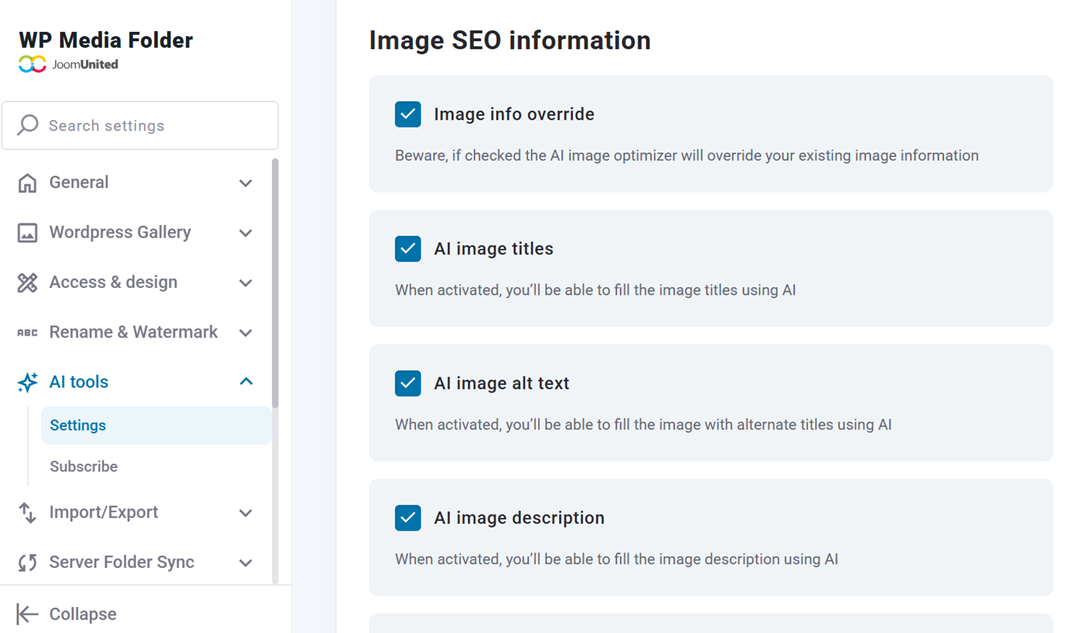
Enabling these fields enables the AI to populate essential SEO and accessibility attributes and, optionally, replace existing metadata to ensure consistency across older images.
Set Language Context
WP Media Folder AI allows you to define a global context that guides how images are described. By setting a clear system prompt related to your website's niche, the AI can generate more relevant and accurate metadata.
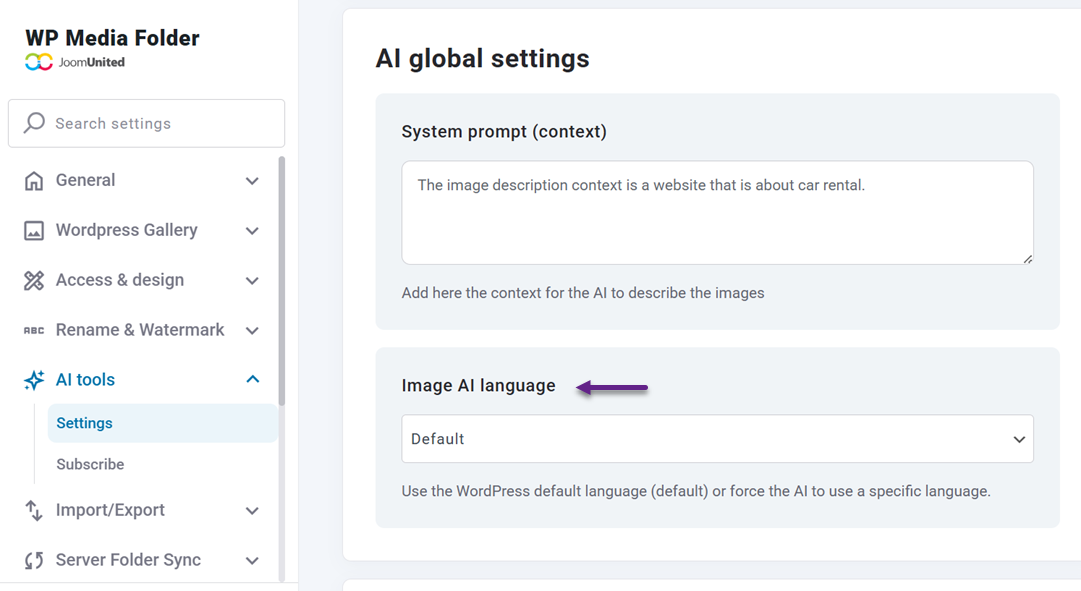
You can also select the language used for metadata generation, making this feature especially useful for multilingual websites or content targeting specific regions.
Bulk Optimize Image Metadata
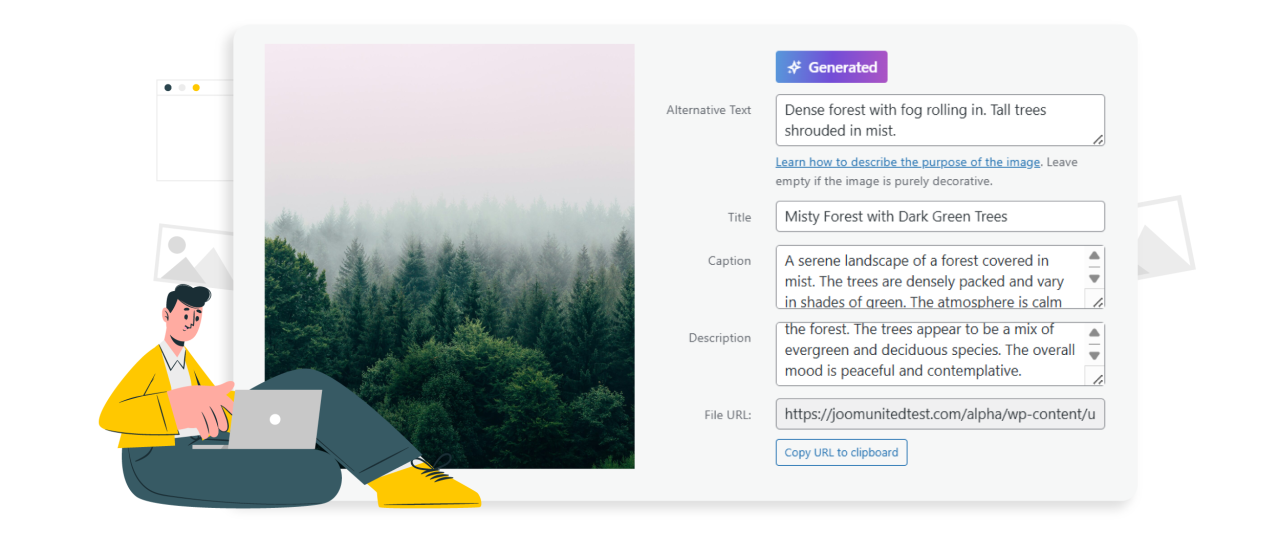
Once the AI settings are in place, you can start optimizing existing images in bulk directly from the WordPress media library. The AI will apply your predefined rules to generate consistent metadata across multiple photos in a single workflow.
This process eliminates repetitive manual work and ensures all images adhere to the same SEO and accessibility standards.
Select Multiple Images
Open Media > Library, then enable the bulk selection option to select multiple images at once. You can choose a specific group of pictures or apply optimization to a larger portion of your media library.
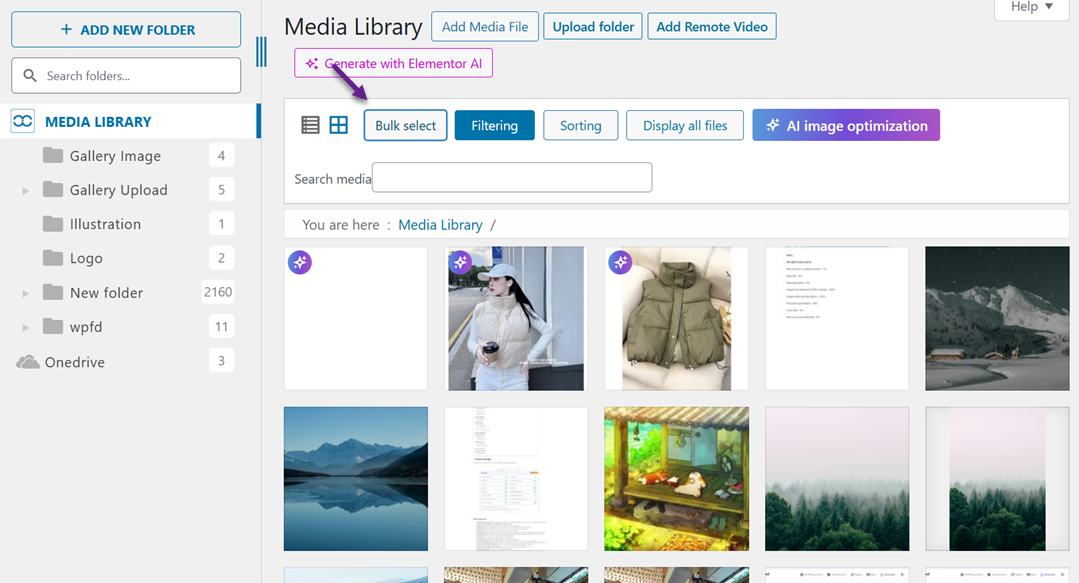
The selected images will be processed using the AI configuration you previously set, including language, context, and enabled metadata fields.
Run AI Generation
After selecting your images, click AI image optimization to start creating metadata. WP Media Folder AI analyzes each image and automatically generates titles, alt text, captions, and descriptions.
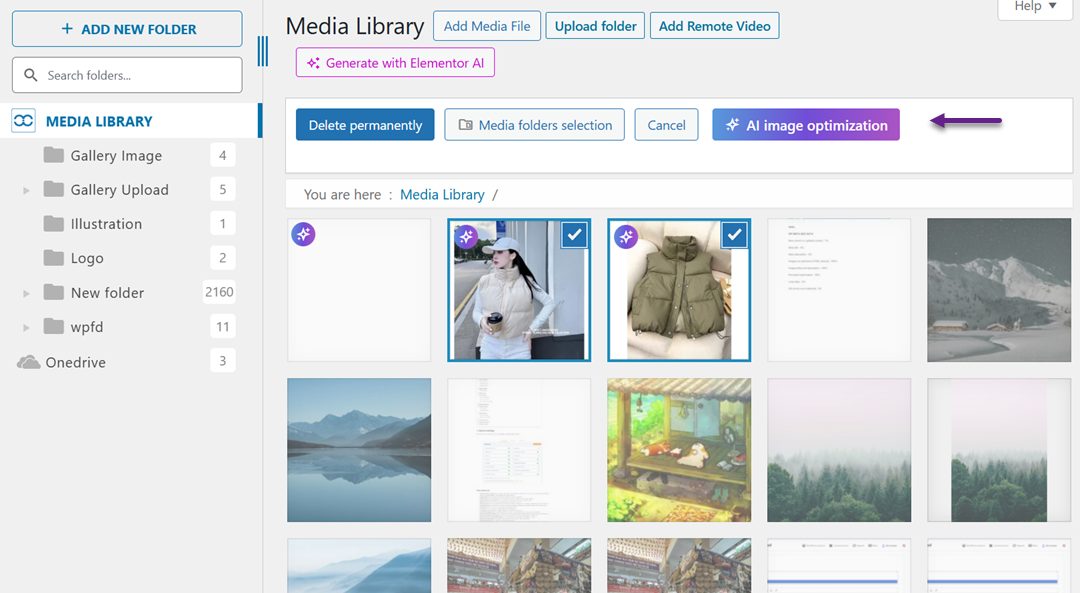
The process usually completes within seconds, even for multiple images, making it an efficient solution for large libraries.
Process Metadata
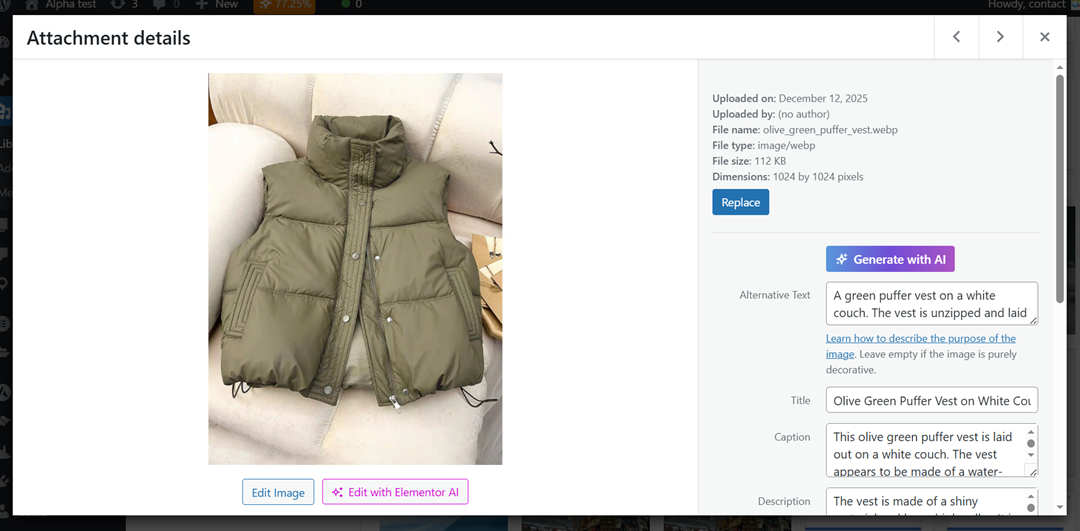
Once the generation is complete, the metadata fields are filled automatically in the media library. The results are based on image content and your defined context, ensuring relevance and consistency.
At this stage, all generated metadata remains fully editable, allowing you to refine descriptions or keywords before final use.
Review Optimization Results
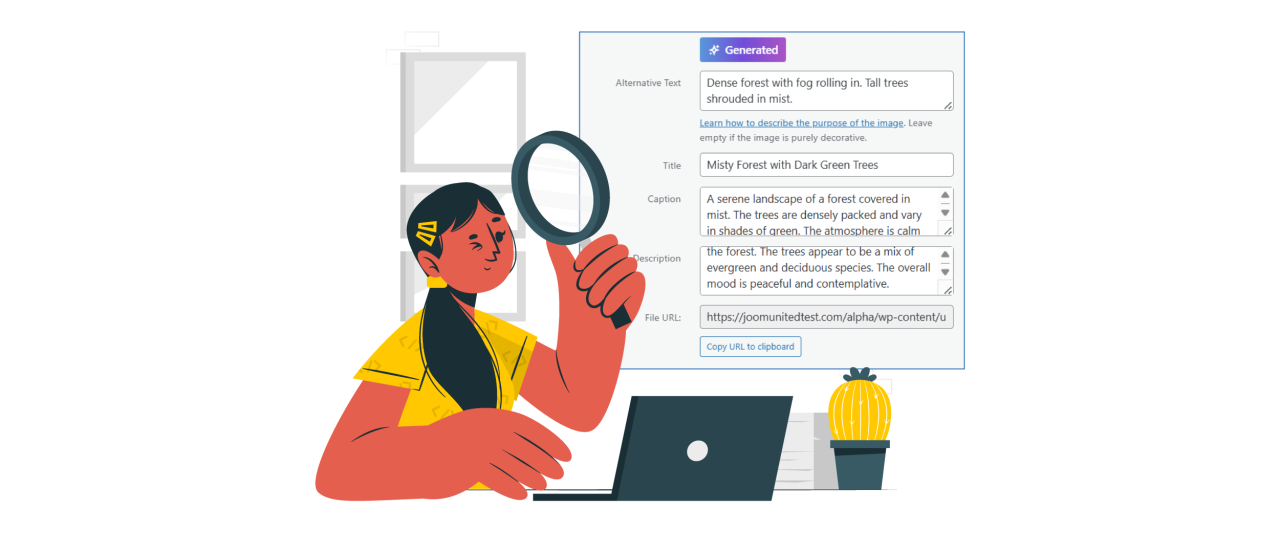
After bulk optimization is complete, reviewing the AI-generated metadata is an important step to ensure accuracy and quality. While WP Media Folder AI handles most of the work, a quick evaluation helps confirm that each image aligns with your content goals and brand context.
This review process ensures that optimized metadata not only supports SEO and accessibility but also delivers meaningful descriptions for real users.
Check Alt Text
Start by reviewing the generated alt text for each image, focusing on clarity and accuracy. Alt text should clearly describe the image without being overly long or vague, especially for images that convey information.
Well-written alt text helps search engines understand image content and improves accessibility for screen reader users. If any descriptions feel too generic or miss key visual details, minor edits can significantly improve their effectiveness.
Edit Key Images
Not all images require the same level of attention, so prioritize high-impact visuals such as featured images, product photos, or images used on core landing pages. These images play a bigger role in SEO and user engagement.
Editing key images allows you to refine keywords, adjust tone, and ensure descriptions fully support the surrounding content. This targeted approach keeps optimization efficient while maintaining high-quality results where it matters most.
Ensure Relevance
Finally, review the metadata to confirm it remains relevant to each image's page context. Metadata should support the content topic, not introduce unrelated terms or unnecessary keywords.
Ensuring relevance helps avoid over-optimization and keeps metadata natural and useful. When image descriptions align with page intent, they contribute more effectively to SEO performance and user experience.
Optimization Best Practices

To keep image metadata effective over time, bulk optimization should be treated as an ongoing process rather than a one-time task. Applying best practices helps maintain consistent SEO and accessibility standards as your media library grows.
By combining AI automation with thoughtful review, you can ensure long-term optimization without increasing manual workload.
Use AI Regularly
Regular use of AI tools helps prevent metadata gaps from accumulating as new images are added. Running periodic bulk optimization ensures that newly uploaded or previously missed images are quickly aligned with your SEO and accessibility goals.
Regular use of AI also helps maintain consistency across your media library. When metadata is consistent in structure and style, search engines and users can better understand your visual content.
Combine Manual Review
While AI handles bulk generation efficiently, manual review remains essential for quality control. Specific images may require more precise wording, especially those tied closely to branding, products, or key content pages.
Combining AI automation with selective manual edits ensures accuracy without sacrificing efficiency. With WP Media Folder AI tools, you can generate metadata at scale while still having complete flexibility to refine and control critical image details directly from the WordPress media library.
Update When Needed
Image metadata should evolve along with your content and SEO strategy. When pages are updated, rebranded, or repurposed, existing image metadata may need to be adjusted to remain relevant.
Updating metadata when needed helps prevent outdated descriptions and misaligned keywords. This ensures your images continue to support both search visibility and user experience over time.
Calling all webmasters!
Save hours of manual image work with WP Media Folder Image AI. Auto-optimize images, generate alt texts, enhance SEO, and deliver lighter, faster-loading sites for your clients.
Supercharge your image workflow today!
Conclusion
Bulk-optimizing existing image metadata with WP Media Folder AI is a practical way to improve image SEO and accessibility without adding manual workload. By automating alt text, titles, and descriptions at scale—while still allowing full manual control—you ensure that every image contributes to search visibility, accessibility compliance, and a better overall user experience.
If you're managing a growing media library and want a faster, more consistent approach to image optimization, now is the right time to act. Try WP Media Folder AI and see how AI-powered bulk image optimization can streamline your workflow while keeping your image metadata accurate, relevant, and SEO-ready.
When you subscribe to the blog, we will send you an e-mail when there are new updates on the site so you wouldn't miss them.