WordPress products
 Joomla products
 Support
 News
News Login
LoginHow to Automatically Generate SEO-Friendly Filenames for Images with WP Media Folder AI

Automatically generating SEO-friendly filenames for images is a simple step that is often overlooked, even though it has a significant impact on your website's SEO performance. When a filename is not descriptive, Google loses important context that could help your page appear in search results.
Imagine if every image you upload automatically had a name that matches the content of the page—containing the right keywords, neatly structured, and consistent. Keep reading to discover how you can automatically generate SEO-friendly filenames and optimize your images more efficiently.
- Descriptive, keyword-rich filenames help search engines understand images and improve visibility in search results.
- Generic default names like IMG_1234.jpg reduce relevance and make media libraries harder to manage.
- WP Media Folder AI automatically generates SEO-friendly image names on upload, ensuring consistency and saving time.
Table of content
Why Image Filenames Matter for SEO?

At first glance, an image filename may seem like a small technical detail. However, for search engines, it plays an important role in understanding what your content is about. Before Google even analyzes the surrounding text or alt attributes, it reads the image filename to gather context about the visual content.
Search engines rely on multiple signals to determine relevance, and filenames are one of them. A descriptive filename like seo-friendly-image-filenames.jpg provides clear meaning, while a generic one like IMG_1234.jpg offers no value. Proper filenames help improve visibility in Google Images, strengthen page relevance for specific keywords, and support overall on-page SEO.
In short, a well-structured filename helps search engines connect your images with the right search queries more accurately.
Common Problems with Default Image Filenames
Default image filenames may seem harmless, but they can quietly weaken your overall SEO performance. When images are uploaded without proper naming, they often create technical and organizational issues that affect both search visibility and workflow efficiency.
Duplicate and Generic Naming Patterns
Most cameras and design tools automatically generate filenames like IMG_0001.jpg or Screenshot-2026.png. When these files are uploaded directly to a website, they create repetitive and generic naming patterns that provide no unique value to search engines.
Over time, this can lead to duplicate or very similar filenames across different pages. Search engines struggle to differentiate content relevance, and your images lose the opportunity to rank individually in image search results because the filenames lack clear context.
No Keyword Relevance for SEO
Default filenames do not include target keywords or descriptive phrases related to your content. As a result, search engines miss an important ranking signal that could help associate your image with relevant search queries.
When filenames contain meaningful keywords, they reinforce the topic of the page and support on-page SEO. Without this keyword relevance, your images become passive elements instead of strategic assets that contribute to search visibility.
Poor Media Library Organization
Generic filenames also create confusion inside your media library. When managing hundreds or even thousands of images, it becomes difficult to identify specific files quickly because their names do not reflect their content.
This lack of structure slows down workflow, increases the risk of uploading the wrong image, and makes content management inefficient. A well-organized naming system not only benefits SEO but also improves productivity and long-term website maintenance.
Supercharge your WordPress images with AI.
WP Media Folder Image AI helps you optimize images automatically, generate alt texts, improve SEO, and compress files in one click.
Upgrade your media workflow with intelligent automation.
How to Automatically Generate SEO-Friendly Filenames

Automatically generating SEO-friendly filenames does not have to be complicated or manual. With the right tool, you can ensure every uploaded image follows a consistent, keyword-rich naming structure from the start. This is where WP Media Folder AI comes in.
WP Media Folder AI is an AI-powered feature inside the WP Media Folder plugin that helps optimize image-related elements automatically. One of its most practical capabilities is generating Image names using AI. When activated, the plugin automatically fills and optimizes image file titles during new uploads—without requiring manual renaming one by one.
Open AI Settings
Start by accessing your WordPress dashboard and navigating to Settings > WP Media Folder > AI Tools. This section serves as the control center for configuring AI-powered features, including automatic filename generation.
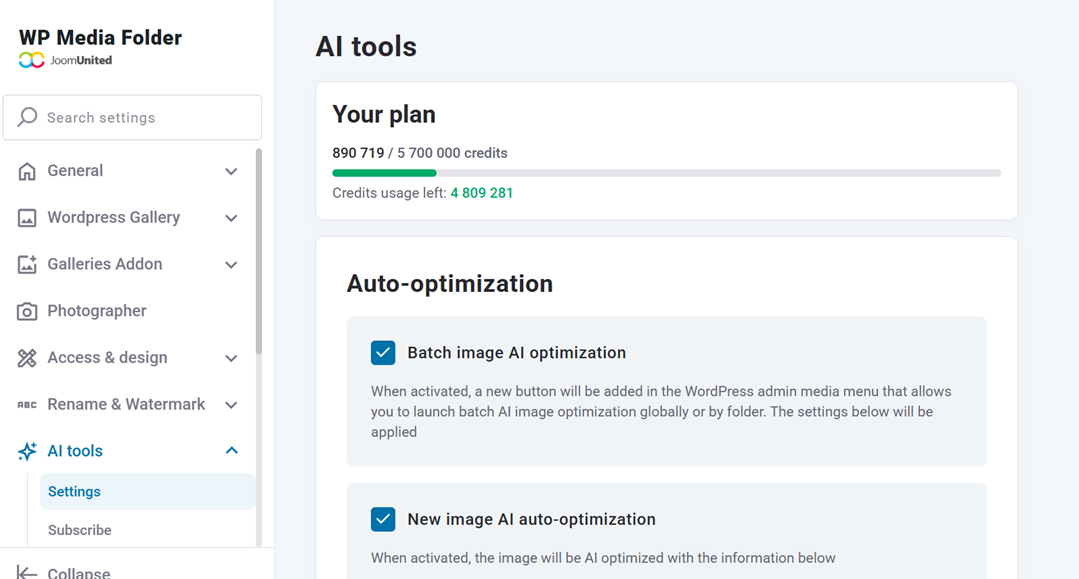
Inside this panel, you can manage how the AI works, monitor usage, and define how images should be processed when uploaded to your media library.
Enable "Image Names"
To focus on automatic filename optimization, activate the "Rename image files on upload" option. Once enabled, make sure to check the "Image names" field in the AI settings.
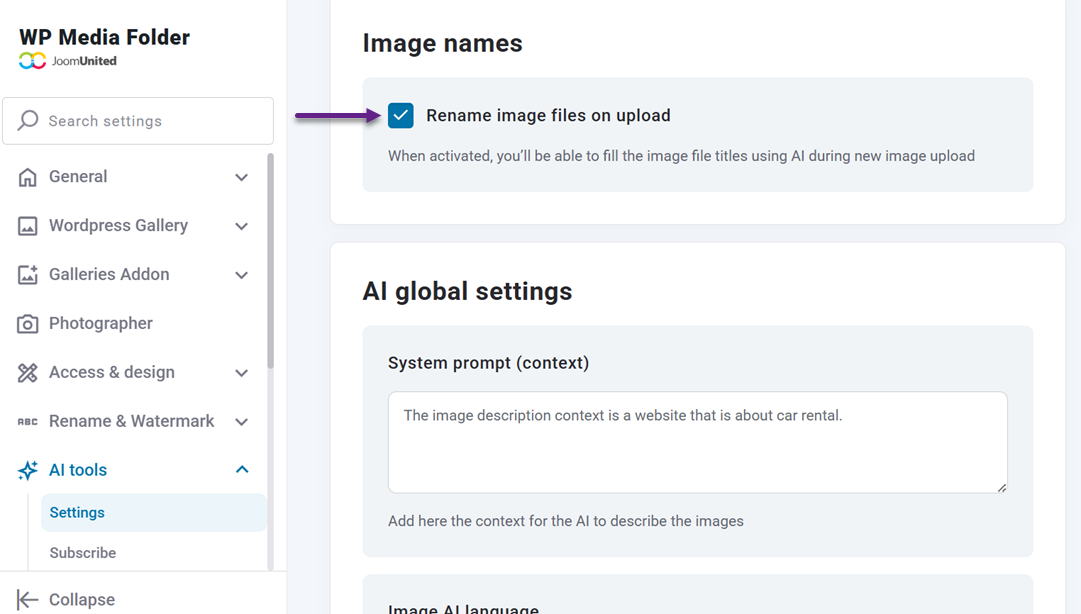
This ensures that every new image uploaded to your website will automatically receive a descriptive, SEO-friendly filename generated by AI. Instead of keeping default names like IMG_1234.jpg, the system replaces them with relevant, structured image names based on the image content.
Set Language and Context
Although the primary goal is optimizing image names, setting the correct language and context improves accuracy. You can define the language used for filename generation, which is especially helpful for multilingual websites.
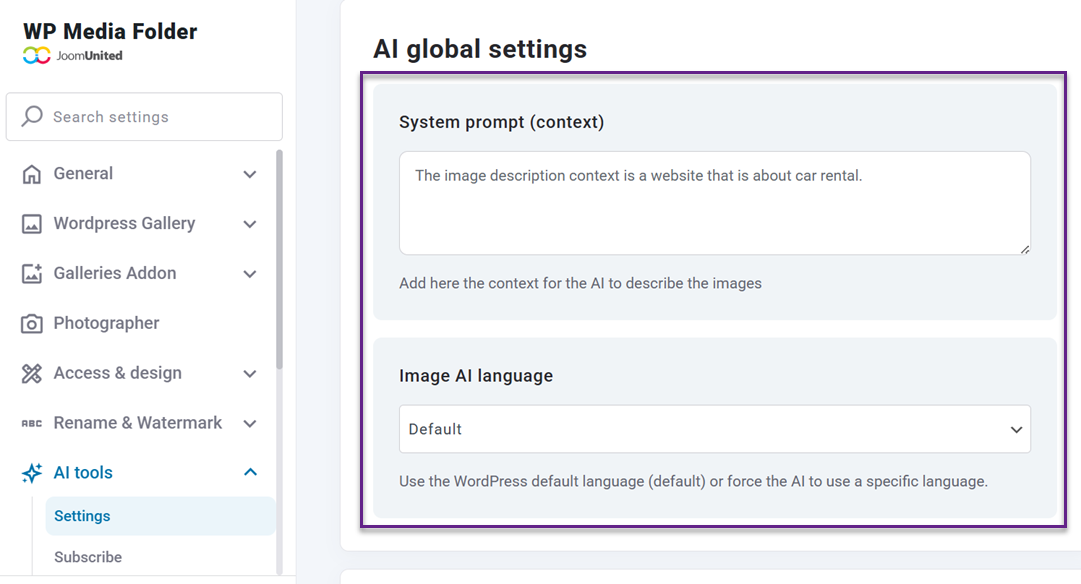
Providing clear context about your website's niche helps the AI create more relevant and aligned image names. For example, an e-commerce store and a travel blog will generate very different naming patterns based on their content focus.
Upload New Images and Let AI Generate Filenames
Once everything is configured, simply upload new images to your media library as usual.
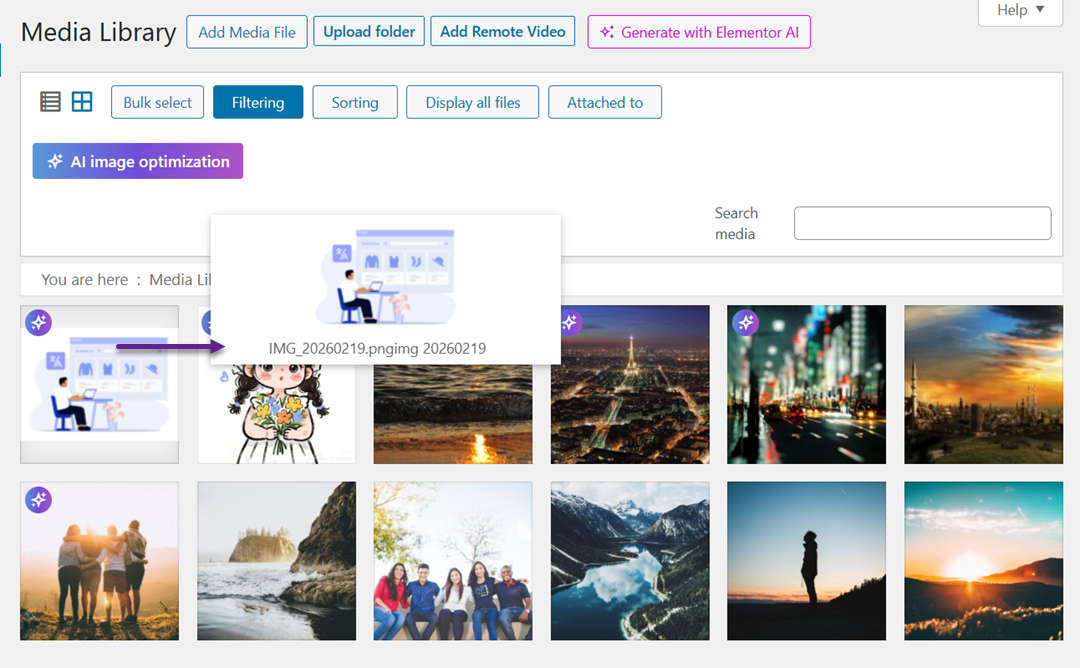
Then, you can open the image you just uploaded, and you'll see that the filename has changed from IMG_20260219 to "man-at-desk-with-computer-graph", adjusted automatically based on the context of the image.
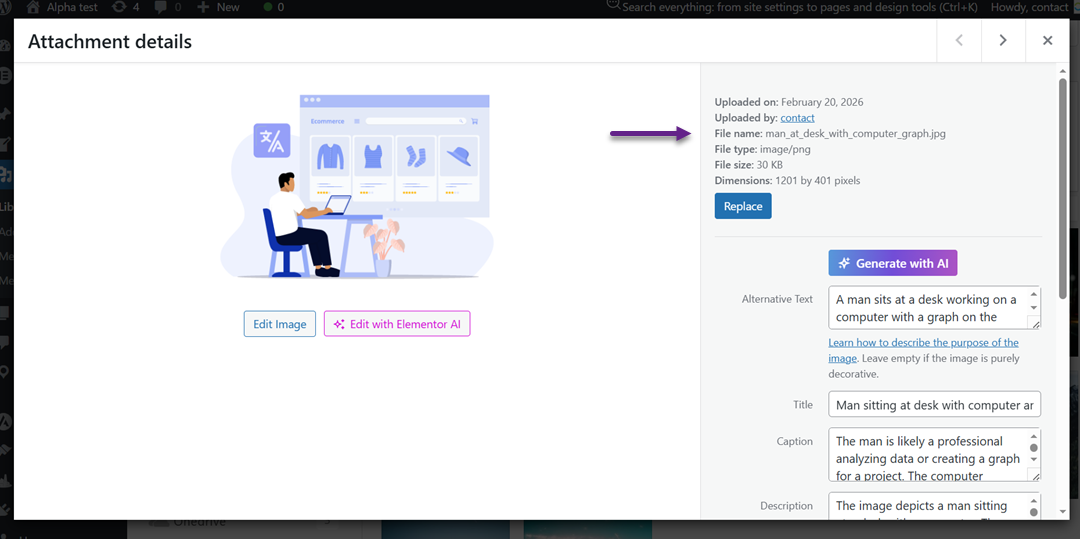
The process runs in the background and completes within seconds, ensuring consistency, saving time, and eliminating repetitive manual work. From that point forward, your images are not just visual assets—they are properly named SEO contributors from the moment they go live.
Best Practices for Creating SEO-Optimized Image Filenames

Creating SEO-optimized image filenames does not require complex technical skills. With a few consistent habits, you can turn every uploaded image into a stronger SEO asset that supports your page rankings and improves visibility in image search results.
Use Descriptive, Keyword-Rich Phrases
Instead of uploading a file named IMG_4589.jpg, rename it using a phrase that clearly describes the image content. For example, if the image shows a product, use something like black-leather-office-chair.jpg. This gives search engines immediate context about what the image represents.
Make sure the keyword aligns naturally with the page topic. Avoid forcing unrelated keywords just to chase rankings. The filename should accurately reflect what users see in the image while reinforcing the main topic of the page.
Keep Filenames Short and Clear
While descriptive filenames are important, they should remain concise. Long and overly complicated filenames can look messy and reduce readability. Focus on the core description without adding unnecessary words.
A good rule of thumb is to include the primary keyword and one or two supporting words. Clear and simple filenames are easier for search engines to process and for you to manage inside your media library.
Separate Words with Hyphens
Always use hyphens (-) to separate words in your filenames. Search engines interpret hyphens as spaces, which makes it easier to read each word individually. For example, seo-friendly-image.jpg is better than seofriendlyimage.jpg.
Avoid using underscores or combining words without separation, as this can reduce clarity. Consistent word separation improves both readability and indexing accuracy.
Avoid Keyword Stuffing and Special Characters
Adding too many keywords to a single filename can look spammy and harm your SEO efforts. For example, "best-seo-image-seo-optimization-google-ranking-image.jpg" is excessive and unnatural. Keep it focused and relevant.
Also, avoid special characters like &, %, $, or symbols that may cause technical issues in URLs. Clean, simple, and relevant filenames not only improve SEO but also ensure compatibility across browsers and platforms.
Calling all webmasters!
Save hours of manual image work with WP Media Folder Image AI. Auto-optimize images, generate alt texts, enhance SEO, and deliver lighter, faster-loading sites for your clients.
Supercharge your image workflow today!
Conclusion
Automatically generating SEO-friendly filenames for images is a strategic step to strengthen your overall SEO performance. Descriptive, keyword-rich, and well-structured filenames help search engines better understand your visual content, improve image search visibility, and keep your media library organized. Instead of letting images sit with generic names that add no value, you can turn them into assets that actively support your rankings.
If you want to streamline the process and avoid renaming files manually, WP Media Folder AI can help you automatically generate SEO-friendly filenames consistently and efficiently. Start optimizing your images today and see how a smarter naming strategy can enhance your website's search performance.
When you subscribe to the blog, we will send you an e-mail when there are new updates on the site so you wouldn't miss them.