 WordPress products
 Joomla products
 Support
 News
News Login
LoginSelling & Managing Cloud-Based WooCommerce Digital Products with WP File Download

Selling digital products with WooCommerce has become far more complex as agencies move toward cloud-based systems. What used to feel straightforward now involves managing structured file delivery, ensuring secure access, and keeping everything organized across multiple clients and products. Without a clear system, even simple digital assets like templates or guides can quickly become difficult to manage.
As demand grows, agencies need a more reliable way to handle digital product workflows—from purchase to delivery and beyond. A structured approach not only improves the customer experience but also helps maintain control over files, access, and performance as the business scales.
- Sync Cloud Files with WooCommerce: Connect Dropbox, Google Drive, or OneDrive to WP File Download for automatic product generation from cloud assets.
- Limit Access Securely: Combine WooCommerce purchase restrictions with download counts, expirations, and user roles for protected delivery.
- Manage Everything in WordPress: Handle sales, statistics, and file updates from one dashboard without leaving your site.
Table of content
Why Digital Product Systems Matter?

A digital product system defines how your files are stored, delivered, and managed after a customer makes a purchase. In a WooCommerce environment, you're handling access, downloads, and user expectations in real time. Without a structured system, even a minor issue, such as a failed download, can directly impact customer trust.
As your product catalog grows, the complexity increases. Managing multiple files, updates, and customer access manually can quickly lead to disorganized storage, duplicated files, and inconsistent delivery. This is especially challenging for agencies handling multiple clients, where each product may require different access rules and delivery methods.
A well-built digital product system helps you stay in control. It ensures secure delivery, keeps files organized, and enables effective performance tracking. More importantly, it creates a smoother experience for both you and your customers—making your digital product business easier to scale without adding unnecessary complexity.
WooCommerce & WP File Download Setup
Managing digital products in WooCommerce can quickly become complex when you start dealing with multiple files, categories, and access rules. To simplify this, many website owners use WP File Download, a WordPress download manager plugin designed to organize and deliver digital files in a structured way. It helps you keep everything neat while still being fully integrated with WooCommerce for selling purposes.
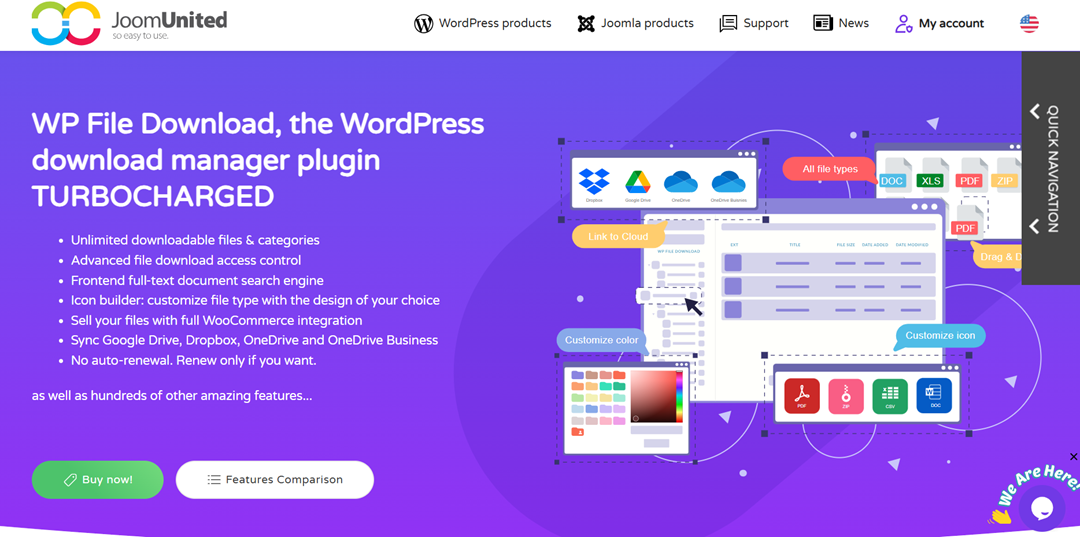
WP File Download, the WordPress download manager plugin, offers powerful capabilities, including unlimited file and category management, advanced access control for secure downloads, and full WooCommerce integration for selling digital products. It is designed to handle both organization and delivery of digital assets in a scalable way without complicating the workflow.
Looking for a powerful file management solution for client websites?
WP File Download is the answer. With advanced features like file categories, access
restrictions, and intuitive UI.
Impress your clients with top-notch file organization!
Installing and Activating Plugins
The first step is installing the essential plugins that will power your digital product system. You need to install WooCommerce as your main e-commerce platform and WP File Download as your file management system.
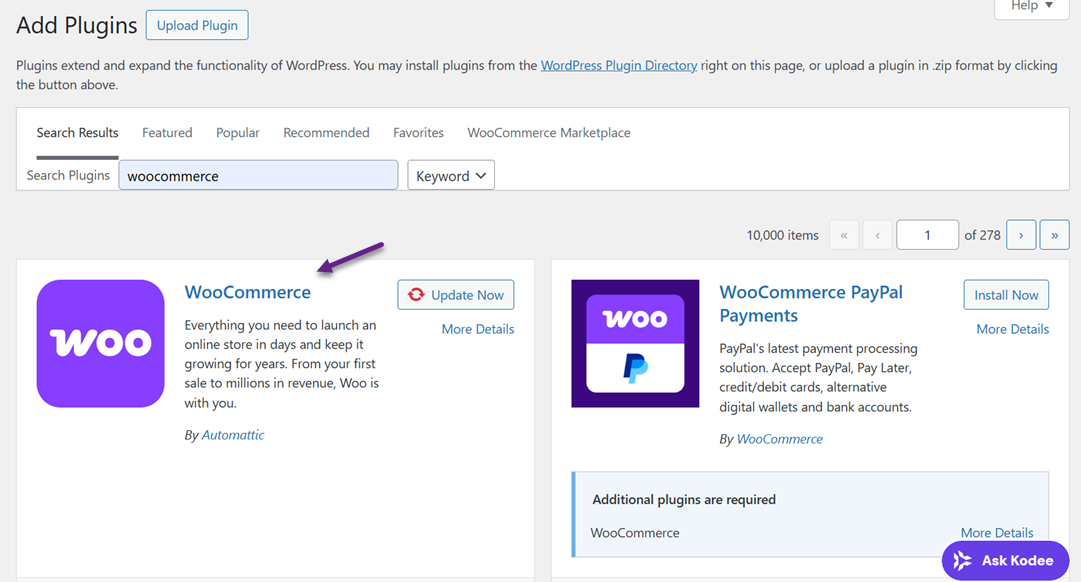
After installing them from the WordPress dashboard, activate WooCommerce first so the store system initializes properly, then activate WP File Download to enable file-handling features. Once both are active, the system is ready for configuration and integration.
Organizing Files in WP File Download
After WooCommerce is installed and activated, the next important step is organizing your digital assets inside WP File Download. This stage is crucial because it determines how easy it will be to manage, update, and assign files to your WooCommerce products later.
In WP File Download, you start by creating a clear folder structure for your product types, such as eBooks, templates, software, or other digital assets.
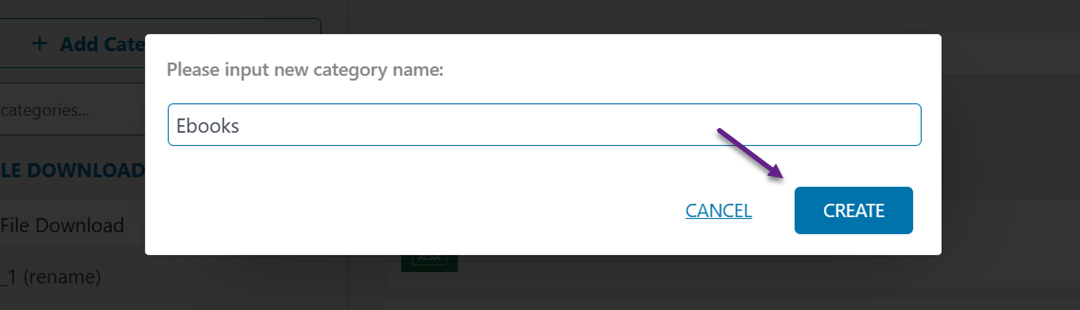
Once the categories are set, you can upload your files directly into the appropriate folders and keep them neatly arranged with consistent naming so each file is easy to identify.
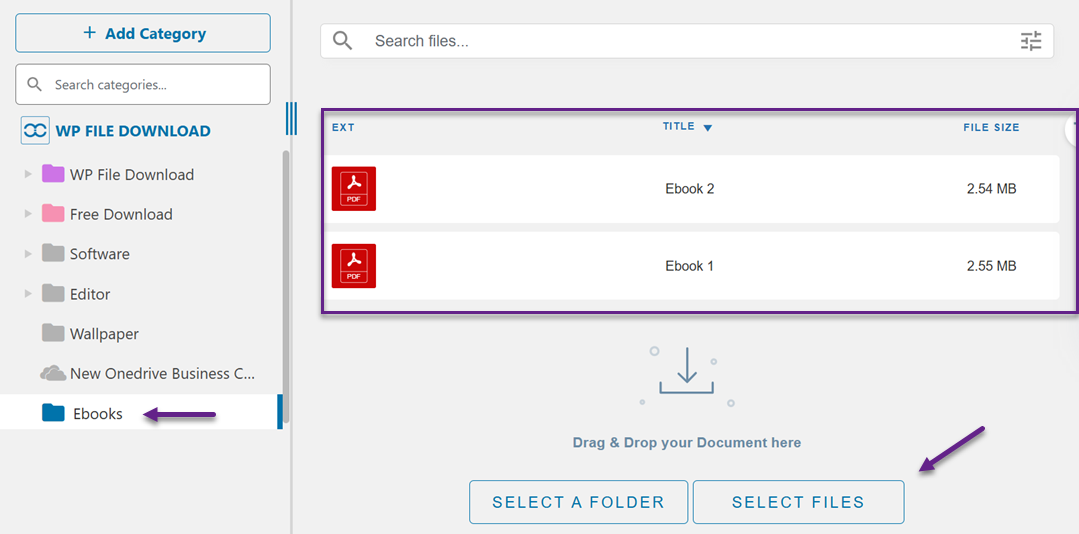
This structure acts as your central file library, making it much easier to scale your digital store without confusion when the number of products increases.
Configuring WooCommerce for Digital Products
Configuring WooCommerce for digital products means setting up the store to properly handle and deliver downloadable items rather than physical goods. To do this, go to WooCommerce > Settings > Products > Downloadable products, then enable the necessary options for digital delivery.
In this configuration, you typically enable downloadable product functionality and adjust general rules for file delivery, such as when customers can access their downloads based on order status and whether a login is required. You also define the overall download behaviour to ensure that only valid, completed transactions can trigger access to digital files.
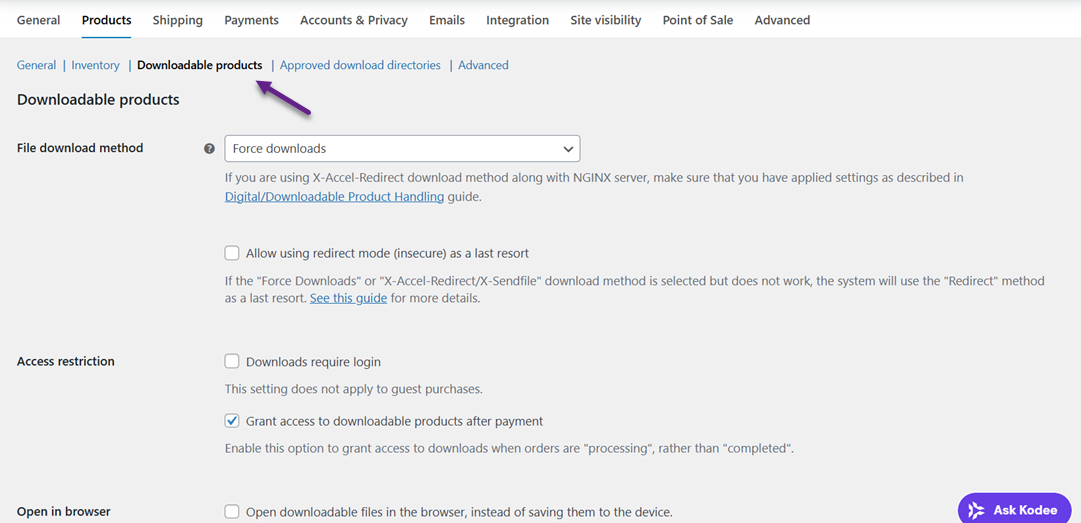
This setup creates a secure and consistent system for managing all digital product deliveries across your store.
Linking Files to WooCommerce Products
In WooCommerce settings, you enable downloadable product support and configure general rules for how digital downloads are handled after purchase, including access based on order status and login requirements.
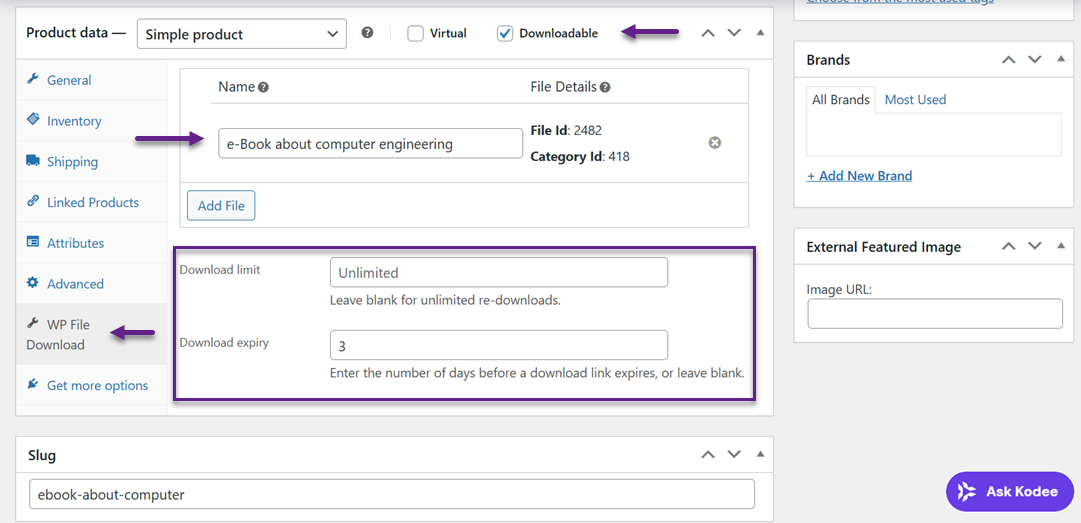
When creating a product, you mark it as Virtual and Downloadable, indicating it does not require shipping and will be delivered digitally.
Then, in the product data section, upload or attach the file and assign a clear filename so customers can easily identify it in the download list.
At this level, WooCommerce also allows you to set file-specific controls, such as a download limit that restricts how many times a customer can access the file, and a download expiry that defines how long the download link remains valid after purchase.
Secure File Delivery & Access
Delivering digital products ensures the right users get access at the right time, without compromising security. A structured approach to file delivery helps protect your products while maintaining a smooth customer experience.
Purchase-Based Access
Purchase-based access ensures that only users who have completed a transaction can download specific files. This creates a direct connection between the product and the buyer, preventing unauthorized users from accessing premium content.
In a WooCommerce setup, this approach helps automate permissions, granting access instantly after purchase. It reduces manual work while ensuring that every download is tied to a valid transaction.
Expiring Download Links
Expiring download links limit how long a file can be accessed after purchase. This is useful for preventing users from sharing links indefinitely, especially for high-value digital products.
By setting time or download limits, you maintain better control over distribution. It also encourages users to download their files promptly while reducing the risk of unauthorized access over time.
Secure Cloud Storage
Using secure cloud storage allows you to manage files outside your main website while keeping them organized and easily accessible. This helps reduce server load and improve download reliability.
Cloud-based storage also adds a layer of protection, as files are not directly exposed through public URLs. With proper configuration, you can ensure that only authorized requests can retrieve the files.
Preventing File Sharing
Preventing file sharing is essential to protect the value of your digital products. Without proper controls, users can easily distribute direct download links, leading to revenue loss.
By restricting direct access, using protected links, and controlling permissions, you can minimize unauthorized distribution. This ensures that your digital products remain exclusive to legitimate customers while maintaining business sustainability.
Sales & Download Analytics
Once your digital product system is running, the next step is understanding how it performs. Sales and download analytics help you see what's working, how users interact with your products, and where you can improve to drive better results.
Sales Tracking
Sales tracking gives you a clear view of how each product performs in terms of revenue and transactions. It helps you identify which products are consistently selling and which may need adjustments.
By monitoring sales data in real time, you can quickly respond to trends, optimize pricing, and refine your product offerings based on actual performance.
Download Monitoring
Download monitoring focuses on user behavior after the purchase. It shows how often files are downloaded, when users access them, and whether they encounter any issues.
This insight is useful for detecting patterns, such as low download rates or repeated access attempts. It helps you ensure customers receive their products successfully and highlights areas where the delivery process can be improved.
Top Product Insights
By analyzing your data, you can identify which digital products perform best. These insights help you understand what your audience values most, whether it's a specific type of template, guide, or software.
Knowing your top-performing products allows you to replicate success. You can create similar offerings, bundle products, or focus your marketing efforts on what already works.
Data-Driven Optimization
Data-driven optimization means using analytics to refine your strategy continuously. Instead of guessing, you make decisions based on real user behavior and performance metrics.
This approach helps improve pricing, product structure, and delivery methods over time. As a result, your digital product system becomes more efficient, scalable, and aligned with customer needs.
Best Practices for Scaling Digital Product Sales Systems
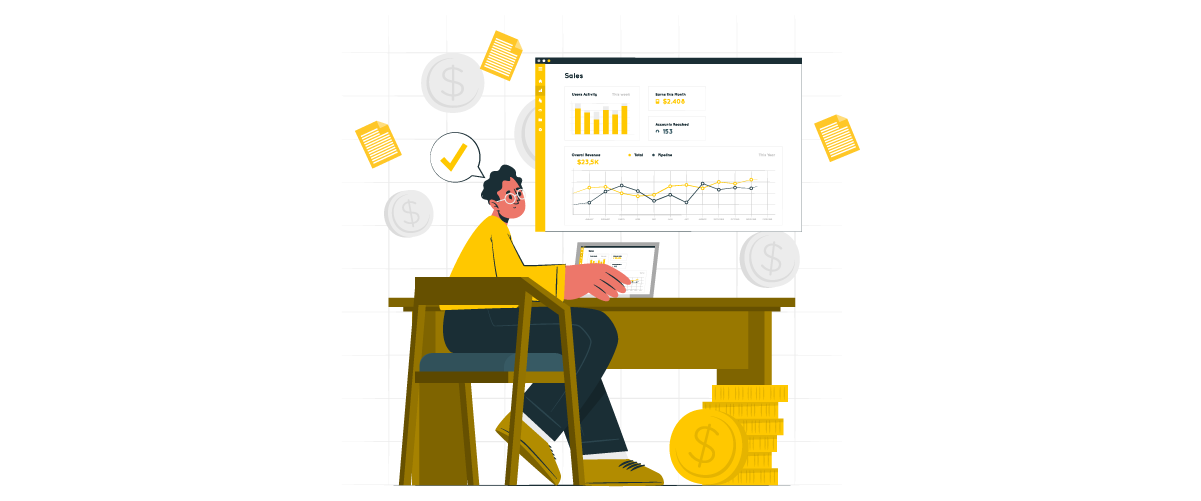
As your digital product business grows, managing everything manually becomes inefficient and error-prone. To scale effectively, you need systems that are structured, automated, and easy to maintain—so you can handle more products and clients without losing control.
Standardized Workflows
Creating standardized workflows means defining a consistent process for how digital products are uploaded, managed, and delivered. Instead of handling each product differently, you follow the same steps every time—from file organization to product setup.
This makes your work faster and reduces confusion, especially when working with multiple clients. Start by documenting a simple workflow (e.g., upload file > assign access > connect to product), then reuse it for every new product you create.
Automated Delivery
Automated delivery ensures that customers receive their files instantly after completing a purchase. This removes the need for manual intervention and minimizes the risk of delays or human error.
To apply this, make sure your system automatically links purchased products to their downloadable files. Once set up, every transaction grants instant access, creating a smoother, more professional experience for users.
Centralized Files
Centralizing your files means storing all digital assets in one organized system rather than scattering them across different locations. This helps you easily manage, update, and locate files when needed.
You can structure files using folders based on product type, client, or category. With everything in one place, updates become simpler—change a file once, and it reflects everywhere it's used.
Performance Monitoring
Performance monitoring helps you ensure that your system continues to run smoothly as it scales. This includes checking download speed, system reliability, and user experience.
By regularly reviewing performance, you can quickly detect issues like slow downloads or broken links. This allows you to fix problems early and maintain a consistent, high-quality experience for your customers.
Calling all webmasters!
Enhance your client websites with WP File Download. Create secure and customizable file
repositories, allowing clients
to easily access and manage their files.
Upgrade your web design services today!
Conclusion
Managing cloud-based WooCommerce digital products demands a structured system that ensures secure delivery, organized storage, and a seamless customer experience. By combining proper configuration, clear file organization, and controlled access settings, you can build a scalable workflow that keeps your digital products efficient, secure, and easy to manage as your business grows.
To simplify this entire process, using a dedicated solution like WP File Download can make a significant difference. With its ability to organize files, control access, and integrate directly with WooCommerce, it helps you maintain a reliable and scalable digital product system—making it a practical choice for anyone looking to optimize their workflow without unnecessary complexity.
When you subscribe to the blog, we will send you an e-mail when there are new updates on the site so you wouldn't miss them.


Comments