WordPress products
 Joomla products
 Support
 News
News Login
LoginWP Speed of Light: Installation
1. Install
The PRO needs to be purchased and downloaded from JoomUnited. To install, download the zip package from your account (My account menu) and install it using the zip uploader:
Plugin > Add New > Upload plugin
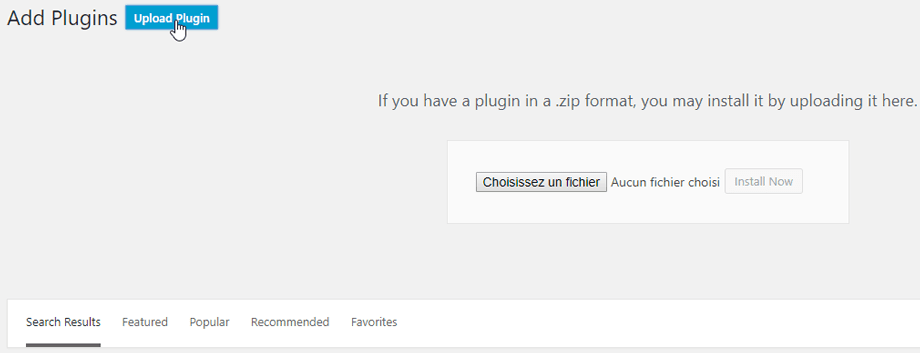
Then click on activate plugin, to see WP Speed of Light menu appear on the WordPress left menu.
From now on, please make sure to log in to your JoomUnited account before using the plugin.
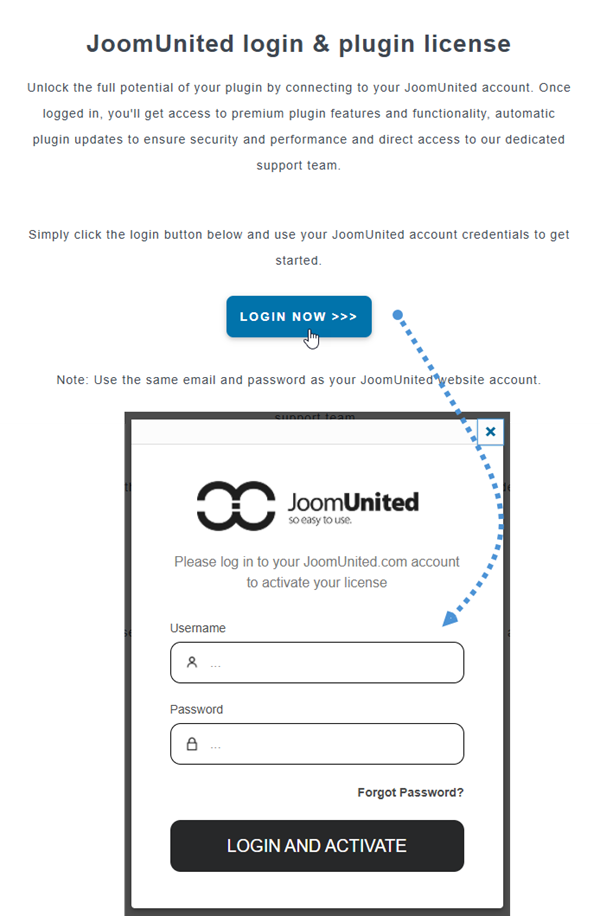
2. Update the plugin
In order to update the WP Speed of Light, you can use the WordPress default updater. You can also remove and install the new version from a .zip file downloaded on www.joomunited.com or wordpress.org. In any case, you won’t lose any content because everything is stored in the database.
Be sure to always have the latest version to avoid security and stability problem.
Navigate to Plugins > Installed Plugins > WP Speed of Light section, click on the 'update now' link text will appear where you can click to update a new version.

Finally, you can update all the JoomUnited commercial plugins using the WordPress standard updater.

3. Notification after install
After install, you'll get a notification that enables cache and brings you to the dashboard automatically.