Produkty WordPress
 Produkty Joomla
 Wsparcie
 Aktualności
 Logowanie
Jak skonfigurować WP Media Folder AI do obsługi wielojęzycznych opisów obrazów (dla witryn wielojęzycznych)

Zarządzanie wielojęzyczną witryną internetową to coś więcej niż tylko tłumaczenie treści strony. Opisy obrazów, w tym tekst alternatywny, tytuły i podpisy, powinny być również dostępne w językach preferowanych przez odwiedzających. Pomaga to poprawić dostępność, zapewnia lepsze wrażenia użytkownika i dostarcza wyszukiwarkom trafniejszych metadanych obrazów dla każdej wersji językowej witryny.
In this guide, you'll learn how to set up multilingual image descriptions using AI, from configuring language settings to reviewing the generated metadata. You'll also discover best practices to keep your image metadata consistent and SEO-friendly across every language on your website.
- Generate multilingual image descriptions automatically with AI: Learn how WP Media Folder AI creates image titles, alt text, captions, and descriptions in different languages, helping multilingual websites maintain consistent and localized image metadata without manual translation.
- Configure language settings and AI context for accurate localization: The guide explains how to set the AI language and global context so image metadata matches each website's language, audience, and industry, improving both relevance and user experience.
- Improve multilingual SEO while saving time: By automating multilingual image metadata generation, website owners can strengthen international SEO, enhance accessibility, and eliminate repetitive manual work when managing multilingual WordPress websites.
Spis treści
Why Multilingual Image Descriptions Matter

When your website is available in multiple languages, your image descriptions should be translated alongside your content. If you're using a website translation plugin to create multilingual pages, your images should also display titles, alt text, captions, and descriptions in the corresponding language. Leaving these descriptions in a single language can create an inconsistent experience for international visitors and reduce the effectiveness of your multilingual SEO efforts.
WP Media Folder AI simplifies this process by generating localized image descriptions based on your selected language. This not only improves website accessibility for people who rely on screen readers but also helps search engines better understand and index images across different language versions of your website. By providing accurate, localized image descriptions for every language, you can create a more accessible, user-friendly, and search-optimized multilingual website.
Set Up WP Media Folder AI for Multilingual Images
Before generating multilingual image descriptions, you need to configure WP Media Folder AI to produce image content in the correct language. The plugin lets you choose the AI language, define how descriptions should be generated, and automatically create image titles, alt text, captions, and descriptions that match your multilingual website.
Proper language configuration is especially important for multilingual websites because visitors expect images to be accompanied by descriptions in the same language as the page they're viewing. With the correct settings, WP Media Folder AI helps create consistent multilingual image descriptions while reducing the need for manual translation.
Wymagania wstępne
Before generating image descriptions, make sure WP Media Folder AI is installed and connected to your preferred AI provider. Then, navigate to Settings > WP Media Folder > AI Tools, where you can configure how AI processes images and generates content for your media library.
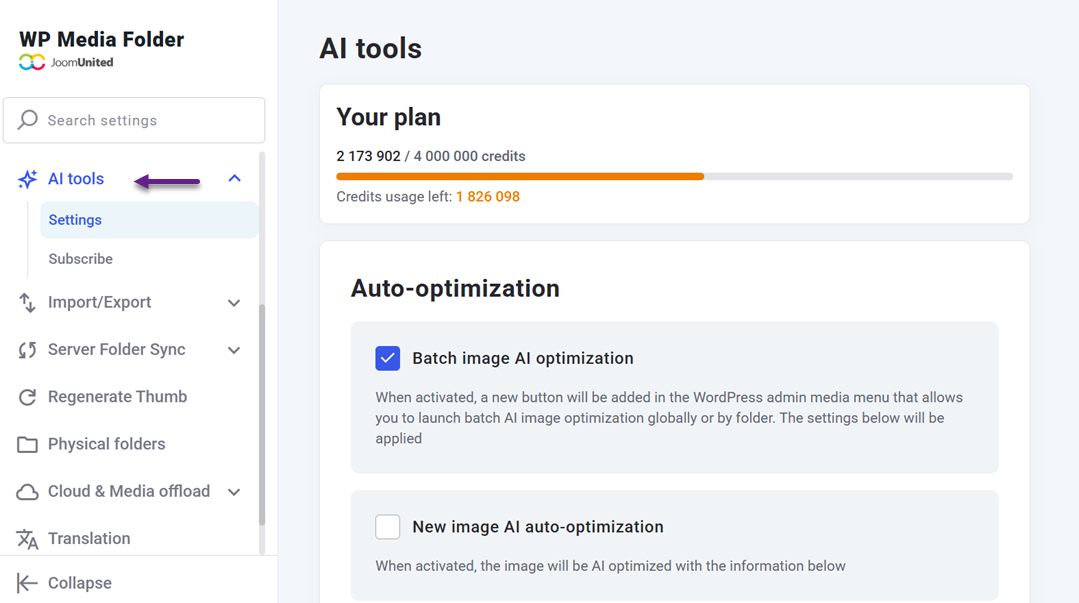
At this stage, you can also choose which image fields AI should generate, such as titles, alt text, captions, and descriptions.
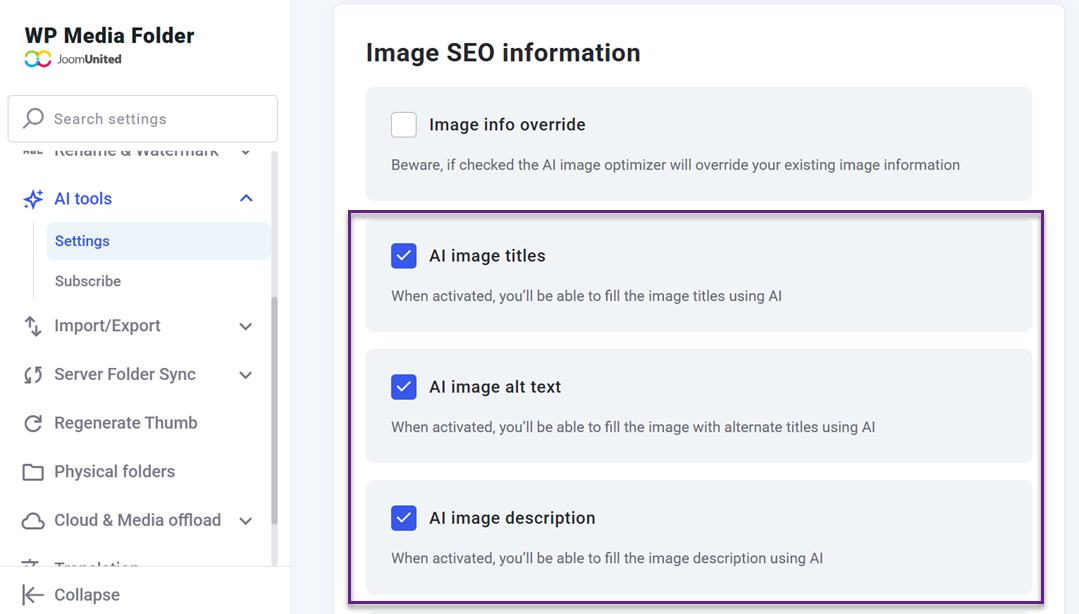
Although the main focus is on creating image descriptions, enabling the appropriate fields ensures every image contains consistent information that can be displayed across different language versions of your website.
Configure AI Language Settings
The most important step is selecting the language AI will use to generate image descriptions. Within the AI settings, choose the language that matches your website or the translated version of your content.
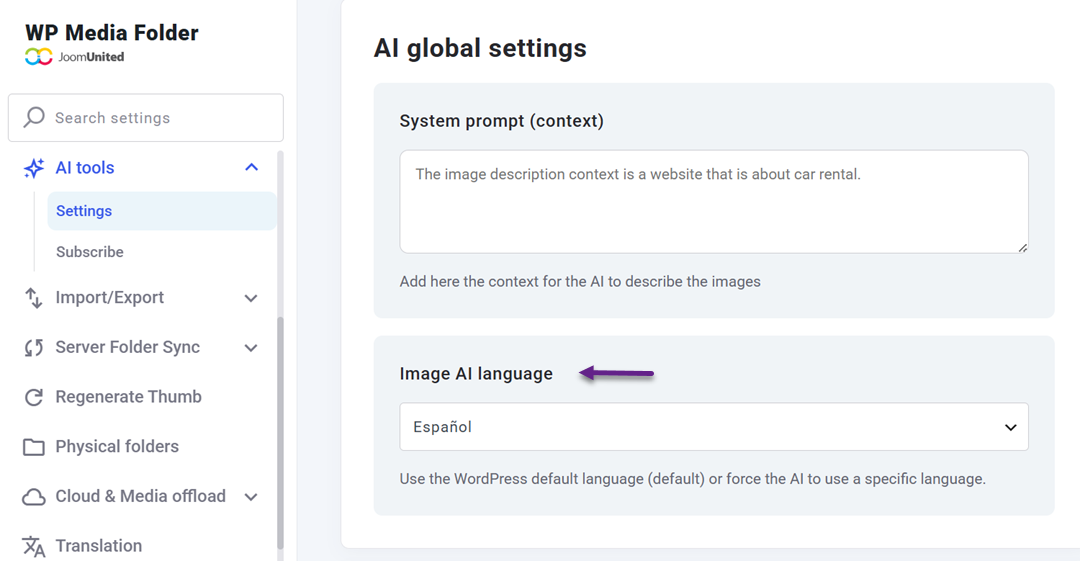
This allows AI to generate titles, alt text, captions, and descriptions in the same language visitors read, providing a more natural browsing experience. You can also define a language context or system prompt to guide how AI describes your images. For example, like below.
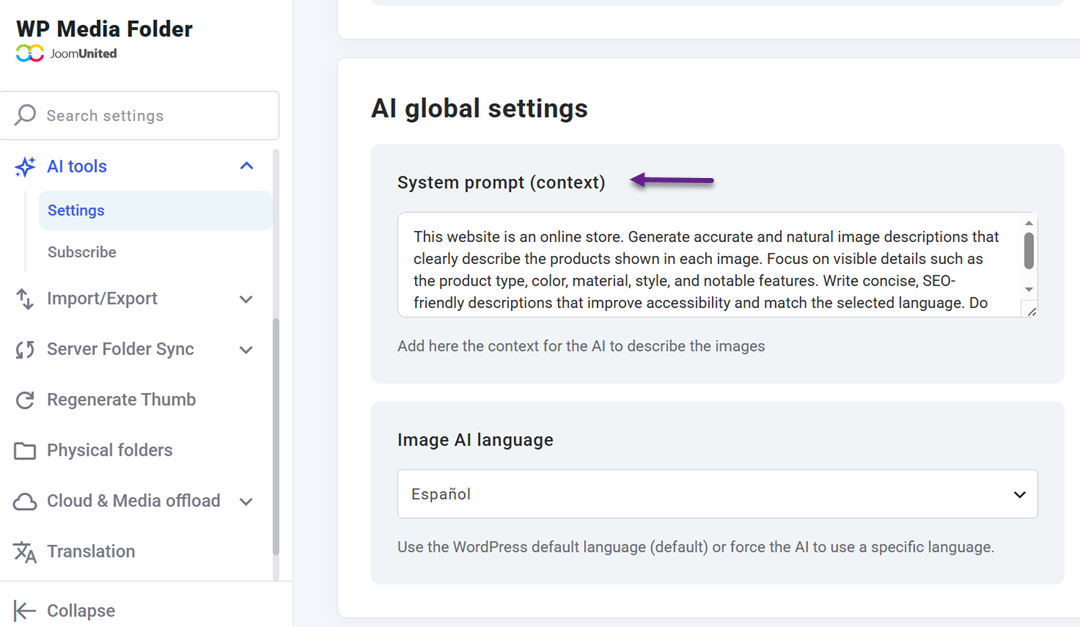
After saving these settings, you're ready to generate localized image descriptions directly from the Media Library.
Generate and Review Multilingual Image Descriptions
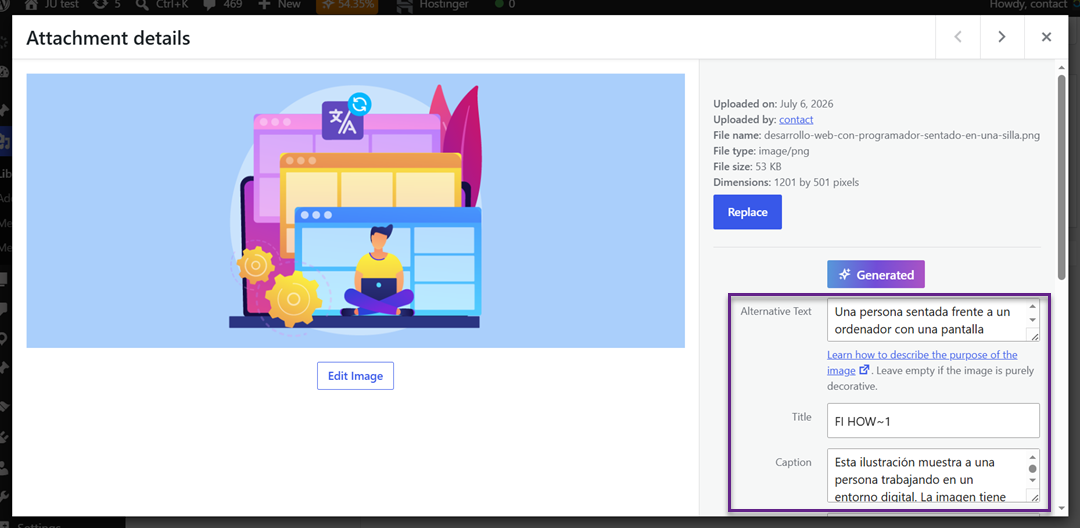
Once your language settings are configured, open the Media Library and run the AI generation feature for the images you want to optimize. WP Media Folder AI will automatically generate localized titles, alt text, captions, and descriptions based on your selected language, eliminating the need to manually translate image descriptions. Each generated description is automatically added to its corresponding image fields, where you can review and edit the content before using it across your multilingual website.
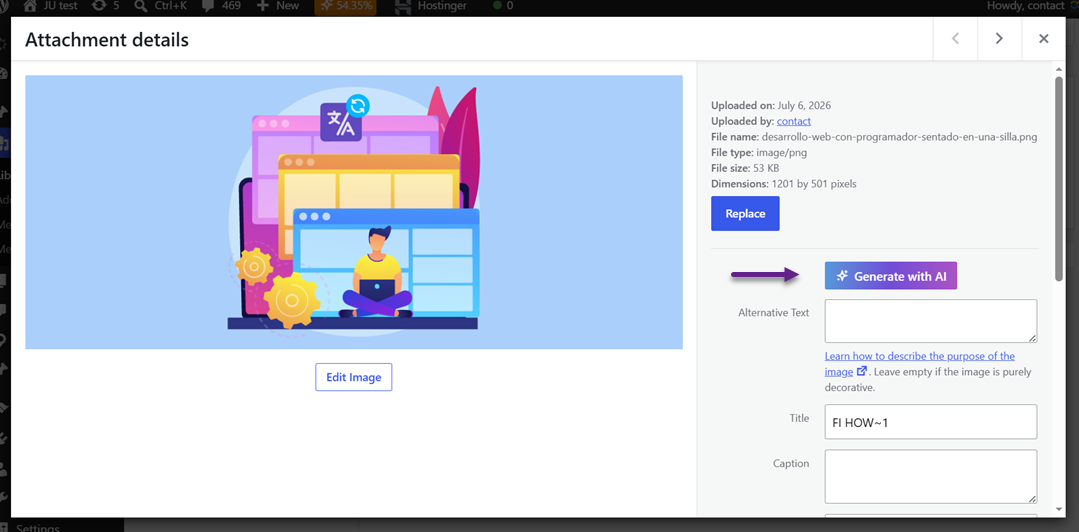
After the descriptions are generated, review the results to ensure they accurately represent each image and read naturally in the selected language. Since all AI-generated content remains editable, you can easily refine the wording, adjust phrases, or improve localization to better match your brand voice while ensuring a better user experience, accessibility, and multilingual SEO.
Wzmocnij swoje obrazy WordPress za pomocą AI.
WP Media Folder Image AI pomaga automatycznie optymalizować obrazy, generować teksty alternatywne, poprawiać SEO i kompresować pliki jednym kliknięciem.
Ulepsz swój przepływ pracy mediów dzięki inteligentnej automatyzacji.
Best Practices for Managing Multilingual Image Description
Generating multilingual image descriptions with AI can save significant time, but achieving the best results still requires a thoughtful approach. Following a few best practices helps ensure your image metadata remains accurate, consistent, and optimized for both users and search engines across every language version of your website.
Keep Multilingual Image Descriptions Consistent
Consistency is essential when managing multilingual image descriptions across different language versions of your website. While each description should sound natural to native speakers, the core meaning should remain the same so that every language accurately represents the same image. This creates a more consistent experience for visitors regardless of the language they choose.
For example, if an English image description says "Modern office workspace with ergonomic chairs," the French, German, or Spanish versions should describe the same workspace rather than adding details or omitting important information. Keeping image descriptions aligned across languages also makes your multilingual website easier to manage as your content and media library continue to grow.
Use Localized Descriptions
A direct translation is not always the best description for international audiences. Instead of translating every word literally, adapt the image description to match the natural language and terminology used by your target audience. Localized descriptions are easier to understand and feel more authentic to visitors.
For instance, an image showing a holiday promotion may use different wording depending on the market. An English description mentioning a "holiday sale" might be better localized as "Christmas promotion" or another culturally appropriate term where relevant. This approach creates a more natural experience while improving the relevance of your multilingual content.
Add Relevant Keywords
Image descriptions should include keywords that relate naturally to both the image and the surrounding content. This helps search engines better understand what the image represents without making the metadata feel repetitive or overly keyword-heavy.
For example, if your article is about multilingual WordPress websites, an image description such as "WordPress multilingual dashboard with translated media library" provides clear context and includes relevant search terms. Avoid stuffing multiple keywords into a single description; concise, descriptive metadata is generally more effective for both SEO and accessibility.
Review AI Metadata
AI can generate image descriptions quickly, but the results should always be reviewed before publishing. Automated descriptions may occasionally use incorrect terminology, miss important visual details, or generate text that doesn't fully match the context of your page.
For example, an AI-generated description might identify an image as "website dashboard" when it actually shows a multilingual media management interface. Spending a few moments reviewing and editing AI-generated metadata helps ensure every description is accurate, consistent with your content, and suitable for visitors in each language.
Zadzwońcie wszyscy webmasterzy!
Zaoszczędź godziny ręcznej pracy nad obrazami z WP Media Folder Image AI. Automatycznie optymalizuj obrazy, generuj teksty alternatywne, poprawiaj SEO i dostarczaj lżejsze, szybciej ładujące się strony dla Twoich klientów.
Przyspiesz swój workflow obrazów już dziś!
Wniosek
Creating multilingual image descriptions is an important step toward building a more accessible, user-friendly, and SEO-friendly multilingual website. By generating localized image descriptions and reviewing them before publishing, you can ensure every language version of your website delivers a consistent experience for both visitors and search engines while keeping image metadata accurate across your translated pages.
If you're looking for a faster and more efficient way to manage image descriptions, try WP Media Folder AI. It automatically generates localized titles, alt text, captions, and descriptions in your selected language, helping you save time while maintaining high-quality image metadata across every language version of your website.
Gdy zapiszesz się do bloga, będziemy wysyłać Ci e-mail, gdy pojawią się nowe aktualizacje na stronie, abyś ich nie przegapił.