WordPress-producten
 Joomla-producten
 Ondersteuning
 Nieuws
 Inloggen
Hoe je geüploade afbeeldingen in WP Media Folder automatisch kunt hernoemen en beschrijven met behulp van AI (bespaar tijd en verbeter je SEO)

Automatisch afbeeldingen hernoemen en beschrijven met AI om repetitief handmatig werk te elimineren en ervoor te zorgen dat elke geüploade afbeelding vanaf het begin SEO-vriendelijke metadata bevat. In plaats van tijd te besteden aan het hernoemen van bestanden en het één voor één toevoegen van alt-tekst, titels en beschrijvingen, kunnen website-eigenaren het hele proces automatiseren en tegelijkertijd een overzichtelijkere mediabibliotheek behouden.
As websites grow and image uploads become more frequent, managing image metadata manually can quickly become inefficient and prone to inconsistencies. AI-powered automation can generate descriptive filenames and metadata based on image content, helping improve both search visibility and accessibility without adding extra work to your workflow. In this article, you'll learn how to automate image renaming and metadata generation, along with best practices for achieving the best results.
- Automate SEO‑friendly image filenames with AI: This article shows how to use WP Media Folder's AI features to automatically rename uploaded images with descriptive, keyword‑rich filenames instead of generic camera IDs.
- Generate alt text, titles, and descriptions at scale: You'll learn how to auto‑create meaningful alt text, titles, captions, and descriptions for new and existing images so your media library becomes fully SEO‑optimized without manual work.
- Save time while improving WordPress image SEO: The guide explains how to run bulk optimization, configure rules once, and then let AI handle ongoing image naming and metadata, boosting search visibility and accessibility while you focus on content.
Inhoudsopgave
Why Automate Image Metadata?

Image metadata plays an important role in helping search engines and users understand what an image contains. Elements such as file names, alt text, titles, and descriptions provide additional context that can improve image SEO, support accessibility, and keep your media library organized. However, when managing dozens or even hundreds of images, creating this metadata manually can be repetitive and time-consuming.
Automating image metadata helps eliminate this manual workload while maintaining consistency across your website. Instead of entering the same information field by field for every upload, AI can analyze image content and automatically generate relevant metadata. This not only saves time but also reduces the risk of missing important SEO and accessibility elements, allowing you to focus more on creating content rather than managing image details.
How to Auto-Rename & Describe Images with AI

Automatically renaming uploaded image files and generating image descriptions no longer requires editing each image manually. With AI-powered tools, image metadata can be generated automatically during the upload process, helping maintain consistency and reduce repetitive work.
One solution that supports this workflow is WP Media Folder AI. This feature can automatically rename image files and generate alt text, titles, captions, and descriptions based on image content, allowing you to optimize images as soon as they are uploaded to your WordPress media library.
Geef uw WordPress-afbeeldingen een supercharge met AI.
WP Media Folder Image AI helps you optimize images automatically, generate alt texts, improve SEO, and compress files in one click.
Upgrade your media workflow with intelligent automation.
AI-instellingen openen
To get started, open your WordPress dashboard and navigate to Settings > WP Media Folder > AI Tools. This section contains all AI-related settings that govern how image metadata is generated and applied within your media library.
From this panel, you can configure metadata generation options, manage AI preferences, and control how uploaded images are processed. Taking a few minutes to review these settings before uploading images can help ensure more accurate and consistent results.
Enable Image Renaming
After opening the AI settings, enable the option that automatically renames image files when they are uploaded. This feature replaces generic filenames with descriptive names generated from the image content itself.
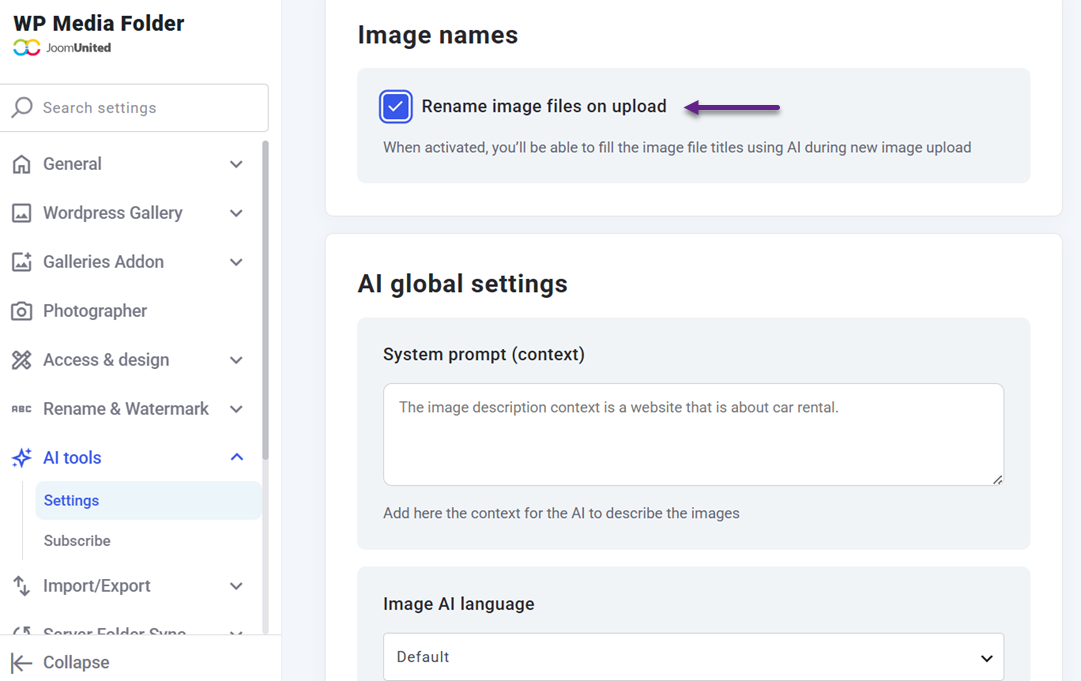
You can also enable metadata fields such as image titles, alt text, captions, and descriptions.
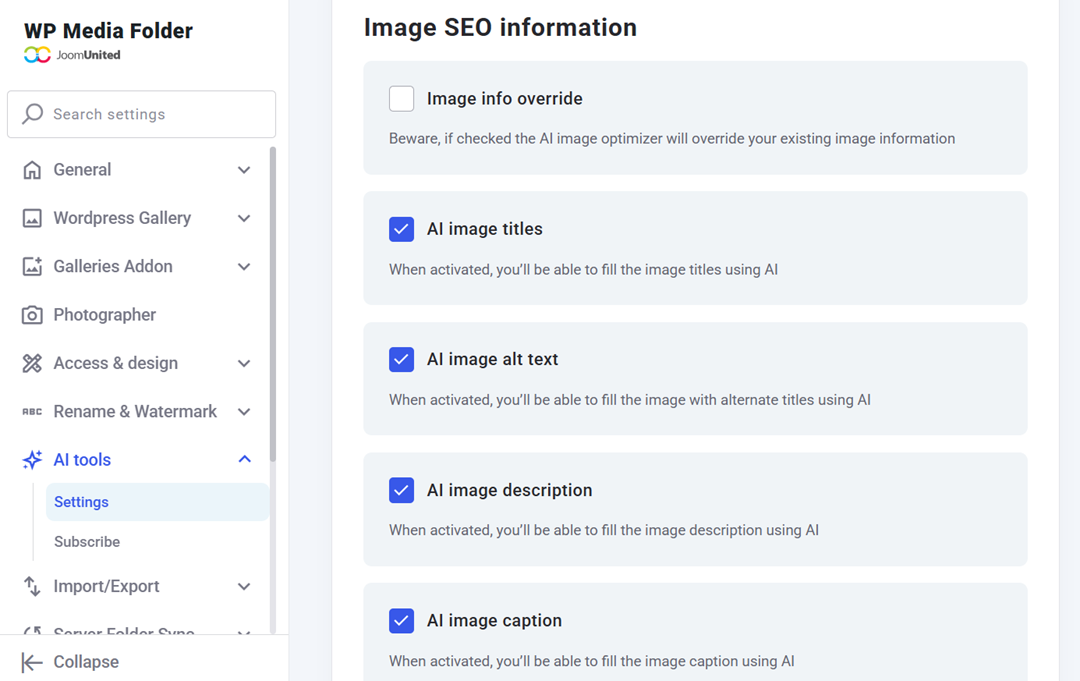
By turning on these options, the AI can generate all important image attributes at once, helping improve both image organization and SEO performance.
Taal en context instellen
Before generating metadata, configure the language and content context that the AI should follow. The selected language determines how filenames and descriptions are written, which is particularly useful for multilingual websites.
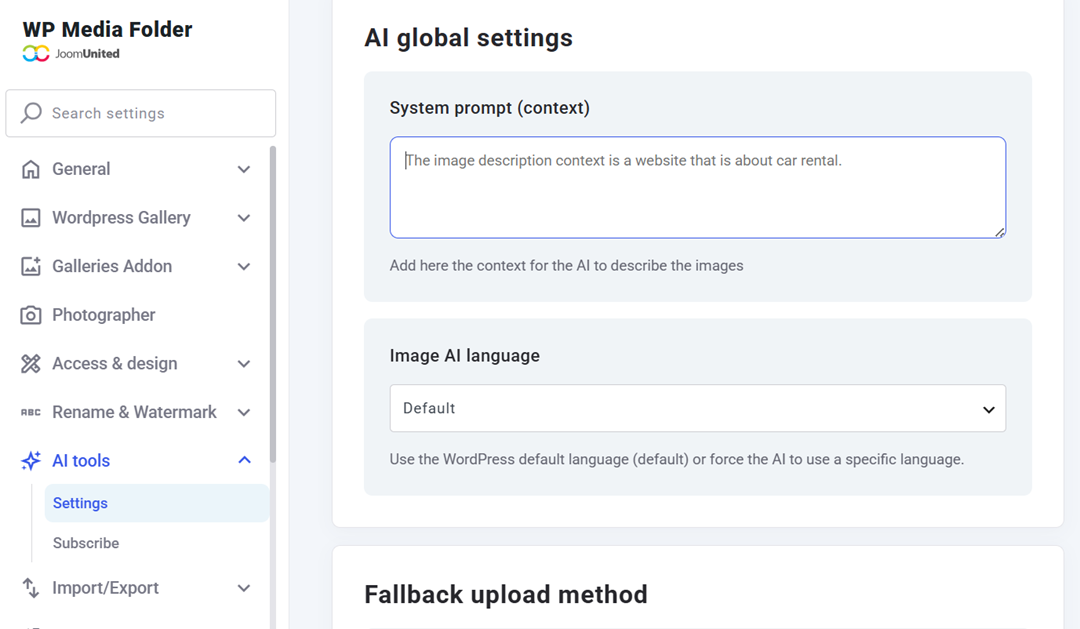
Providing context about your website or industry helps the AI generate more relevant results. For example, an online store, a photography portfolio, and a travel blog may use different terminology, so defining the appropriate context can improve the quality of the generated metadata.
Upload Images
Once the configuration is complete, upload images to your media library as you normally would.
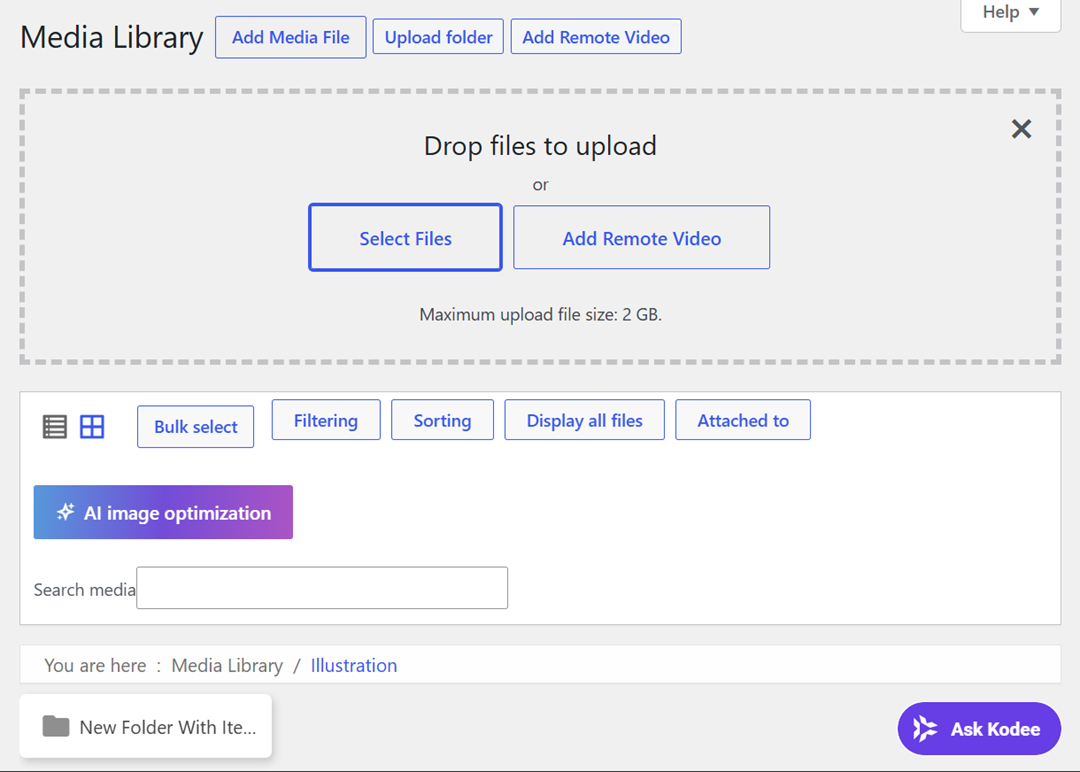
There is no need to change your existing workflow, as WP Media Folder AI works automatically in the background using the settings you previously configured.
This allows you to continue adding images to your website as usual while the AI automatically processes uploaded images in the background, reducing manual work and streamlining metadata management.
Generate Metadata Automatically
Once a new image is uploaded, WP Media Folder AI analyzes its visual content and automatically generates a descriptive filename based on what appears in the image.
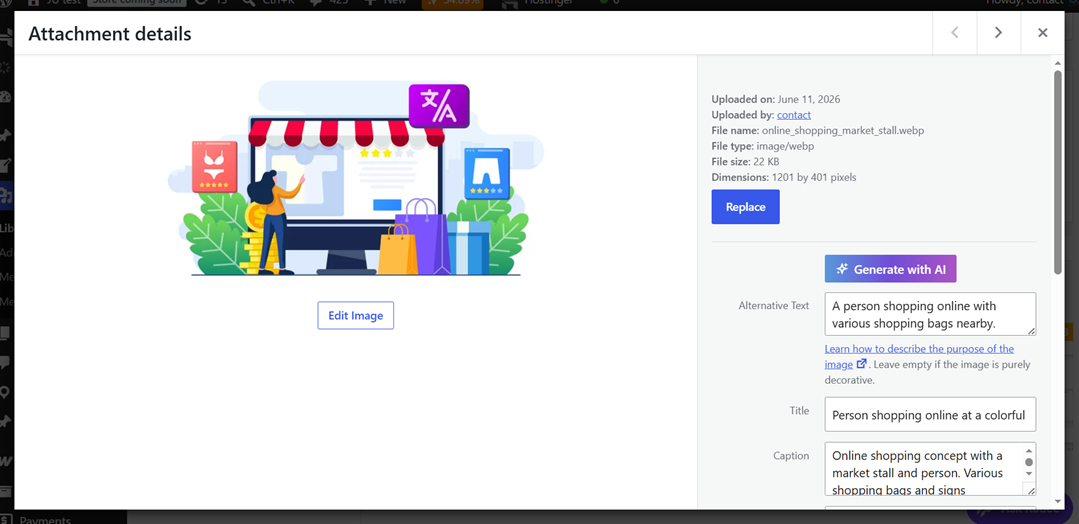
This eliminates the need to manually rename files before publishing and helps ensure every image follows a more SEO-friendly naming structure. After analyzing the image, the AI automatically fills the title, alt text, caption, and description fields according to the language and context settings you previously defined. Instead of uploading files such as IMG_1234.jpg and manually completing metadata fields, your images are uploaded with descriptive filenames and relevant metadata already generated. All generated fields remain fully editable, allowing you to refine any information whenever needed.
Best Practices for AI-Generated Image Metadata

AI can significantly reduce the time required to create image metadata, but the best results come from combining automation with a thoughtful review process. While AI can generate filenames, alt text, and descriptions in seconds, following a few best practices helps ensure the metadata remains accurate, relevant, and aligned with your website's goals.
Review AI Metadata
Although AI-generated metadata is often accurate, it is still a good idea to review the results before relying on them completely. AI interprets images based on visual patterns, which means it may occasionally miss specific details, brand names, products, or context that only you understand.
For example, an image of a product on your online store might receive a generic description such as "blue running shoes." While technically correct, you may want to include the product name or collection to make the metadata more useful. Taking a quick look at the generated titles, descriptions, and alt text helps ensure that the information accurately reflects your content.
As a simple practice, review metadata for important images such as product photos, featured images, or marketing visuals. A few small adjustments can improve both search visibility and the overall quality of your media library.
Use Descriptive File Names
A descriptive filename helps search engines understand the subject of an image before analyzing other metadata fields. Instead of using default filenames such as IMG_1234.jpg or Screenshot_001.png, use names that clearly describe what appears in the image.
When AI automatically generates filenames, check whether the result accurately reflects the image content. For example, a filename like "woman-working-on-laptop.jpg" provides much more context than a generic camera-generated name. This makes the image easier to identify in your media library and improves its SEO.
When uploading images regularly, try to maintain a naming style that remains clear and readable. Consistent, descriptive filenames help both website administrators and search engines better understand your visual content.
Optimize Alt Text
Alt text is one of the most important metadata elements because it supports both accessibility and SEO. Screen readers use alt text to describe images to visually impaired users, while search engines use it to gain additional context about image content.
AI can generate alt text automatically based on what it detects in an image, providing a strong starting point. However, it is worth checking whether the generated text accurately reflects the image's purpose on the page. Sometimes an image may support a specific topic that requires a more contextual description.
For instance, if a blog post discusses remote work productivity, an alt text such as "person using a laptop at home office" may be more useful than a generic description like "person sitting at a desk." Small improvements like this help create a better experience
Keep Metadata Consistent
Consistency is important when managing large media libraries. If filenames, alt text, titles, and descriptions follow different formats across images, it can become difficult to maintain an organized system over time.
Using a consistent language, writing style, and content context helps ensure all metadata follows the same standard. This is particularly useful for websites with hundreds of images, where manually maintaining consistency would require significant effort.
One practical approach is to configure AI settings with a clear website context before generating metadata. Whether you manage an e-commerce store, company website, portfolio, or blog, keeping metadata aligned with your content style helps create a more professional and organized media library while improving long-term SEO performance.
Alle webmasters!
Save hours of manual image work with WP Media Folder Image AI. Auto-optimize images, generate alt texts, enhance SEO, and deliver lighter, faster-loading sites for your clients.
Supercharge your image workflow today!
Conclusie
Automatically rename and describe uploaded images with AI to simplify image management and ensure every upload includes meaningful, SEO-friendly metadata. By automating file names, alt text, titles, captions, and descriptions, you can save valuable time, improve accessibility, and maintain a more organized media library without relying on repetitive manual work.
With tools like WP Media Folder AI, generating image metadata becomes a seamless part of your workflow, whether you're managing a few uploads each week or hundreds of images across your website. If you're looking for a faster and smarter way to improve image SEO and metadata consistency, try WP Media Folder AI and experience how AI-powered automation can transform your WordPress media management.
Wanneer u zich abonneert op de blog, sturen we u een e-mail wanneer er nieuwe updates op de site zijn, zodat u ze niet mist.