ผลิตภัณฑ์ WordPress
 ผลิตภัณฑ์ Joomla
 สนับสนุน
 ข่าวสาร
 เข้าสู่ระบบ
ตั้งค่าการแจ้งเตือนการดาวน์โหลดอัตโนมัติสำหรับไฟล์ที่โฮสต์บนคลาวด์ใน WP File Download

การแจ้งเตือนการดาวน์โหลดอัตโนมัติช่วยให้คุณตรวจสอบกิจกรรมไฟล์ รับทราบข้อมูลเกี่ยวกับการดาวน์โหลด และเข้าใจว่าผู้ใช้โต้ตอบกับไฟล์ที่จัดเก็บไว้ในระบบคลาวด์ของคุณอย่างไร การรับการแจ้งเตือนอย่างทันท่วงทีช่วยให้คุณติดตามการใช้งานไฟล์ ปรับปรุงการจัดการทรัพยากร และรักษาความสามารถในการมองเห็นภาพรวมของเอกสารที่แชร์ได้ดียิ่งขึ้น.
In this article, we'll explore why download tracking matters, how to set up automated notifications, and how to use download alerts for reporting, compliance, and team collaboration. Read on to discover how to make file management more efficient and gain valuable insights from download activity.
- Explain how to set up automated download notifications for cloud-hosted files.
- Show how to configure download notification settings in WP File Download.
- Track file downloads and receive notifications automatically.
- Manage cloud-hosted files while keeping download activity monitored.
- Improve file management and stay informed about user downloads.
สารบัญ
Why Track File Downloads in Cloud Storage

Tracking file downloads in cloud storage helps you understand how users interact with shared files and ensures that important resources are being accessed appropriately. It also provides valuable insights into file usage, making it easier to manage content and improve accessibility. Here are some key reasons to track file downloads.
- Monitor file usage: Track how often files are downloaded to understand which resources are actively used and which may need improvement.
- Identify popular files: Recognize frequently downloaded documents to determine which content is most valuable to users.
- Improve resource management: Use download activity to organize files, update outdated content, and optimize storage resources.
- Enhance access visibility: Stay informed about file activity and identify unusual download patterns that may require further review.
- Support data-driven decisions: Use download insights to evaluate content performance, improve resource planning, and better meet user needs.
กำลังมองหาโซลูชันการจัดการไฟล์ที่มีประสิทธิภาพสำหรับเว็บไซต์ลูกค้าหรือไม่?
WP File Download คือคำตอบ ด้วยคุณสมบัติขั้นสูง เช่น หมวดหมู่ไฟล์ ข้อจำกัดการเข้าถึง และ UI ที่ใช้งานง่าย
สร้างความประทับใจให้กับลูกค้าของคุณด้วยองค์กรไฟล์ที่ดีที่สุด!
Set Up Automated Download Notifications in WP File Download
WP File Download is a WordPress plugin that helps you organize, manage, and share downloadable files directly from your website. It supports file categorization, access management, and cloud storage integrations, making it easier to handle digital resources in one place.
When managing cloud-hosted files, WP File Download's email notification system helps you stay informed about file activity, including uploads, updates, deletions, and downloads. You can configure notification triggers, customize email content, and select recipients from the plugin's settings, helping you maintain visibility into shared files without manually checking each activity.
Enable Notifications
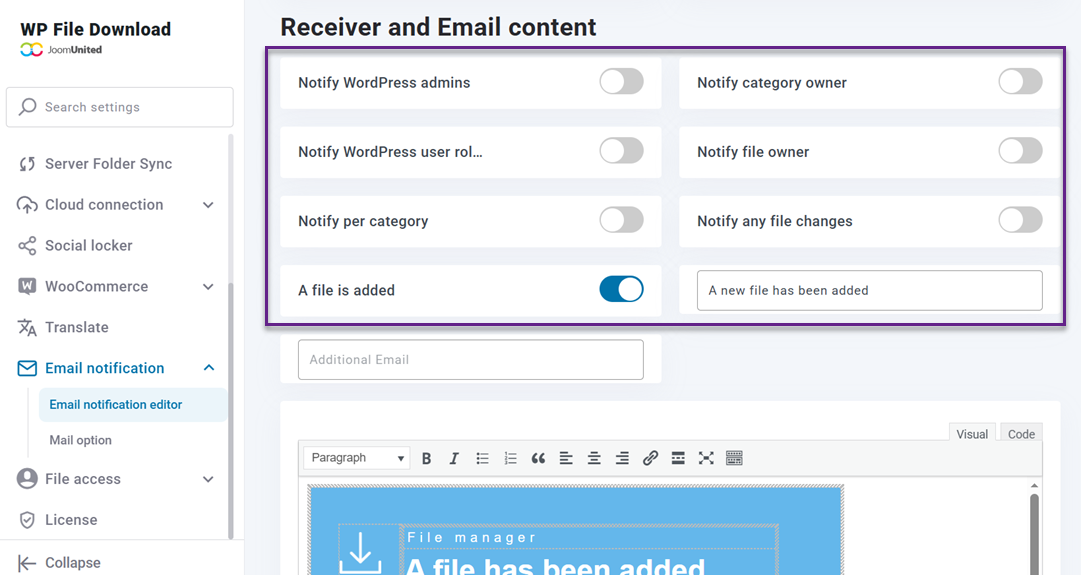
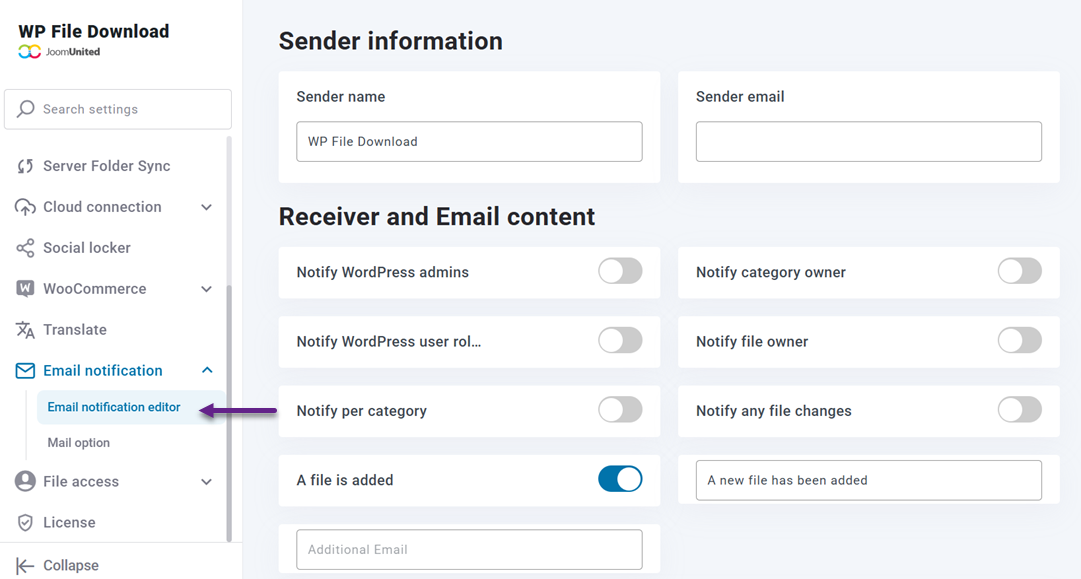
To configure email notifications, go to WP File Download > Configuration > Email notification editor. From here, you can access the available notification settings and customize the HTML content of each email to match your file management needs.
Set Notification Triggers
WP File Download supports several notification triggers, including new file uploads, file updates, file deletions, and file downloads. You can enable the relevant notification types based on the activities you want to monitor. For example, enabling download notifications helps admins stay informed whenever users download files.
You can also use dynamic tags in email content, such as {category}, {receiver}, {username}, {website_url}, {file_name}, {file_download_url}, {file_location}, and {date_upload}. These tags are automatically replaced with relevant information when an email is sent, making each notification more specific and informative.
Choose Recipients
WP File Download allows you to choose who receives email notifications based on your file management needs. Available recipient options include WordPress admins, category owners, WordPress user roles, file owners, specific categories, and additional email addresses. This helps ensure that notifications reach the people responsible for managing or monitoring particular files.
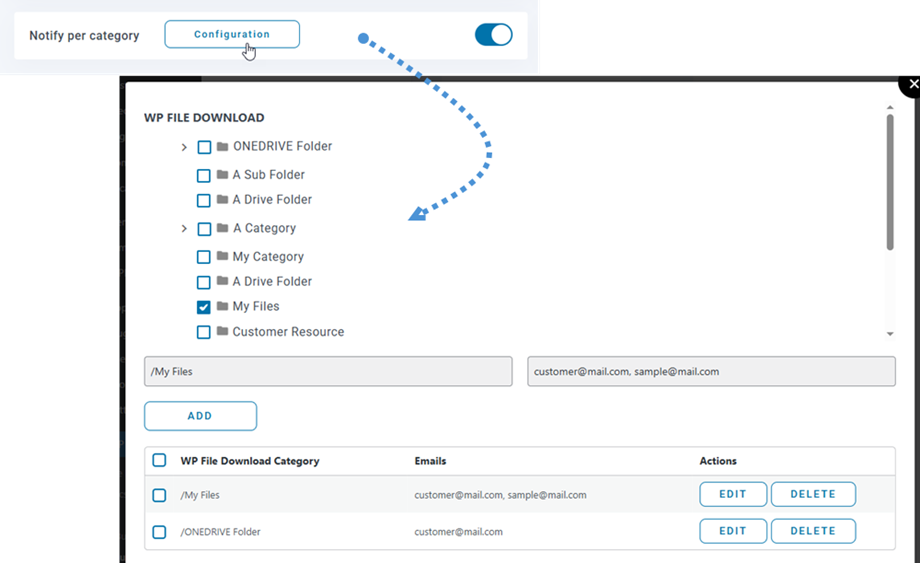
For category-specific notifications, open the Configuration settings, select a category, and enter the email addresses that should receive alerts.
You can also enable Notify WordPress user roles and select the roles that should receive notifications.
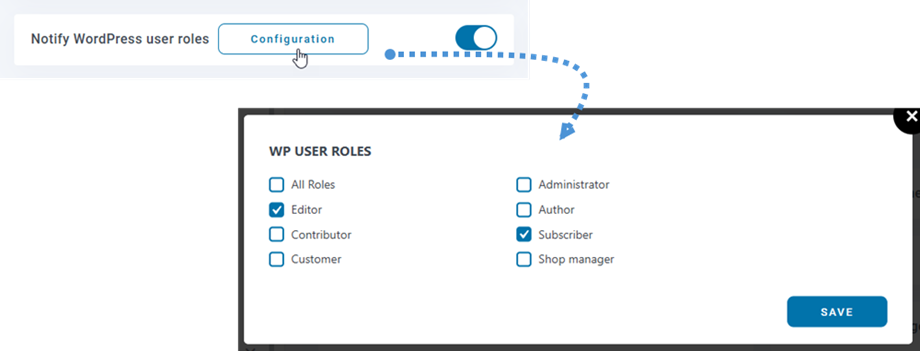
Additionally, the Notify any file changes option allows users to subscribe to selected files or all files within a category from the frontend, including notifications for newly uploaded files in subscribed categories.
Test Notifications
After configuring notification triggers and recipients, download a file to check whether the relevant notification is sent to the selected recipients. Review the received email to ensure that the message contains the expected file details and that dynamic tags are replaced with the correct information.
If notification emails are not delivered, check your email delivery configuration. WP File Download provides SMTP settings under Email Notification> Mail Option, where you can configure your preferred mail server to support email delivery.
เรียกผู้ดูแลเว็บทุกคน!
ยกระดับเว็บไซต์ของลูกค้าด้วย WP File Download สร้างที่เก็บไฟล์ที่ปลอดภัยและปรับแต่งได้ ช่วยให้ลูกค้าสามารถเข้าถึงและจัดการไฟล์ของตนได้อย่างง่ายดาย
ยกระดับบริการออกแบบเว็บไซต์ของคุณวันนี้!
Admin and User Alert Use Cases
Automated download notifications can serve different purposes depending on who receives them. Whether you manage a file library, share resources with customers, or collaborate with a team, download alerts help keep everyone informed about relevant file activity.
Admin Alerts
Administrators can use download notifications to stay informed when users access files managed through WP File Download. For cloud-hosted resources, these alerts can help admins monitor relevant download activity without having to manually check each file.
For example, when a user downloads a shared product guide or company document, the designated administrator can receive an email notification with relevant file details. This makes it easier to follow up on important resources and maintain visibility into file activity.
User Alerts
Users can subscribe to notifications for selected files or entire categories through the frontend. This allows them to stay informed about file changes, including newly uploaded files in subscribed categories, without having to check the website manually.
For example, users who subscribe to a category containing product documentation can receive notifications when new files are added. This helps them stay updated with the latest resources and access relevant information more easily.
Team Notifications
Teams can use download notifications to stay aligned when sharing important files across departments or projects. By keeping relevant team members informed about download activity, notifications can help improve coordination and reduce the need for manual status updates.
For example, when a colleague downloads a shared project document, designated team members can receive an alert and understand that the file has been accessed. This can help coordinate follow-up tasks, manage shared resources, and keep everyone informed throughout a project.
Download Notifications for Compliance and Reporting

Download notifications can also help organizations maintain better visibility into file activity while supporting internal reporting and compliance processes. By tracking download events, businesses can monitor access, document relevant activity, and improve accountability when managing shared files.
Track File Access
Download notifications help admins stay informed about when users access and download files. These alerts provide useful details about download activity, making it easier to monitor important documents and identify activity that may require further review.
For example, businesses can use download alerts to keep track of access to internal documents, project files, or sensitive resources. This visibility helps admins understand how files are being used and take appropriate action when necessary.
Create Reports
Download activity can provide useful information for creating reports on file usage and user engagement. By reviewing notification records alongside available download logs or analytics, admins can identify frequently downloaded files, monitor usage patterns, and understand how shared resources are being used.
These insights can support internal reporting by helping teams evaluate resource performance and identify areas for improvement. Regularly reviewing download activity also makes it easier to track changes in file usage over time and make informed decisions about content management.
Download activity can also provide useful insights for business intelligence. By analyzing frequently downloaded files, user activity, and usage patterns over time, businesses can identify which resources are most valuable, understand user interests, and make more informed decisions about content, documentation, and resource planning.
Support Compliance
Download notifications can support compliance efforts by improving visibility into how files are accessed and shared. Keeping records of download activity can help organizations maintain accountability and provide supporting information when reviewing internal file-handling practices.
For example, businesses can use download records to assist with internal audits and review access to important documents. However, notifications alone do not guarantee compliance or replace dedicated audit logs, access controls, and other security measures required by applicable regulations.
สรุป
Automated download notifications in WP File Download help you monitor file activity and stay informed when users download, upload, update, or delete shared resources. By configuring notification triggers, customizing email content, and selecting recipients, you can improve visibility into the activity of files managed through your WordPress website, including supported cloud-hosted files.
If you want to simplify file management and stay informed about important file activity, explore the notification features in WP File Download and start improving your file management workflow.
เมื่อคุณสมัครสมาชิกบล็อก เราจะส่งอีเมลถึงคุณเมื่อมีการอัปเดตใหม่บนไซต์เพื่อให้คุณไม่พลาด.