Продукты WordPress
 Продукты Joomla
 Поддержка
 Новости
 Вход
ВходЗагрузка файлов WordPress и темы: Загрузите файлы с дизайном

WP file download - лучший друг, когда вы создаете загружаемые версии ваших файлов, поскольку это не только упрощает процесс, но и помогает вам персонализировать ваши публикации с помощью тем загрузки.
WP File Download как цифровой скачиваемый файл в видео
Ищете мощное решение для управления файлами для сайтов клиентов?
WP File Download - это ответ. С расширенными функциями, такими как категории файлов, ограничения доступа и интуитивно понятный интерфейс.
Произведите впечатление на своих клиентов первоклассной организацией файлов!
Используя удобную панель управления WP file download, вы можете выбрать любую тему, просто кликнув на тему, которую хотите использовать, в действительно дружественной среде, конечно, не всё заканчивается на этом, поскольку вы также можете создать свою собственную тему на основе любой другой темы, которая поставляется с плагином, и без беспокойства о том, что это повлияет на папку, где размещена ваша тема, которая не будет изменена или перезаписана при обновлении плагина.

Выберите тему менеджера загрузок, чтобы определить лучший вариант
Существует множество способов использовать WP file download благодаря различным вариантам, которые он предлагает, и тому, насколько легко использовать этот плагин, а также разнообразию тем, которые можно адаптировать к различным типам страниц, которые можно найти в интернете. В этом блоге мы научим вас, как изменить тему, и приведем несколько примеров использования.
Давайте посмотрим, как изменить тему, есть два способа выбрать тему:
ПЕРВОЕ: Выберите тему для всех категорий. Это настройка по умолчанию для плагина. Просто перейдите в раздел WP file download > «Конфигурация» > «Основные настройки»
. Убедитесь, что параметр «Тема для каждой категории» отключен, и выберите тему в параметре «Тема по умолчанию для каждой категории».

ВТОРОЙ ПУНКТ: Выберите тему для каждой категории. Чтобы выбрать эту опцию, просто перейдите в раздел WP file download > «Конфигурация» > «Основные настройки» и включите опцию «Тема для категорий». После этого у вас появится возможность изменить тему в соответствующем разделе каждой категории.
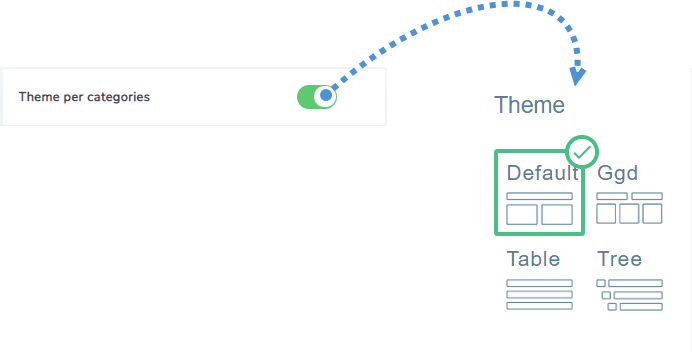
Этот плагин поставляется с 4 разными темами для выбора в разных случаях, и вот список некоторых вариантов использования, которые вы можете дать каждой теме:
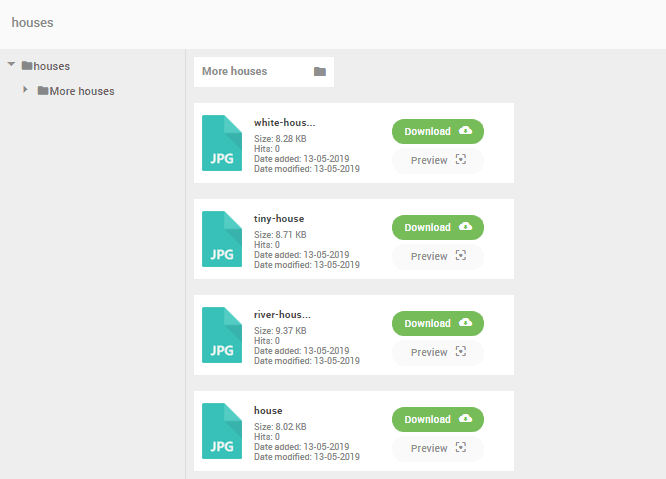
Стандартная тема
Как мы видим на изображении, это очень гибкая тема, в которой вы можете увидеть большие значки, которые можно персонализировать, чтобы отобразить логотип вашей компании или миниатюру изображения, видео или любой другой тип файла, который вы хотите добавить для удобства пользователя и дать краткую информацию о файле, или который позволяет пользователю простым способом увидеть такие вещи, как дата, когда они были добавлены, количество раз, когда они были загружены, среди прочего.
Тема GGD (похожа на Google Диск)
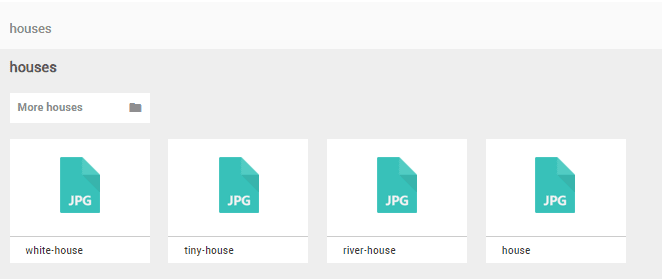
Эта тема более стилизована, поскольку мы видим, что подкатегории отображаются вверху в виде папок, идеально, если вы хотите создать что-то похожее на портфолио, и у вас есть много подкатегорий, поскольку способы отображения других категорий в виде папок в очень стильном виде все файлы и подкатегории.
Тема таблицы
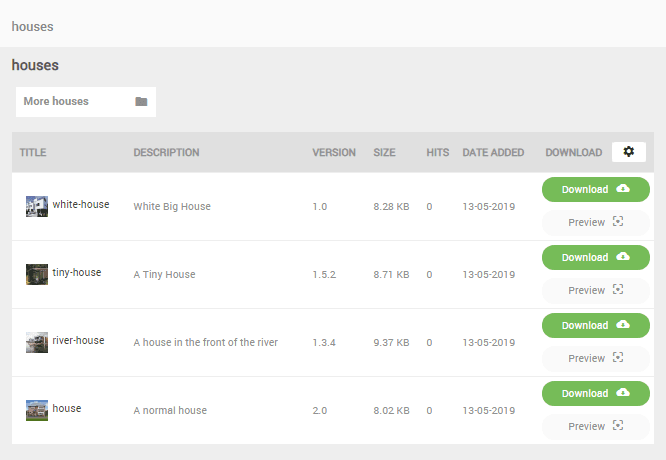
В этой теме мы видим более подробную версию всех файлов, идеально, если у нас есть значительное количество файлов, которые будут обновлены, и мы хотим показать их более профессионально, поскольку она показывает нам упорядоченную категорию и подробную информацию, такую как описание и версия каждого файла.
Тема дерева
Это самая компактная тема для категорий, содержащих множество файлов и подкатегорий, она идеальна, если у вас есть скачиваемые версии множества песен или у вас есть альбом с большим количеством изображений и подкатегорий.

Как мы видим, изначально отображается только значок и заголовок, но мы сможем увидеть все детали, как и в остальных темах, кликнув на файлы, как мы видим на следующем изображении.

Как мы видим, есть очень хорошие варианты, когда речь идет о показе наших скачиваний, но это не единственные варианты, которые предлагает нам этот замечательный плагин.
Создание пользовательской темы WP File Download
Да, именно так это звучит, вы можете создать пользовательскую тему WP file download таким образом, нет никаких оправданий тому, что ваши загрузки не отображаются в соответствии с темой, которую вы используете, или для цели, для которой вы хотите ее использовать, и, что самое главное, это действительно легко.
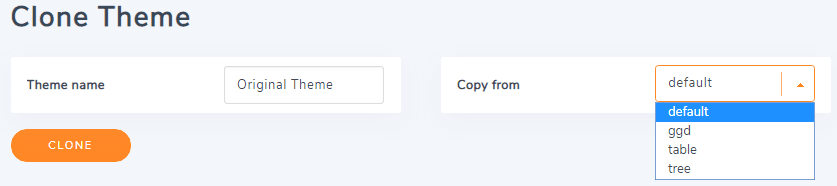
Чтобы создать тему, перейдите в WP file download > «Конфигурация» > «Клонировать тему». Здесь вы сможете ввести название вашей темы, выбрать тему, которую хотите клонировать, и нажать кнопку «КЛОНИРОВАТЬ».
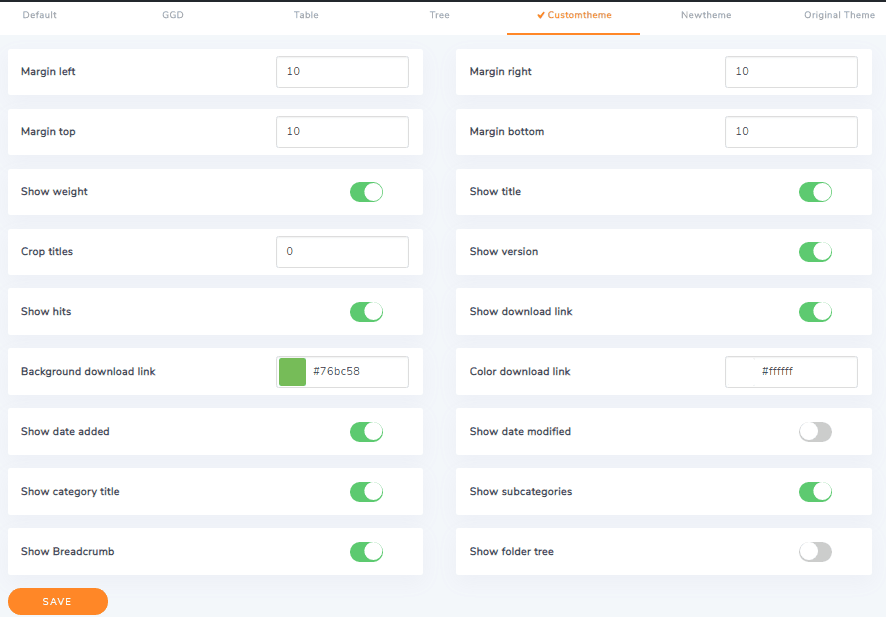
Параметры конфигурации можно увидеть в разделе темы в главном меню настроек при WP file download.
И если у вас есть знания в области программирования, вы можете редактировать гораздо больше новую тему, которую вы создали, поскольку будет создана новая папка со всеми предопределенными файлами и функциями, не беспокойтесь о том, что работа, проделанная в обновлении, будет потеряна, потому что лучше всего то, что тема, которую вы создали, не будет затронута ни одним из обновлений, которые могут быть у плагина, и если вы хотите удалить новую тему, это действительно просто, просто удалите папку.
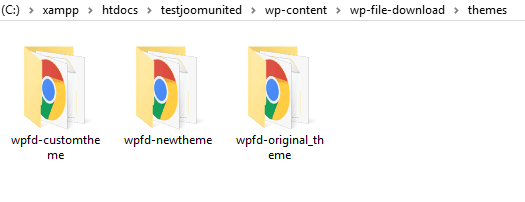
Новые темы будут храниться в wp-content/wp-file-download/themes
Вы также можете контролировать доступ к вашим скачиваниям с помощью WP File Download!
Внимание всем вебмастерам!
Улучшите веб-сайты своих клиентов с помощью WP File Download. Создавайте безопасные и настраиваемые файловые репозитории, позволяя клиентам легко получать доступ к своим файлам и управлять ими.
Улучшите свои услуги по веб-дизайну сегодня!
Так просто, как лучший менеджер скачиваний WordPress
Как мы видим в этом посте, это один из лучших менеджеров загрузки WordPress благодаря тому, насколько легко его настроить и использовать, это действительно лучший способ создания файлов для скачивания в WordPress, так что ... чего вы ждете? Переходите сейчас и покупайте его здесь https://www.joomunited.com/wordpress-products/wp-file-download
Когда вы подпишетесь на блог, мы будем отправлять вам электронное письмо, когда появятся новые обновления на сайте, чтобы вы не пропустили их.