WordPress 製品
 Joomla製品
 Support
 News
News Login
LoginYoast SEOの使い方:初期設定、構成、ヒント

Yoast SEOは、検索エンジン向けにウェブサイトを最適化するための最も人気のある WordPress SEOプラグイン の1つです。初心者でも経験豊富なユーザーでも、検索エンジンにとってサイトをより理解しやすくすることで、サイトの可視性を高めるのに役立ちます。
Yoastの主な機能には、キーワード分析と最適化の提案、XMLサイトマップの生成、メタディスクリプションとタイトルタグの最適化、コンテンツ分析、可読性スコアが含まれます。この記事では、WordPressにYoast SEOプラグイン をインストールして設定するためのステップバイステップガイドを共有し、Yoast SEOを最大限に活用するための役立つヒントを提供します。
目次
Yoast SEOプラグインのインストール方法
Yoast SEOを使い始めるための最初のステップは、WordPressサイトにプラグインをインストールすることです。その方法は次のとおりです:
ステップ1: ログイン してWordPressダッシュボードにアクセスします。
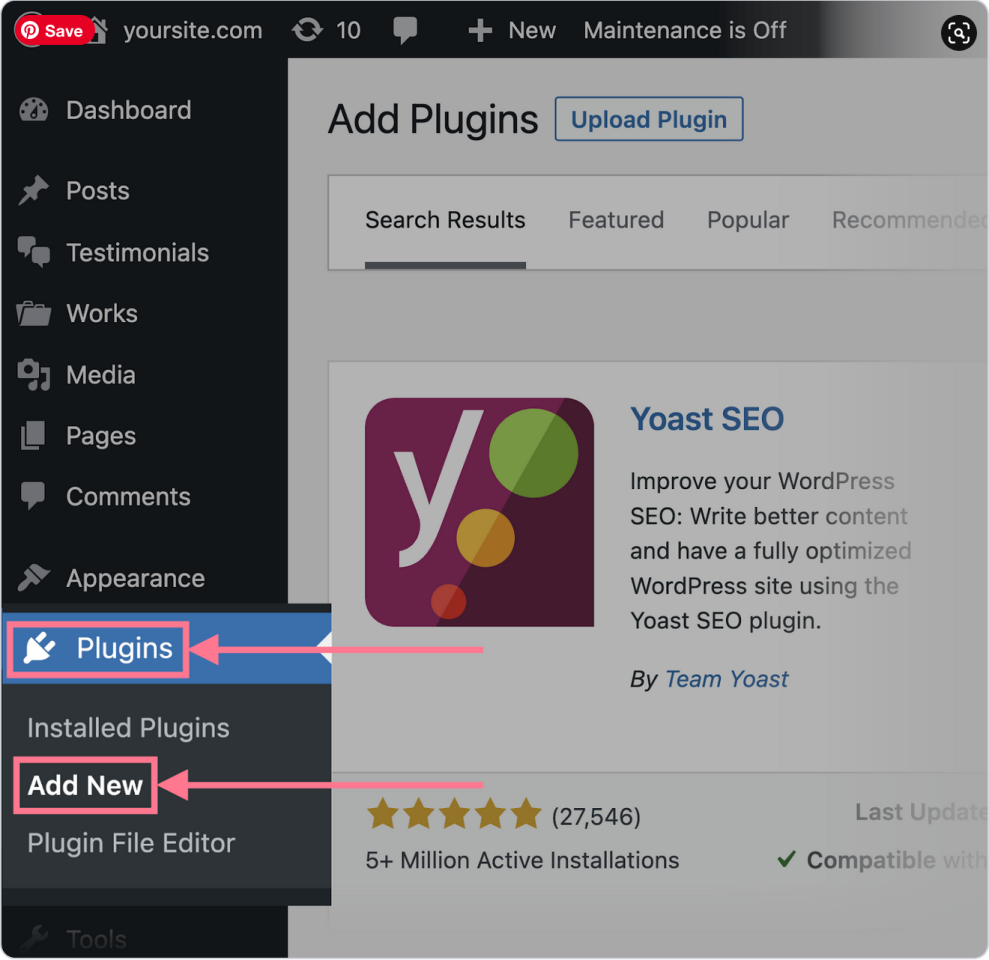
ステップ2:「プラグイン」セクションに移動し、「新規追加」をクリックします。
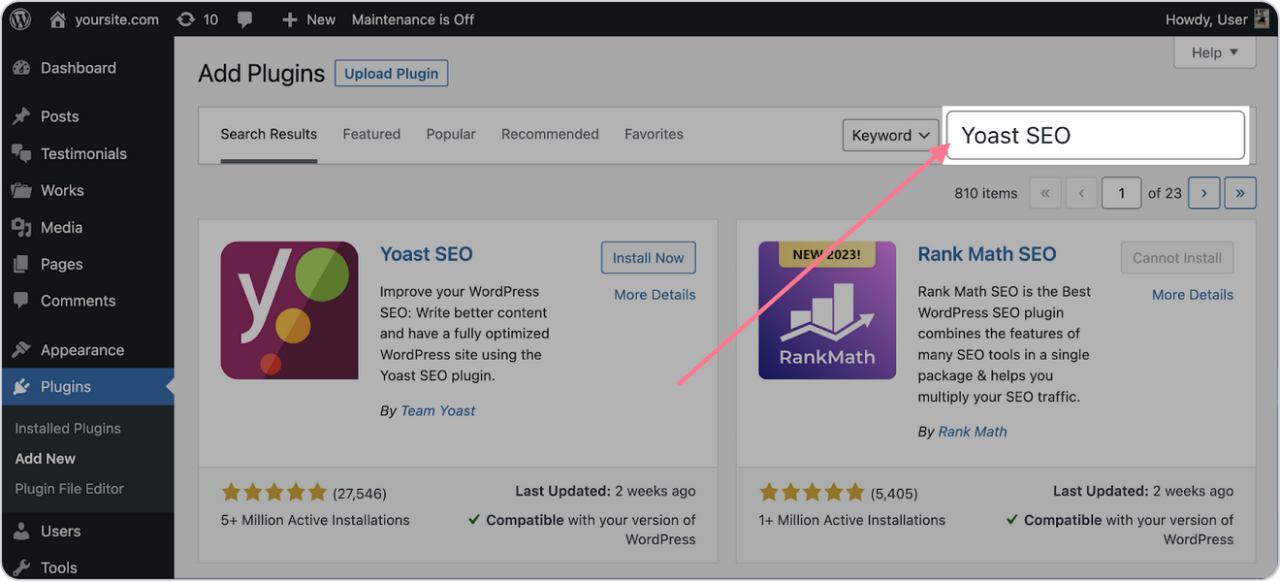
ステップ3: 検索バーに「Yoast SEO」と入力します。
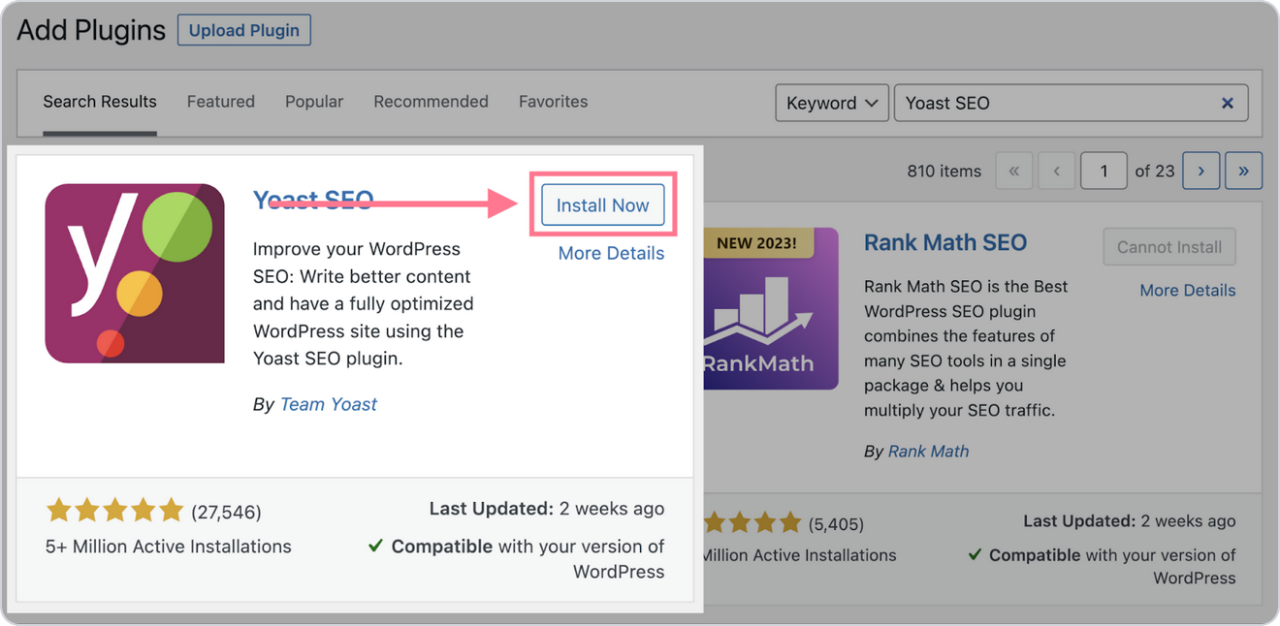
ステップ4: プラグインを見つけたら、「今すぐインストール」をクリックし、その後 有効化 します。
インストール後、プラグインはWordPressダッシュボードの「SEO」に表示されます。また、プラグインは常に最新の状態に保つことを忘れないでください。Yoastは、最新バージョンのWordPressや検索エンジンアルゴリズムの変更との互換性を維持するため、定期的に新しいバージョンをリリースしています。
WP Meta SEO は、SEO 最適化のすべてをコントロールできます。一括 SEO コンテンツと画像 SEO、オンページコンテンツチェック、404 とリダイレクト。.
Yoast SEOプラグインの設定方法
初期設定が完了したら、Yoast SEOの詳細設定を構成できます。WordPressダッシュボードの左側メニューにある「Yoast SEO」をクリックすると、Yoast SEO設定ウィザードにアクセスできます。
まず、「初回設定」の手順に従って、サイトにYoast SEOを設定してください。自動的にリダイレクトされない場合は、サイドバーのナビゲーションで「プラグイン」をクリックしてください。
その後、Yoast SEOを探して「初回設定を完了する."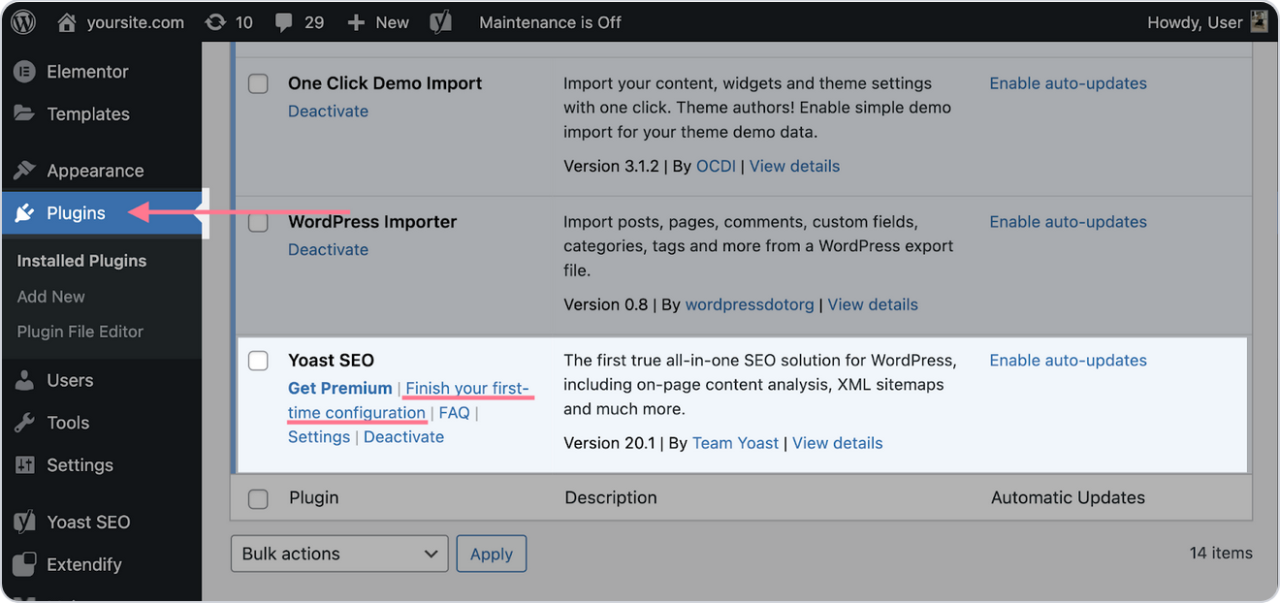
このステップでは何もする必要はありません。Yoastがデータを最適化し、いくつかの技術的な問題を修正します。その後、「続行」をクリックします。
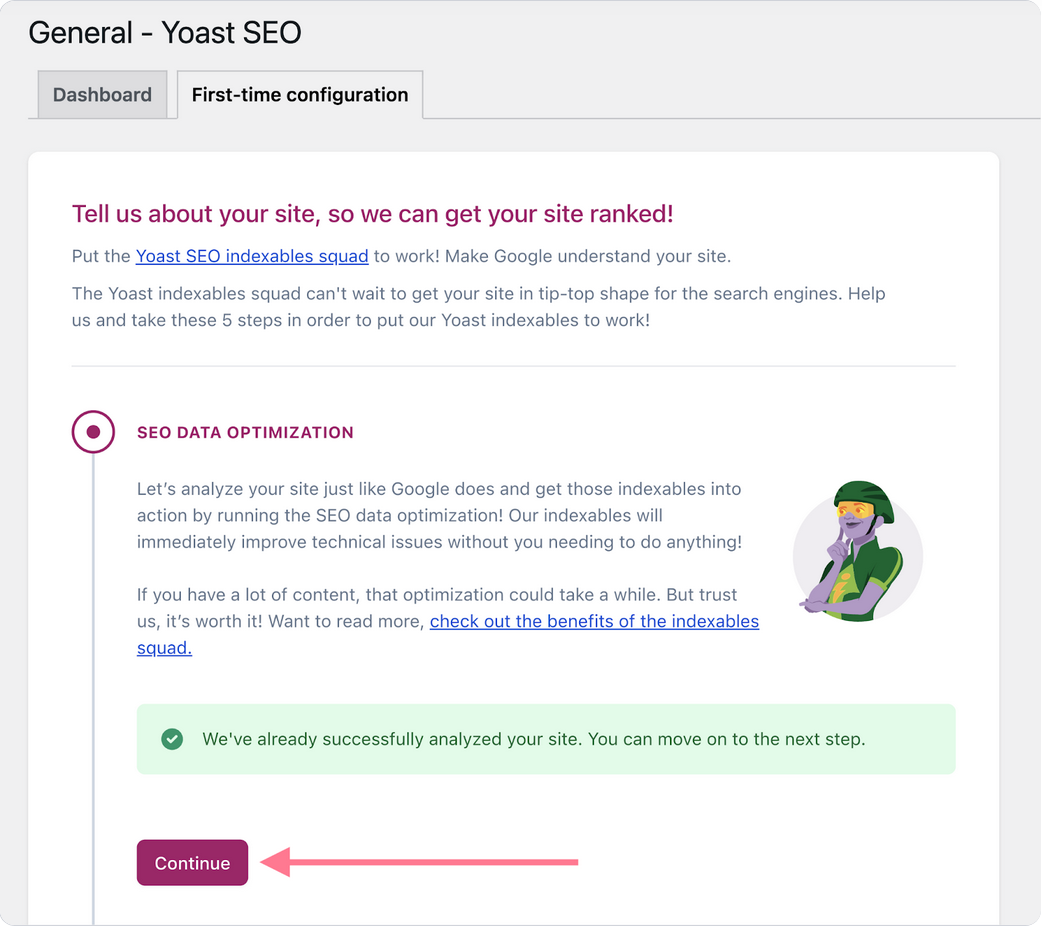
プラグインにこれ以上変更を加えていなくても、すでにいくつかの最適化が実装されています。これには以下が含まれます:
- XMLサイトマップ
- robots.txtファイル
- 基本的なスキーママークアップ(セットアップ時に入力した詳細を使用)
次に、Yoast SEOがSEOの他の側面でどのように役立つかを見ていきましょう。.
1. 一般設定
「一般」セクションには、4つのサブセクションにさまざまな設定が含まれています。
- サイト機能 のサブセクションでは、XMLサイトマップ、可読性分析、キーワード最適化など、さまざまな機能を有効または無効にできます。
- サイトの基本情報 のサブセクションでは、サイトに関する基本情報を入力できます。ここでは タイトル区切り文字 も選択できます。これは、タイトルタグ内でページタイトルとサイト名を区切る記号です。
- 「 サイト表現 」サブセクションには、プラグインの初期設定時に入力した情報が含まれます。これはGoogleのナレッジグラフにデータを提供することを目的としています。
- 最後に、 サイト接続 のサブセクションでは、Google Search Consoleなどのさまざまなツールでサイトを確認できます。
2. 検索での表示
このセクションは、検索結果でサイトがどのように表示されるかを決定するために重要です:
- コンテンツタイプ: これにより、ホームページ、投稿、ページ、ランディングページなど、さまざまな種類のコンテンツが検索エンジンやソーシャルメディアプラットフォームでどのように表示されるかを決定できます。
- カテゴリーとタグ: カテゴリー、タグ、著者アーカイブが検索結果でどのように表示されるかを選択して、検索での表示を設定できます。これはタクソノミーと呼ばれます。これらのページを表示したくない場合は、「noindex」に設定できます。
- 詳細設定: パンくずリスト を有効にすると、ユーザーと検索エンジンがあなたのサイトをより簡単にナビゲートできるようになります。パンくずナビゲーションは、ウェブサイト構造のさまざまなフォルダやサブフォルダへのリンクを含むテキストパスです。
3. ソーシャル設定
Yoast SEOでは、コンテンツがソーシャルメディアプラットフォームでどのように共有されるかを最適化できます。「ソーシャル」タブでソーシャルプロフィールを追加し、画像や説明のメタタグを追加して、ページがFacebookやTwitterでどのように表示されるかを設定します。
Yoast SEOプラグインを使用するためのヒント
Yoast SEOは、検索エンジン結果におけるあなたのウェブサイトの可視性を大幅に向上させることができます。適切に設定し、そのコンテンツ最適化機能を使用することで、オンページSEOとテクニカルSEOの両方を改善できます。.
これらのヒントを参考に、Yoast SEOの強力な機能を活用してその効果を最大限に引き出しましょう:
- WordPressの各投稿やページで フォーカスキーワード を設定すると、タイトル、URL、メタディスクリプション、およびコンテンツ本文内にそのキーワードが表示されるようになります。また、キーワードの配置が自然であることを確認してください。
- 次に、 可読性分析 機能を活用して、文の長さ、段落構成、小見出し、受動態の使用状況に基づいてコンテンツの可読性を分析しましょう。良い可読性スコアを実現するには、文と段落を簡潔に保ち、小見出しを使ってコンテンツを区切り、Yoastの可読性メーターで「グリーンライト」を目指すことが含まれます。
- Yoast SEOは各投稿に対して詳細な SEO分析 を提供し、キーワード密度(フォーカスキーワードが十分に使われているか、あるいは多すぎるか)に関するフィードバックを行い、メタディスクリプションにフォーカスキーワードが含まれていることを確認し、SEOとアクセシビリティを向上させるために画像に代替テキストを追加することを提案します。
一方で、Google AnalyticsやGoogle Search Consoleなどのツールを使って、常にサイトのパフォーマンスを監視する必要があります。幸いなことに、Yoast SEOは両方と連携しており、トラフィックや検索エンジンでの順位に関する貴重な洞察を提供します。.
ブログを購読すると、サイトに新しい更新があったときにメールでお知らせしますので、見逃すことはありません。.