WordPress उत्पाद
 Joomla उत्पाद
 सहायता
 News
News Login
LoginWP Media Folder ऐडऑन में नया गैलरी मैनेजर

जहाँ WordPress ब्लॉग होते हैं, वहाँ छवियाँ और मीडिया का होना स्वाभाविक है, और जहाँ छवियाँ होती हैं, वहाँ गैलरी का दिखना बिल्कुल स्वाभाविक है। भले ही आप छवियों के समूह को प्रदर्शित करते समय केवल जगह बचाना चाहते हों, गैलरी आपके मीडिया को सर्वोत्तम रूप में प्रस्तुत करने का एक स्टाइलिश तरीका है।.
WP Media Folder गैलरी ऐडऑन WP Media Folder पर आधारित है जो इमेज गैलरी प्रबंधन को सुविधाजनक बनाता है। WordPress गैलरी मैनेजर को एक बड़ा अपडेट मिला है, जिसमें नया UX, अनुकूलन योग्य गैलरी और आपके ब्लॉग में कहीं भी इमेज गैलरी एम्बेड करने के लिए नया Gutenberg ब्लॉक शामिल है।.
वीडियो में WordPress गैलरी मैनेजर
अव्यवस्थित मीडिया लाइब्रेरी को अलविदा कहें।.
WP Media Folder आपको फ़ाइलों को वर्गीकृत करने, क्लाउड स्टोरेज के साथ फ़ोल्डर सिंक करने, शानदार गैलरी बनाने और लिंक तोड़े बिना छवियों को बदलने की सुविधा देता है।
आज ही अपने मीडिया वर्कफ़्लो को अनुकूलित करें
नए गैलरी मैनेजर UX की खोज
आप इसे मिस नहीं कर सकते। जैसे ही आप WP Media Folder Gallery Addon को अपडेट करेंगे, आपका स्वागत एक बिल्कुल नए UX से होगा। जब आप Media Folder Galleries पर Media मेनू से जाएँगे, तो आप नवीनतम संस्करण में अपनाए गए नए, मिनिमलिस्ट लुक को नोटिस करेंगे।
यह मिनिमलिज़्म एक सुविधा-संपन्न गैलरी मैनेजर को छिपाता है, लेकिन नई सुविधाओं का पता लगाने से पहले, एक टूर आवश्यक है। साइड-बार वह जगह है जहाँ आप शुरू से नई गैलरी बना सकते हैं, या जहाँ आप मौजूदा इमेज फ़ोल्डरों को स्वचालित रूप से पूर्ण विकसित गैलरी में बदल सकते हैं। ठीक नीचे, आप किसी भी गैलरी पर क्लिक करके उसे संपादित करना शुरू कर सकते हैं।.
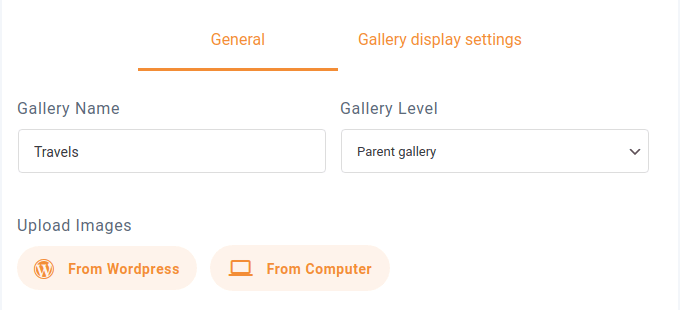
वास्तविक गैलरी प्रबंधन काफी सरल है। ऊपर, आप एक नाम और गैलरी स्तर निर्दिष्ट कर सकते हैं—गैलरी को निर्देशिकाओं की तरह पदानुक्रमित रूप से व्यवस्थित किया जा सकता है। नीचे, आप WordPress छवियों को गैलरी में आयात कर सकते हैं, या अपने कंप्यूटर से नई छवियाँ अपलोड कर सकते हैं।.
बाकी जगह गैलरी द्वारा भरी जाती है। WordPress गैलरी मैनेजर आपको प्रत्येक छवि को अलग-अलग संपादित करने की सुविधा देता है, बस उस पर होवर करें और settings आइकन पर क्लिक करें। यदि आप गलती से गैलरी में कोई छवि जोड़ देते हैं, तो आप उसे इसी तरह होवर करके और delete आइकन पर क्लिक करके हटा सकते हैं।
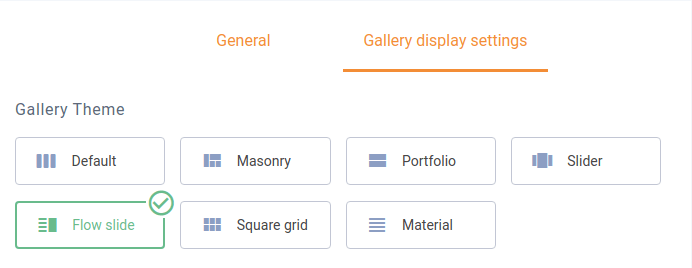
हालाँकि, गैलरी मैनेजर में असली मुख्य जोड़ इस क्षेत्र में नहीं है। ऊपर, गैलरी डिस्प्ले सेटिंग्स टैब आपको प्रत्येक गैलरी को अलग-अलग अनुकूलित करने देता है। आप सात गैलरी थीम में से एक चुन सकते हैं। ‘गैलरी मैनेजर’ लेबल को दिल से अपनाते हुए, WP Media Folder गैलरी ऐडऑन आपको नीचे अपनी इच्छानुसार गैलरी को बारीकी से समायोजित करने देता है।
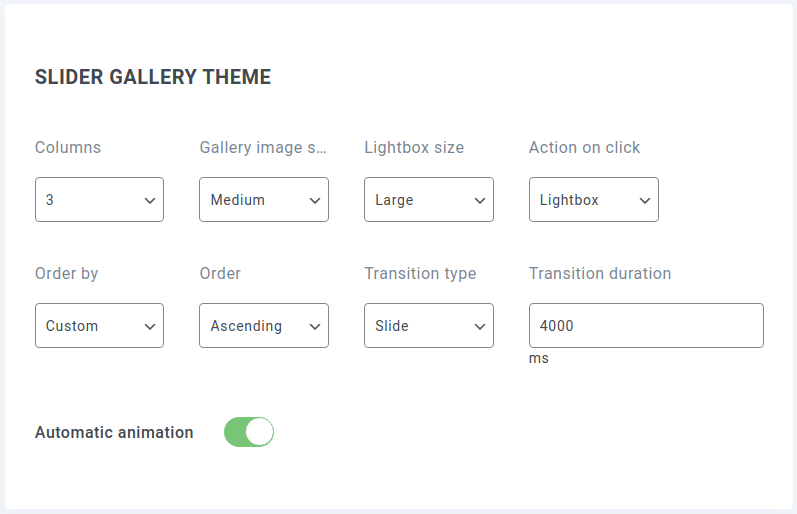
कुछ विकल्प, जैसे कॉलम की संख्या, छवि का आकार और क्रम, या लाइटबॉक्स व्यवहार, सभी थीम्स में सामान्य होते हैं। हालाँकि, उदाहरण के लिए, स्लाइडर थीम में थीम-विशिष्ट विकल्प होते हैं जिनका आप लाभ उठा सकते हैं।.
कई मामलों में, जब भी आप थीम्स का पुनः उपयोग करेंगे, आप संभवतः वही सेटिंग्स लागू करना चाहेंगे। WP Media Folder Gallery Addon की सेटिंग्स आपको विशिष्ट थीम्स के लिए डिफ़ॉल्ट सेटिंग्स परिभाषित करने देती हैं। उन्हें सेट करके तैयार रखने के लिए, WP Media Folderके सेटिंग्स पेज पर जाएँ।.
गैलरी मैनेजर की सेटिंग्स Galleries Addon अनुभाग में, default settings टैब के अंतर्गत स्थित हैं। विकल्पों में वही सेटिंग्स शामिल हैं जो आम तौर पर अलग-अलग गैलरी बनाते समय मिलती हैं, साथ ही कुछ अतिरिक्त विकल्प भी, जैसे स्वचालित एनिमेशन।
गैलरी को कहीं भी एम्बेड करना…
गैलरी मैनेजर सेट अप करना पूरा करने के बाद, आप सीधे सेटिंग्स से गैलरी साझा करना शुरू कर सकते हैं। शॉर्टकोड टैब वह जगह है जहाँ आप गैलरी की सेटिंग्स निर्दिष्ट कर सकते हैं और कहीं भी गैलरी एम्बेड करने के लिए एक कोड—शॉर्टकोड—प्राप्त कर सकते हैं।
सेटिंग्स वही सामान्य होती हैं जो आपको गैलरी मैनेजर में मिलती हैं, जिनमें गैलरी और उसकी थीम चुनना, और थीम के बारीक विवरण बदलना शामिल है। जैसे-जैसे आप सेटिंग्स बदलते हैं, पेज के निचले हिस्से में मौजूद शॉर्टकोड भी बदल जाता है। सेटिंग्स पूरी करने के बाद, आप इस कोड को कॉपी करके गैलरी एम्बेड करने के लिए अपने WordPress ब्लॉग में कहीं भी रख सकते हैं।.
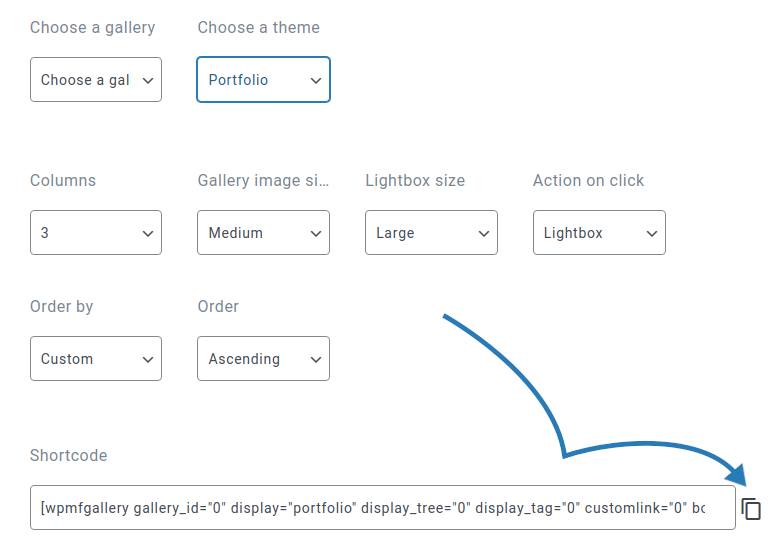
शॉर्टकोड आदर्श है यदि आप किसी असंभावित स्थान पर गैलरी एम्बेड करना चाहते हैं, जैसे कि साइडबार मेनू में शोकेस के रूप में। हालाँकि, यदि आप किसी पोस्ट या पेज में गैलरी बनाना चाहते हैं, तो एक आसान समाधान है: गैलरी मैनेजर का बिल्कुल नया Gutenberg ब्लॉक।.
गुटेनबर्ग ब्लॉक को WPMF Gallery Addon कहा जाता है। जैसे ही आप इसे बनाते हैं, आपको एक गैलरी चुनने या बनाने के लिए कहा जाएगा। आप जो भी तरीका चुनें, गैलरी चुनें और इसे अपनी सामग्री में जोड़ने के लिए insert पर क्लिक करें।
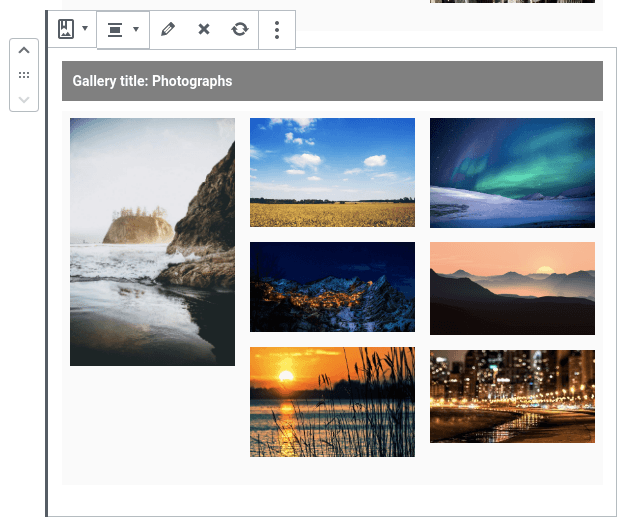
गुटेनबर्ग ब्लॉक की सबसे अच्छी बात यह है कि इसमें गैलरी मैनेजर शामिल होता है। आप ब्लॉक टूलबार से संपादित करें आइकन पर क्लिक करके गुटेनबर्ग एडिटर से गैलरी की छवियों को बदल सकते हैं। ब्लॉक सेटिंग्स में थीम जैसे अन्य गैलरी-विशिष्ट विकल्प, और बॉर्डर, मार्जिन और शैडो सहित ब्लॉक विकल्प शामिल होते हैं।
सभी वेबमास्टर्स को आमंत्रण!
समय बचाएं और उत्पादकता बढ़ाएं WP Media Folder के साथ। ग्राहक मीडिया फ़ाइलों को सहजता से व्यवस्थित करें, कस्टम गैलरी बनाएं, और एक सहज उपयोगकर्ता अनुभव प्रदान करें।
अपने वेबसाइट प्रोजेक्ट्स को अभी अपग्रेड करें!
WP Media Folder गैलरी ऐडऑन गैलरी को फिर से नहीं बनाता, लेकिन यह आपके लिए गैलरी को सर्वोत्तम संभव तरीके से प्रदर्शित करना आसान बनाता है। चुनने के लिए 7 थीम और उन्हें अनुकूलित करने के अनगिनत तरीकों के साथ, गैलरी मैनेजर का नवीनतम अपडेट आपकी छवियों को गैलरी में प्रदर्शित करना पहले से कहीं अधिक आसान बनाता है।.
जब आप ब्लॉग की सदस्यता लेते हैं, तो साइट पर नए अपडेट होने पर हम आपको ई-मेल भेजेंगे ताकि आप उन्हें मिस न करें।.