WordPress products
 Joomla products
 Support
 Ειδήσεις
 Σύνδεση
Πώς να Δημιουργήσετε έναν Ιστότοπο Portfolio στο WordPress

Ένα portfolio ήταν πάντα απαραίτητο για να αναδεικνύουμε τις δεξιότητές μας. Στις μέρες μας, έχουμε τη δυνατότητα να το κάνουμε online για να φτάσουμε σε περισσότερους ανθρώπους σε όλο τον κόσμο και το WordPress μας προσφέρει πολλά εργαλεία που μπορούμε να χρησιμοποιήσουμε για να το πετύχουμε επαγγελματικά και να μπορούμε να δείξουμε τη δουλειά μας σε πιθανούς εργοδότες, πελάτες και συνεργάτες.
Με πολλά plugins και themes διαθέσιμα, το WordPress είναι ένα καταπληκτικό εργαλείο που θα μας επιτρέψει να δημιουργήσουμε οποιονδήποτε τύπο ιστότοπου, δίνοντάς μας πλήρη έλεγχο της προσαρμογής, του περιεχομένου και με τον ευκολότερο τρόπο.
Σε αυτόν τον οδηγό, θα δούμε πώς να ρυθμίσετε έναν ιστότοπο χαρτοφυλακίου χρησιμοποιώντας το WordPress, από την επιλογή του σωστού θέματος και των πρόσθετων έως τη βελτιστοποίηση του ιστότοπού σας για μηχανές αναζήτησης και κινητές συσκευές. Θα καλύψουμε βασικές συμβουλές και βέλτιστες πρακτικές για να σας βοηθήσουμε να δημιουργήσετε ένα οπτικά εντυπωσιακό, φιλικό προς τον χρήστη χαρτοφυλάκιο που αναδεικνύει τα ταλέντα και την εμπειρογνωμοσύνη σας.
Πείτε αντίο στην ακατάστατη βιβλιοθήκη πολυμέσων.
WP Media Folder σας επιτρέπει να κατηγοριοποιείτε αρχεία, να συγχρονίζετε φακέλους με αποθηκευτικό χώρο στο cloud, να δημιουργείτε εκπληκτικές γκαλερί και ακόμη να αντικαθιστάτε εικόνες χωρίς να σπάτε συνδέσμους.
Βελτιστοποιήστε τη ροή εργασίας των πολυμέσων σας σήμερα
Επιλέξτε το τέλειο θέμα portfolio στο WordPress
Το θέμα είναι ένα από τα πιο σημαντικά πράγματα όταν δημιουργείτε έναν ιστότοπο χαρτοφυλακίου, αυτό θα καθορίσει τον σχεδιασμό, τη διάταξη και τις γενικές λειτουργίες του ιστότοπού σας, οπότε είναι πραγματικά σημαντικό να επιλέξετε το σωστό και να είστε προσεκτικοί όταν το κάνετε.
Έρευνα και Αξιολόγηση Διαφορετικών Θεμάτων Portfolio για το WordPress
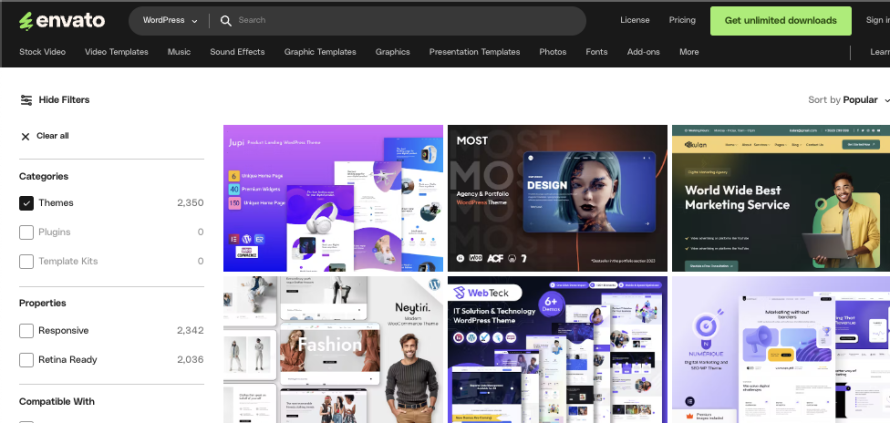
Δεν θα πρέπει να επιλέξουμε το πρώτο θέμα που βλέπουμε, αντίθετα, θα πρέπει να αξιολογήσουμε όλες τις επιλογές μας, ξεκινώντας από τον κατάλογο θεμάτων του WordPress που μπορούμε να βρούμε στο wp-admin > Themes > Add New ή εδώ, μπορούμε επίσης να χρησιμοποιήσουμε δημοφιλείς αγορές όπως το Envanto και το Theme Forest χρησιμοποιώντας το portfolio ως λέξη-κλειδί για να αναζητήσουμε το τέλειο θέμα.
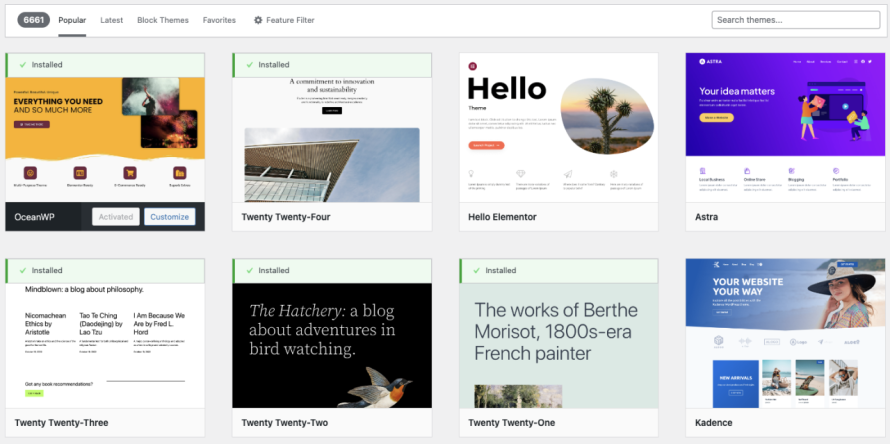
Άλλα δημοφιλή θέματα όπως το Hello της Elementor ή το Divi διαθέτουν τους δικούς τους page builders και έτοιμα πρότυπα για να κάνουν το κύριο έργο της δημιουργίας και συντήρησης του ιστότοπου ευκολότερο.
Υπάρχουν μερικά πράγματα που πρέπει να έχετε κατά νου όταν επιλέγετε το ιδανικό θέμα portfolio:
Σχεδιασμός και Αισθητική
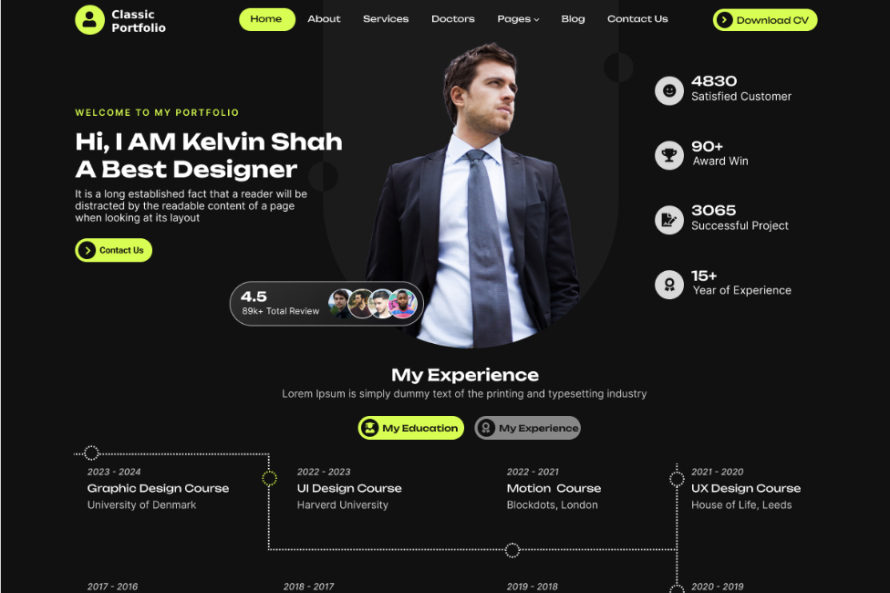
Ο σχεδιασμός του θέματος θα πρέπει να ευθυγραμμίζεται με την προσωπική σας επωνυμία και τη συνολική εμφάνιση και αίσθηση που θέλετε να επιτύχετε. Αναζητήστε καθαρές, μοντέρνες διατάξεις που αναδεικνύουν τη δουλειά σας με τον καλύτερο τρόπο.
Ανταπόκριση και Φιλικότητα προς Κινητά
Στο σημερινό web που καθοδηγείται από τα κινητά, ο ιστότοπος του χαρτοφυλακίου σας πρέπει να είναι βελτιστοποιημένος για απρόσκοπτη προβολή και πλοήγηση σε smartphones και tablets. Βεβαιωθείτε ότι το θέμα είναι πλήρως responsive.
Επιλογές Προσαρμογής
Αναζητήστε θέματα που προσφέρουν υψηλό βαθμό προσαρμογής, επιτρέποντάς σας να προσαρμόσετε τον σχεδιασμό, τη διάταξη και τη λειτουργικότητα στις συγκεκριμένες ανάγκες σας. Τα θέματα με οπτικό εργαλείο δημιουργίας σελίδων μπορεί να είναι ιδιαίτερα χρήσιμα.
Δωρεάν vs Επί πληρωμή Θέματα, Πλεονεκτήματα και μειονεκτήματα
Τα δωρεάν και τα επί πληρωμή θέματα έχουν τα πλεονεκτήματα και τα μειονεκτήματά τους, θα πρέπει να τα έχουμε υπόψη μας όταν επιλέγουμε το σωστό:
Δωρεάν Θέματα
Κύρια Πλεονεκτήματα
- Χαμηλότερο αρχικό κόστος.
- Υπάρχουν πολλά για να διαλέξετε, και μπορούμε να τα δοκιμάσουμε χωρίς κανένα ρίσκο.
Κύρια Μειονεκτήματα
- Περιορισμένες επιλογές προσαρμογής.
- Μπορεί να λείπουν προηγμένες λειτουργίες ειδικά για χαρτοφυλάκια.
- Πιθανές ανησυχίες για την ασφάλεια και την υποστήριξη.
Premium Θέματα
Κύρια Πλεονεκτήματα
- Εκτενείς επιλογές προσαρμογής και λειτουργίες με επίκεντρο το χαρτοφυλάκιο.
- Αποκλειστική υποστήριξη και τακτικές ενημερώσεις.
- Βελτιωμένη ασφάλεια και απόδοση.
Κύρια Μειονεκτήματα
- Υψηλότερο αρχικό κόστος.
Τελικά, η επιλογή μεταξύ ενός δωρεάν ή premium θέματος θα εξαρτηθεί από τις συγκεκριμένες απαιτήσεις, τον προϋπολογισμό και την τεχνική σας εξειδίκευση. Πολλοί επαγγελματίες ιδιοκτήτες portfolio επιλέγουν ένα premium θέμα για να διασφαλίσουν μια άρτια, πλούσια σε λειτουργίες ιστοσελίδα.
Συμπληρώστε τον ιστότοπο με το σωστό πρόσθετο WordPress
Είναι σωστό ότι η επιλογή ενός καλού θέματος είναι το κλειδί, αλλά η επιλογή των σωστών πρόσθετων είναι επίσης σημαντική, καθώς τα πρόσθετα μπορούν να βελτιώσουν τις λειτουργίες του ιστότοπού σας, βοηθώντας το θέμα σας με την εμπειρία χρήστη και τα κύρια χαρακτηριστικά γενικότερα.
Υπάρχουν ορισμένα πρόσθετα που πρέπει να έχουμε κατά νου όταν τα προσθέτουμε στον ιστότοπο του χαρτοφυλακίου μας:
Plugins Gallery και διαχείρισης Portfolio
Ένα πρόσθετο gallery είναι πάντα χρήσιμο, αυτό μας επιτρέπει να προσεγγίζουμε τους επισκέπτες μας και να τους επιτρέπουμε να βλέπουν οπτικά τι μπορούμε να προσφέρουμε, μια εικόνα πάντα προσελκύει περισσότερες προβολές από ένα κείμενο.
Σε αυτό το παράδειγμα, για να δημιουργήσουμε ένα portfolio, μπορούμε να προσθέσουμε τα πάντα σε μια γκαλερί εικόνων, από σχέδια αν είμαστε καλλιτέχνες, μέχρι προεπισκοπήσεις ιστοτόπων αν είμαστε προγραμματιστές ή γραφικά των αποτελεσμάτων μας.
Για αυτό το άρθρο, θα χρησιμοποιήσουμε το WP Media Folder το οποίο προσφέρει πολλές δυνατότητες, όπως η οργάνωση των πολυμέσων μας και η δημιουργία γκαλερί από μια μεγάλη ποσότητα έτοιμων θεμάτων, καθώς και πολλά εργαλεία προσαρμογής που θα μας βοηθήσουν να κάνουμε τη γκαλερί μας να ταιριάζει με τον ιστότοπο του χαρτοφυλακίου.
Οργανώστε τη δουλειά σας στη βιβλιοθήκη πολυμέσων
Το πρώτο κύριο χαρακτηριστικό του WP Media Folder είναι να οργανώνει την εργασία μας στη βιβλιοθήκη πολυμέσων.
Από τις προεπισκοπήσεις προτύπων ιστοτόπων μέχρι σχέδια ή γραφικά στατιστικών, θα πρέπει να έχουμε μια εικόνα που αντιπροσωπεύει τη δουλειά μας, ώστε να προσελκύουμε τους επισκέπτες του ιστοτόπου μας, στην περίπτωση αυτή, το WP Media Folder μας επιτρέπει να οργανώνουμε τα πολυμέσα μας σε φακέλους, κάνοντας ευκολότερη τη διαχείριση και την εύρεση των πολυμέσων μας.
Για να τα βρούμε αυτά (έχοντας εγκατεστημένο το WP Media Folder ) μπορούμε να πάμε στη Βιβλιοθήκη Πολυμέσων μας και οι επιλογές για τη δημιουργία φακέλων θα βρίσκονται εκεί.
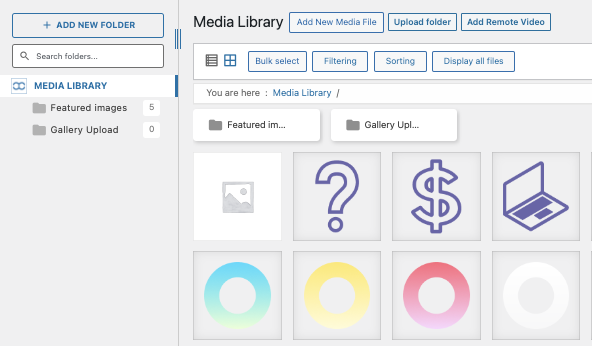
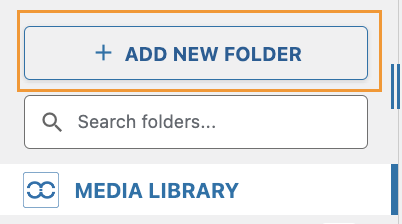
Για να προσθέσουμε έναν νέο φάκελο, πρέπει απλώς να κάνουμε κλικ στο + Add New Folder και να πληκτρολογήσουμε το όνομα του φακέλου.
Είναι σημαντικό να σημειωθεί ότι επιλέγοντας έναν φάκελο που έχει ήδη δημιουργηθεί και κάνοντας ξανά κλικ στο + Προσθήκη Νέου Φακέλου θα δημιουργηθούν υποφάκελοι, επιτρέποντάς μας να δημιουργήσουμε επίπεδα φακέλων για καλύτερη διαχείριση, θα μπορούσε να είναι για παράδειγμα:
- Σχέδια
-- Ζώα
-- Κατακόρυφος προσανατολισμός
-- Τοπίο
Και οποιοδήποτε άλλο πράγμα μπορούμε να φανταστούμε, καθώς μπορούμε να δημιουργήσουμε όσα επίπεδα θέλουμε.
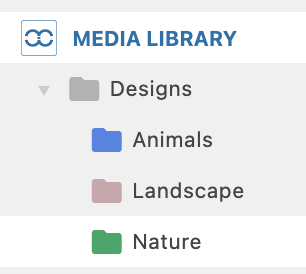
Δεν θα είναι πλέον δύσκολο να βρείτε ένα συγκεκριμένο πολυμέσο!
Προσθέστε το χαρτοφυλάκιο πολυμέσων σας στο περιεχόμενό σας
Τώρα που έχουμε προσθέσει τα πολυμέσα μας, μπορούμε να χρησιμοποιήσουμε οποιοδήποτε από τα πολλά θέματα που είναι διαθέσιμα στο WP Media Folder για να εμφανίσουμε τα πολυμέσα μας και να τα προβάλουμε με τον πιο επαγγελματικό τρόπο.
Υπάρχουν πολλές επιλογές για να δημιουργήσουμε τη συλλογή μας, για παράδειγμα, χρησιμοποιώντας το πρόσθετο διαχείρισης συλλογής για να προσαρμόσουμε περαιτέρω τις συλλογές μας ή μπορούμε απλώς να δημιουργήσουμε μια συλλογή από έναν φάκελο με ένα έτοιμο πρότυπο ή επιλέγοντας τα πολυμέσα που θέλουμε στη συλλογή μας.
Μια καλή επιλογή για τη δημιουργία της γκαλερί είναι το χαρτοφυλάκιο, ας δούμε πώς μπορούμε να προσθέσουμε τη γκαλερί μας:
Πρόσθετο διαχείρισης συλλογής
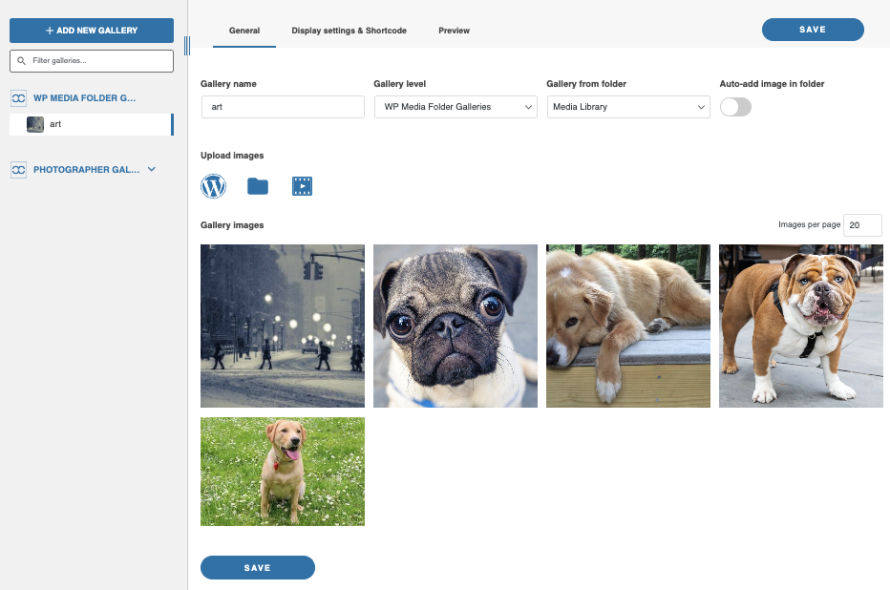
Όπως μπορούμε να δούμε, έχουμε την επιλογή να επιλέξουμε το θέμα μας καθώς και τις εικόνες και να χρησιμοποιήσουμε έναν πίνακα ελέγχου παρόμοιο με αυτόν που έχουμε στη βιβλιοθήκη πολυμέσων μας με φακέλους συν περισσότερες επιλογές προσαρμογής.
Αυτό έχει 2 κύριες επιλογές για προσθήκη στη συλλογή μας, μπορείτε να δημιουργήσετε ένα Shortcode ή απλώς να προσθέσετε το προκαθορισμένο πρόσθετο σε όλους τους κύριους κατασκευαστές σελίδων όπως το Gutenberg, το Divi ή το Elementor.
Από έναν φάκελο στη σελίδα επεξεργασίας
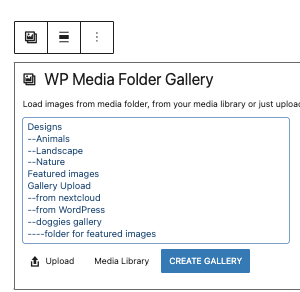
Ένα widget διαθέσιμο σε όλους τους κύριους page builders που ονομάζεται WP Media Folder Gallery θα μας επιτρέψει να επιλέξουμε έναν φάκελο και στη συνέχεια ένα θέμα για να δημιουργήσουμε τη gallery, ενώ είναι επίσης δυνατή η δημιουργία ενός shortcode με ένα προκαθορισμένο θέμα.
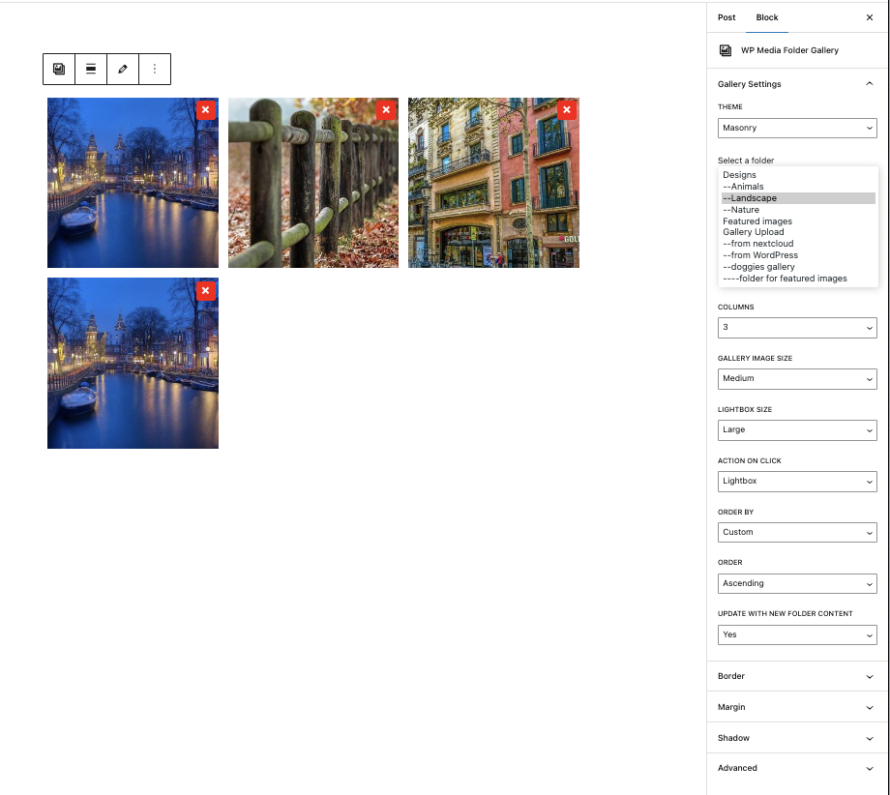
Είναι σημαντικό να γνωρίζετε ότι έχουμε τη δυνατότητα να επιλέγουμε επιλογές στην πλαϊνή στήλη και επίσης την επιλογή να διαγράφουμε/προσθέτουμε περισσότερες εικόνες απευθείας στην προεπισκόπηση.
Έχουμε πολλές galleries, από slider έως ένα portfolio αποκλειστικό θέμα που μπορούμε να δούμε εδώ:
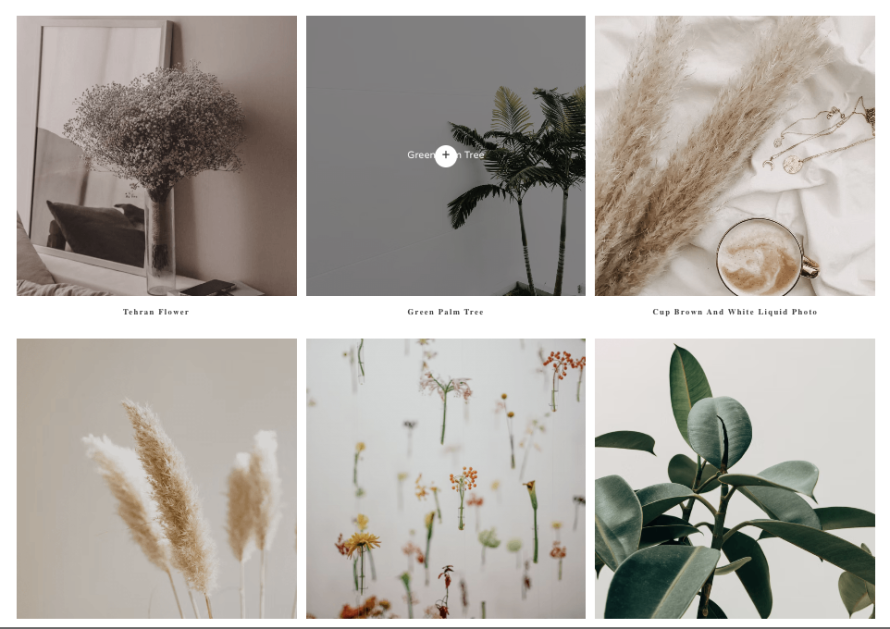
Είναι σημαντικό να σημειωθεί ότι έχουμε πολλές επιλογές για ενέργεια στο κλικ, μία από τις οποίες είναι η ανακατεύθυνση σελίδας, ώστε να μπορούμε να έχουμε, για παράδειγμα, μια σελίδα που εξηγεί την εικόνα και να κάνουμε την εικόνα να ανακατευθύνει εκεί.
Έχουμε επίσης επιλογές όπως η εφαρμογή υδατογραφημάτων στα πολυμέσα μας.
Πρόσθετα SEO και Βελτιστοποίησης
Η βελτιστοποίηση της ταχύτητας και της προβολής σας στις μηχανές αναζήτησης για τον ιστότοπο του χαρτοφυλακίου σας είναι ζωτικής σημασίας. Οι χρήστες θα κατέληγαν να εγκαταλείπουν έναν ιστότοπο που είναι αργός ή δεν θα μπορούσαν να βρουν έναν ιστότοπο που δεν έχει καλό SEO, γι' αυτό δεν μπορούμε να τα αφήσουμε αυτά έξω από το σύνολο των πρόσθετων μας!
Για παράδειγμα, έχουμε:
WP Speed of Light - Ένα δωρεάν πρόσθετο βελτιστοποίησης που μας προσφέρει σύστημα προσωρινής αποθήκευσης (caching) καθώς και επιλογές βελτιστοποίησης εικόνων, ενσωμάτωση με CDN, βελτιστοποίηση πόρων (HTML, CSS, JS), και... Ανέφερα ότι είναι ΔΩΡΕΑΝ; ;)
WP Meta SEO - Ένα πρόσθετο SEO που έρχεται με χρήσιμα εργαλεία όπως έλεγχο SEO, μαζικό επεξεργαστή meta, ενσωμάτωση με το Search Console, SEO εικόνων, και μαντέψτε τι; Είναι επίσης ΔΩΡΕΑΝ!
Μπορούμε να καλυφθούμε με αυτά τα πρόσθετα, τα οποία φυσικά διαθέτουν επίσης ένα πρόσθετο Pro που βελτιώνει και προσθέτει περισσότερες λειτουργίες στον ιστότοπό σας!
Πρόσθετα Επικοινωνίας και Δημιουργίας Δυνητικών Πελατών
Είναι επίσης σημαντικό να προσφέρουμε έναν τρόπο να επικοινωνήσετε μαζί μας όταν επισκέπτεστε τον ιστότοπο του Portfolio μας, αλλιώς, γιατί να το κάνουμε αυτό; :)
Και τα πρόσθετα Φόρμας θα μας βοηθούσαν σε αυτό, μπορούμε να συλλέξουμε από email + όνομα έως πολλές περισσότερες πληροφορίες για να κατηγοριοποιήσουμε και να επεξεργαστούμε τα leads μας, εδώ είναι μερικές επιλογές που μπορείτε να έχετε κατά νου:
Contact Form 7 - Ένα δημοφιλές και άκρως προσαρμόσιμο πρόσθετο φόρμας επικοινωνίας.
Ninja Forms - Προσφέρει προηγμένες δυνατότητες δημιουργίας φορμών.
Gravity Forms - Παρέχει ισχυρές δυνατότητες δημιουργίας δυνητικών πελατών και επεξεργασίας πληρωμών.
Τώρα όλα τα άλλα πρόσθετα που χρειάζεται να χρησιμοποιήσετε εξαρτώνται απολύτως από εσάς και από το πώς θέλετε να διαχειρίζεστε την επιχείρησή σας καθώς και από τις λειτουργίες που θέλετε να προσθέσετε στον ιστότοπό σας, απλώς να θυμάστε να χρησιμοποιείτε πάντα πιστοποιημένες και αξιόπιστες αγορές όπως WordPress κατάλογος πρόσθετων και επίσημους διανομείς/προγραμματιστές premium πρόσθετων όπως JoomUnited.
Προώθηση και Κοινοποίηση του Χαρτοφυλακίου σας
Μόλις ολοκληρωθεί ο ιστότοπος του χαρτοφυλακίου, θα πρέπει να επικεντρωθούμε στην προώθηση και την κοινοποίηση του ιστότοπού μας. Η αποτελεσματική προώθηση και κοινοποίηση του χαρτοφυλακίου σας μπορεί να σας βοηθήσει να προσελκύσετε πιθανούς πελάτες, εργοδότες και συνεργάτες, οδηγώντας τελικά σε νέες ευκαιρίες.
Αξιοποιώντας τις πλατφόρμες κοινωνικών μέσων για να προβάλλετε τη δουλειά σας
Οι πλατφόρμες κοινωνικής δικτύωσης αποτελούν ένα εξαιρετικό κανάλι για την προβολή του χαρτοφυλακίου σας και την προσέλκυση επισκεψιμότητας στον ιστότοπό σας. Εξετάστε τις ακόλουθες στρατηγικές:
- Δημιουργήστε και διατηρήστε ενεργά προφίλ σε πλατφόρμες όπως το LinkedIn, το Behance, το Dribbble και το Instagram. Χρησιμοποιήστε αυτά τα προφίλ για να μοιράζεστε τακτικά τα τελευταία σας έργα και επιτεύγματα.
- Αλληλεπιδράστε με τους ακόλουθούς σας απαντώντας σε σχόλια, μοιράζοντας περιεχόμενο από τα παρασκήνια και συμμετέχοντας σε σχετικές συζητήσεις.
- Αξιοποιήστε τη διαφήμιση στα μέσα κοινωνικής δικτύωσης, όπως οι χορηγούμενες αναρτήσεις στο LinkedIn ή οι χορηγούμενες ιστορίες στο Instagram, για να προσεγγίσετε ένα στοχευμένο κοινό με το περιεχόμενο του χαρτοφυλακίου σας.
- Ενθαρρύνετε τις επαφές σας να μοιράζονται το περιεχόμενο του χαρτοφυλακίου σας στα δικά τους κανάλια κοινωνικών μέσων, επεκτείνοντας την εμβέλειά σας.
Αξιοποίηση καταλόγων ειδικών για χαρτοφυλάκια και ιστότοπων δικτύωσης
Εκτός από τα mainstream μέσα κοινωνικής δικτύωσης, υπάρχουν επίσης εξειδικευμένες πλατφόρμες και κατάλογοι αφιερωμένοι στην προβολή δημιουργικών χαρτοφυλακίων. Παραδείγματα περιλαμβάνουν:
Behance - Μια δημοφιλής πλατφόρμα για σχεδιαστές και καλλιτέχνες να μοιράζονται τη δουλειά τους.
Dribbble - Ένας ιστότοπος που βασίζεται στην κοινότητα και επικεντρώνεται στην ανάδειξη σχεδιαστικής εργασίας υψηλής ποιότητας.
Δημιουργώντας προφίλ και υποβάλλοντας το χαρτοφυλάκιό σας σε αυτές τις εξειδικευμένες πλατφόρμες, μπορείτε να προσεγγίσετε εξειδικευμένα κοινά και ενδεχομένως να προσελκύσετε νέες ευκαιρίες.
Προσέλκυση επισκεψιμότητας στο χαρτοφυλάκιό σας μέσω του μάρκετινγκ περιεχομένου
Συμπληρώστε τις προσπάθειές σας στα μέσα κοινωνικής δικτύωσης και στους καταλόγους με μια στρατηγική μάρκετινγκ περιεχομένου για να προσελκύσετε επισκέπτες απευθείας στον ιστότοπο του χαρτοφυλακίου σας. Αυτό μπορεί να περιλαμβάνει:
- Διατηρώντας ένα blog στον ιστότοπο του portfolio σας και δημοσιεύοντας άρθρα σχετικά με τον κλάδο ή την εξειδίκευσή σας.
- Δημιουργία και κοινοποίηση πολύτιμου περιεχομένου προς λήψη, όπως ηλεκτρονικά βιβλία, οδηγοί ή πρότυπα.
- Βελτιστοποίηση του ιστότοπου και του περιεχομένου του χαρτοφυλακίου σας για μηχανές αναζήτησης (SEO) για τη βελτίωση της προβολής στα οργανικά αποτελέσματα αναζήτησης.
- Συνεργασία με influencers του κλάδου, guest posting σε σχετικά blogs ή συμμετοχή σε webinars και podcasts.
Δημιουργώντας και διανέμοντας με συνέπεια περιεχόμενο υψηλής ποιότητας, μπορείτε να καθιερωθείτε ως ηγέτης σκέψης, να προσελκύσετε περισσότερη επισκεψιμότητα στο χαρτοφυλάκιό σας και, τελικά, να προσελκύσετε νέους πελάτες ή ευκαιρίες εργασίας.
Κάλεσμα σε όλους τους webmasters!
Αναβαθμίστε τις ιστοσελίδες των πελατών σας με το WP Table Manager. Διαχειριστείτε και προσαρμόστε εύκολα πίνακες, γραφήματα και υπολογιστικά φύλλα, παρέχοντας στους πελάτες δυναμικές και ελκυστικές οπτικοποιήσεις δεδομένων.
Αναβαθμίστε τις υπηρεσίες σχεδιασμού ιστού σας σήμερα!
Ξεκινήστε να πηγαίνετε τη δουλειά σας στο επόμενο επίπεδο με το WordPress Portfolio!
Όπως μπορείτε να δείτε, υπάρχουν πολλά εργαλεία και πλεονεκτήματα κατά τη δημιουργία ενός ιστότοπου χαρτοφυλακίου με το WordPress, από θέματα με σχεδόν απεριόριστες επιλογές έως πρόσθετα όπως το WP Media Folder που σας επιτρέπουν να παρουσιάζετε το περιεχόμενό σας με τον πιο επαγγελματικό τρόπο, βελτιώνοντας και προσθέτοντας περισσότερες λειτουργίες στον ιστότοπό σας.
Με αυτόν τον οδηγό, μπορείτε να ξεκινήσετε τη δημιουργία του ιστότοπου του χαρτοφυλακίου σας και επίσης να αρχίσετε να ανεβάζετε τη δουλειά σας στο επόμενο επίπεδο. Λοιπόν, τι περιμένετε; Ξεκινήστε τον ιστότοπο του χαρτοφυλακίου σας τώρα!
Όταν εγγραφείτε στο blog, θα σας στέλνουμε ένα e-mail όταν υπάρχουν νέες ενημερώσεις στον ιστότοπο, ώστε να μην τις χάσετε.