منتجات ووردبريس
 منتجات جوملا
 الدعم
الدعم الأخبار
 تسجيل الدخول
كيف تؤثر نماذج الذكاء الاصطناعي على تفاعل المستخدمين مع مواقع ووردبريس

نماذج الذكاء الاصطناعي لـ WordPress أصبحت جزءًا أساسيًا من المواقع الحديثة، تساعد مالكي المواقع على تقديم استجابات أسرع، بحث أذكى، وتجارب مستخدم أكثر تفاعلية. من روبوتات الدردشة الذكية إلى المساعدين المدعومين بالذكاء الاصطناعي، تؤثر هذه التقنيات بشكل كبير على كيفية تفاعل الزوار مع الموقع، مما يشكل الجودة العامة لتفاعلات المستخدمين مع الذكاء الاصطناعي على مواقع WordPress.
مع ذلك، ليست كل نماذج الذكاء الاصطناعي تعمل بنفس الطريقة. يركز بعضها على السرعة لدعم التفاعلات في الوقت الحقيقي، بينما يولي البعض الآخر الأولوية للتفكير العميق للتعامل مع طلبات المستخدمين الأكثر تعقيدًا. فهم هذه الاختلافات يساعد مالكي مواقع WordPress على اختيار الأنسب. تابع القراءة لاستكشاف كيف تؤثر نماذج الذكاء الاصطناعي المختلفة على تفاعل المستخدمين مع مواقع WordPress.
- نماذج الذكاء الاصطناعي تُخصص المحتوى والتوصيات ونداءات الإجراء (CTAs) بشكل ديناميكي للزوار الفرديين لزيادة التفاعل.
- المساعدون المدربون بالذكاء الاصطناعي يتعاملون مع الاستفسارات فورًا باستخدام بيانات موقعك، مما يقلل أوقات الاستجابة.
- تحلل الذكاء الاصطناعي أنماط السلوك لتحسين تجربة المستخدم، وتقليل الانسحابات، وزيادة التحويلات.
جدول المحتويات
- لماذا نماذج الذكاء الاصطناعي مهمة لتجربة مستخدم ووردبريس؟
- الذكاء الاصطناعي السريع مقابل نماذج الذكاء الاصطناعي التفكيرية في ووردبريس
- سرعة استجابة الذكاء الاصطناعي وتفاعل المستخدم
- التفكير المتقدم للذكاء الاصطناعي للطلبات المعقدة
- حالات استخدام AI العملية لمواقع WordPress
- تحسين أداء وتكلفة AI في WordPress
- الاستنتاج
لماذا نماذج الذكاء الاصطناعي مهمة لتجربة مستخدم ووردبريس؟
الذكاء الاصطناعي يتحول بسرعة إلى عنصر أساسي في المواقع الحديثة، خاصةً للمنصات مثل ووردبريس التي تعطي الأولوية للمرونة وتفاعل المستخدم. من خلال دمج نماذج الذكاء الاصطناعي المناسبة، يمكن لأصحاب المواقع أتمتة التفاعلات، تحسين اكتشاف المحتوى، وتوفير مساعدة أسرع للزوار.
بعض الحلول، مثل WP AI Assistant, حتى تسمح للمواقع بالاتصال مباشرة بنماذج OpenAI باستخدام مفتاح API شخصي أو استخدام نماذج AI مخصصة مُحسّنة للاستجابات السريعة. تساعد هذه المرونة مالكي المواقع على اختيار بنية AI التي تتناسب بشكل أفضل مع أدائهم واحتياجاتهم من حيث التكلفة.
- تحسين سرعة الاستجابة لتفاعلات المستخدمين: تُمكّن نماذج الذكاء الاصطناعي مواقع ووردبريس من الاستجابة الفورية لأسئلة الزوار، سواءً عبر روبوتات الدردشة أو البحث الذكي أو مساعدي الذكاء الاصطناعي. تُقلل الاستجابات الأسرع من وقت الانتظار وتُحسّن تجربة التصفح، مما يُبقي المستخدمين متفاعلين لفترة أطول على الموقع.
- تحسين جودة الإجابات والتوصيات: نماذج الذكاء الاصطناعي المتقدمة يمكنها فهم السياق ونية المستخدم بدقة أكبر. هذا يساعد مواقع WordPress على تقديم إجابات أكثر صلة، وتوصيات منتجات أفضل، وإرشادات أكثر فائدة عندما يبحث المستخدمون عن معلومات.
- دعم التفاعل القابل للتوسع مع العملاء: مع نمو المواقع، يصبح الرد يدويًا على كل طلب من المستخدمين صعبًا. نماذج الذكاء الاصطناعي تمكّن مواقع WordPress من التعامل مع محادثات واستفسارات متعددة في آن واحد دون تقليل جودة الرد.
- إنشاء تجارب أكثر تفاعلية وشخصية: يمكن للميزات المدعومة بالذكاء الاصطناعي أن تتكيف مع سلوك المستخدم، وأنماط التصفح، والتفاعلات السابقة. يتيح ذلك لمواقع WordPress تقديم دعم أكثر تخصيصًا، مما يجعل التجربة العامة أكثر استجابة وتفصيلًا لكل زائر.
الذكاء الاصطناعي السريع مقابل نماذج الذكاء الاصطناعي التفكيرية في ووردبريس
ليس كل نماذج الذكاء الاصطناعي تعمل بنفس الطريقة. بعضها مُصمم للردود الفورية، بينما يركز البعض الآخر على التحليل العميق لتقديم إجابات أكثر تفكيرًا. في بيئات ووردبريس حيث يحدث تفاعل المستخدم في الوقت الحقيقي، يساعد فهم الاختلاف مالكي المواقع على اختيار النموذج المناسب لكل حالة استخدام.
سرعة الاستجابة والكمون
سرعة الاستجابة غالبًا ما تكون أول ما يلاحظه المستخدمون عند التفاعل مع الذكاء الاصطناعي على موقع الويب. نماذج الذكاء الاصطناعي السريعة مُحسّنة لتقديم الإجابات تقريبًا فورًا، مما يجعلها مثالية للتفاعلات في الوقت الحقيقي مثل أدوات الدردشة، الأسئلة المتكررة السريعة، أو اقتراحات البحث الفورية. عندما تظهر الاستجابات خلال ثوانٍ، يشعر المستخدمون أن الموقع سريع الاستجابة وسهل التفاعل معه.
نماذج الذكاء الاصطناعي المتفكرة، من ناحية أخرى، عادةً ما تستغرق وقتًا أطول قليلًا للرد لأنها تعالج سياقًا أكثر قبل توليد إجابة. بينما قد يكون التأخير صغيرًا، فإن هذا الوقت الإضافي للمعالجة يسمح للنموذج بتحليل الطلب بدقة أكبر. بالنسبة لمواقع WordPress، يخلق هذا توازنًا بين السرعة والعمق اعتمادًا على نوع التفاعل.
عمق السياق والتفكير
تركز نماذج الذكاء الاصطناعي السريعة عادةً على تقديم إجابات قصيرة ومباشرة. تعمل بشكل جيد عندما يكون سؤال المستخدم' بسيطًا ويتطلب الرد سياقًا ضئيلًا فقط. على سبيل المثال، يمكن التعامل مع الإجابة على الأسئلة الشائعة حول توفر المنتج، التسعير، أو التنقل الأساسي في الموقع بكفاءة بواسطة النماذج السريعة.
تم تصميم نماذج الذكاء الاصطناعي التفكيرية لتحليل السياق الأعمق والتفكير. يمكنها تفسير المحادثات الأطول، واتباع تعليمات متعددة، وربط قطع مختلفة من المعلومات قبل توليد استجابة. هذه القدرة تجعلها أكثر ملاءمة للمواقف التي يحتاج فيها الذكاء الاصطناعي إلى فهم النية الكاملة وراء طلب المستخدم.
الدقة في الاستعلامات المعقدة
عندما يطرح المستخدمون أسئلة مباشرة، عادةً ما تستطيع نماذج الذكاء الاصطناعي السريعة تقديم إجابات دقيقة بسرعة. في العديد من حالات استخدام ووردبريس، مثل الردود السريعة على الدعم أو الردود الآلية، غالبًا ما تكون هذه الدرجة من الدقة كافية لمساعدة المستخدمين على التقدم دون أي عوائق.
ومع ذلك، تتطلب الاستفسارات المعقدة تفسيرًا أكثر حذرًا. يمكن لنماذج الذكاء الاصطناعي المتفكرة تحليل الأسئلة متعددة الخطوات، وتقييم الاحتمالات المتعددة، وتوليد ردود أكثر دقة. بالنسبة للمواقع التي تقدم إرشادات تقنية، أو مقارنات منتجات، أو شروحات مفصلة، تصبح هذه الدقة الإضافية ذات قيمة خاصة.
الكفاءة في التكلفة واستخدام الموارد
فرق مهم آخر بين نماذج الذكاء الاصطناعي هو كيفية استخدامها للموارد الحاسوبية. عادةً ما تكون نماذج الذكاء الاصطناعي السريعة محسّنة للكفاءة، مما يعني أنها تحتاج إلى موارد أقل ويمكنها معالجة المزيد من الطلبات بتكاليف تشغيلية أقل. وهذا يجعلها مثالية لمواقع ووردبريس ذات الزيارات العالية حيث يتفاعل العديد من المستخدمين مع الذكاء الاصطناعي في آن واحد.
عادةً ما تستهلك نماذج الذكاء الاصطناعي التفكير موارد أكثر لأنها تقوم بتحليل أعمق وتفكير منطقي. بينما قد يزيد ذلك من تكاليف المعالجة، فإن المقايضة هي الحصول على ردود ذات جودة أعلى للمهام المعقدة. بالنسبة للعديد من مالكي مواقع ووردبريس، يتيح الجمع بين النموذجين الحفاظ على الأداء مع الاستمرار في تقديم مساعدة متقدمة مدعومة بالذكاء الاصطناعي عند الحاجة.
سرعة استجابة الذكاء الاصطناعي وتفاعل المستخدم

سرعة الاستجابة تؤثر بشكل كبير على طريقة تفاعل المستخدمين مع الذكاء الاصطناعي على الموقع. عندما يرد الذكاء الاصطناعي بسرعة، يشعر التفاعل بالسلاسة والطبيعية، مما يشجع المستخدمين على الاستمرار في الاستكشاف بدلاً من المغادرة. بالنسبة لمواقع WordPress التي تستخدم ميزات الذكاء الاصطناعي مثل الروبوتات الحوارية، والبحث، أو المساعدين، يمكن للاستجابات الأسرع أن تحسن بشكل كبير التفاعل وتجربة المستخدم.
الذكاء الاصطناعي الأسرع وتفاعل أعلى
تجعل الاستجابات السريعة للذكاء الاصطناعي المحادثات تشعر بالفورية والتفاعلية. عندما يطرح المستخدمون سؤالًا ويتلقون إجابة خلال ثوانٍ، يصبحون أكثر احتمالًا لمتابعة طرح أسئلة متابعة أو تصفح المحتوى أو التفاعل مع ميزات الموقع الأخرى. هذا يخلق تجربة مستخدم أكثر سلاسة ويحافظ على تفاعل الزوار بنشاط.
على العكس، يمكن أن تعيق الاستجابات البطيئة تدفق التفاعل. حتى التأخير القصير قد يجعل المستخدمين يفقدون الاهتمام أو يظنون أن النظام لا يعمل بشكل صحيح. باستخدام نماذج الذكاء الاصطناعي الأسرع، يمكن لمواقع WordPress الحفاظ على تجربة استجابة تشجع المستخدمين على البقاء لفترة أطول والتفاعل بشكل أكثر تكرارًا.
معدلات ارتداد أقل مع الذكاء الاصطناعي الأسرع
يمكن للذكاء الاصطناعي منخفض الكمون أن يساعد في تقليل معدلات الارتداد من خلال تقديم مساعدة سريعة بمجرد وصول المستخدمين إلى صفحة. عندما يجد الزوار المعلومات التي يحتاجونها فورًا—من خلال الدردشة أو اقتراحات البحث أو التوصيات المدعومة بالذكاء الاصطناعي—من غير المرجح أن يغادروا الموقع قبل الأوان.
الاستجابات السريعة تجعل المواقع تبدو أكثر موثوقية وكفاءة. بدلاً من التنقل عبر صفحات متعددة للعثور على الإجابات، يمكن للمستخدمين ببساطة سؤال الذكاء الاصطناعي والحصول على إرشاد فوري. هذه الراحة تبقي المستخدمين متفاعلين وتشجعهم على استكشاف المزيد من الصفحات داخل الموقع.
تحسين رضا المستخدم والثقة
السرعة أيضًا تؤثر على كيفية إدراك المستخدمين لذكاء نظام الذكاء الاصطناعي' وموثوقيته. عندما تظهر الردود بسرعة وتقدم معلومات مفيدة، يكون المستخدمون أكثر ميلًا للثقة في الذكاء الاصطناعي والاعتماد عليه في التفاعلات المستقبلية. مع مرور الوقت، تعزز هذه الثقة العلاقة بين المستخدم والموقع.
التفاعلات المتسقة والاستجابة للذكاء الاصطناعي تحسن أيضًا الرضا العام. يشعر المستخدمون أن الموقع يفهم احتياجاتهم ويمكنه مساعدتهم بكفاءة. بالنسبة لمواقع WordPress التي تنفّذ ميزات مدعومة بالذكاء الاصطناعي، فإن الحفاظ على استجابات سريعة وموثوقة أمر ضروري لبناء ثقة المستخدمين على المدى الطويل.
التفكير المتقدم للذكاء الاصطناعي للطلبات المعقدة
ليس كل أسئلة المستخدمين بسيطة. يطرح العديد من الزوار أسئلة مفصلة أو متعددة الخطوات تتطلب فهماً أعمق قبل توليد الإجابة الصحيحة. هنا يصبح التفكير المتقدم للذكاء الاصطناعي مهمًا، مما يساعد مواقع WordPress على تقديم ردود أكثر دقة وفائدة للطلبات المعقدة.
معالجة الأسئلة المعقدة
بعض المستخدمين لا يطرحون أسئلة مباشرة. بدلاً من ذلك، قد يطرحون أسئلة متعددة الخطوات أو يجمعون عدة طلبات في رسالة واحدة. على سبيل المثال، قد يسأل زائر عن ميزة، ثم يطلب مقارنة، وأخيرًا يسأل كيف يمكن تنفيذها على موقعه الإلكتروني. في هذه الحالات، يحتاج الذكاء الاصطناعي إلى فهم السياق الكامل للمحادثة.
نماذج الذكاء الاصطناعي المصممة للتفكير الأعمق أفضل في التعامل مع هذه الأنواع من التفاعلات. يمكنها تحليل الاستفسارات المعقدة، اتباع تعليمات متعددة، وتوليد إجابات تُعالج الطلب بالكامل بدلاً من جزء واحد فقط منه.
استجابات AI أكثر دقة
مع تزايد تفصيل الأسئلة، تصبح الدقة أكثر أهمية. يتوقع المستخدمون من الذكاء الاصطناعي أن يفهم نواياهم ويقدم ردودًا ليست سريعة فحسب، بل ذات صلة وموثوقة أيضًا.
نماذج الذكاء الاصطناعي التي تدعم التفكير العميق يمكنها تحليل المزيد من السياق قبل توليد استجابة. هذا يساعد على تقليل الإجابات الغامضة أو العامة ويسمح للذكاء الاصطناعي بتقديم شروحات أوضح تتطابق بشكل أفضل مع سؤال المستخدم الفعلي.
عزّز دعم WordPress الخاص بك باستخدام الذكاء الاصطناعي.
WP AI Assistant من إنشاء روبوتات محادثة ذكية مُدرّبة على محتوى موقعك الإلكتروني ووثائقك. قدّم إجابات فورية على مدار الساعة، وقلّل من طلبات الدعم، وعزّز معدلات التحويل دون كتابة سطر واحد من التعليمات البرمجية.
حسّن تفاعلك مع عملائك اليوم.
إجابات أفضل للطلبات التقنية
غالبًا ما تتطلب الأسئلة التقنية شروحات أكثر دقة، خاصةً على المواقع التي توفر الوثائق أو الدروس أو إرشادات المنتج. قد يسأل المستخدمون عن خطوات التكوين أو حل المشكلات أو استخدام الميزات المتقدمة، مما يتطلب من الذكاء الاصطناعي معالجة سياق إضافي قبل الإجابة.
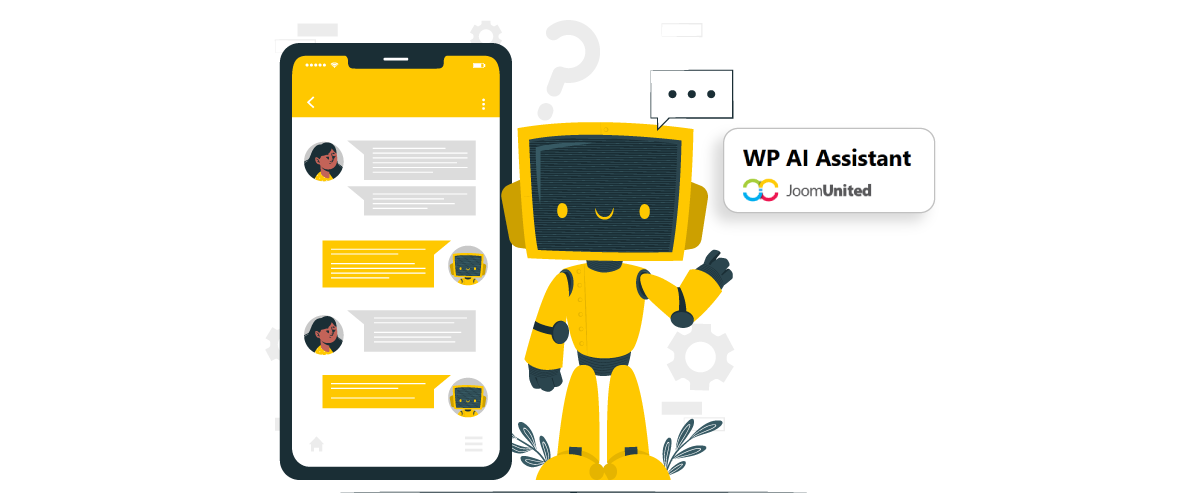
لدعم هذه الأنواع من التفاعلات، الأدوات مثل WP AI Assistant دمج قدرات الذكاء الاصطناعي المتقدمة مباشرةً في ووردبريس. مع تقديم نماذج JoomUnited AI، يمكن لأصحاب المواقع اختيار بين نماذج الذكاء الاصطناعي السريعة للاستجابات الفورية ونماذج الذكاء الاصطناعي التفكيرية للتفكير الأعمق والطلبات المعقدة.
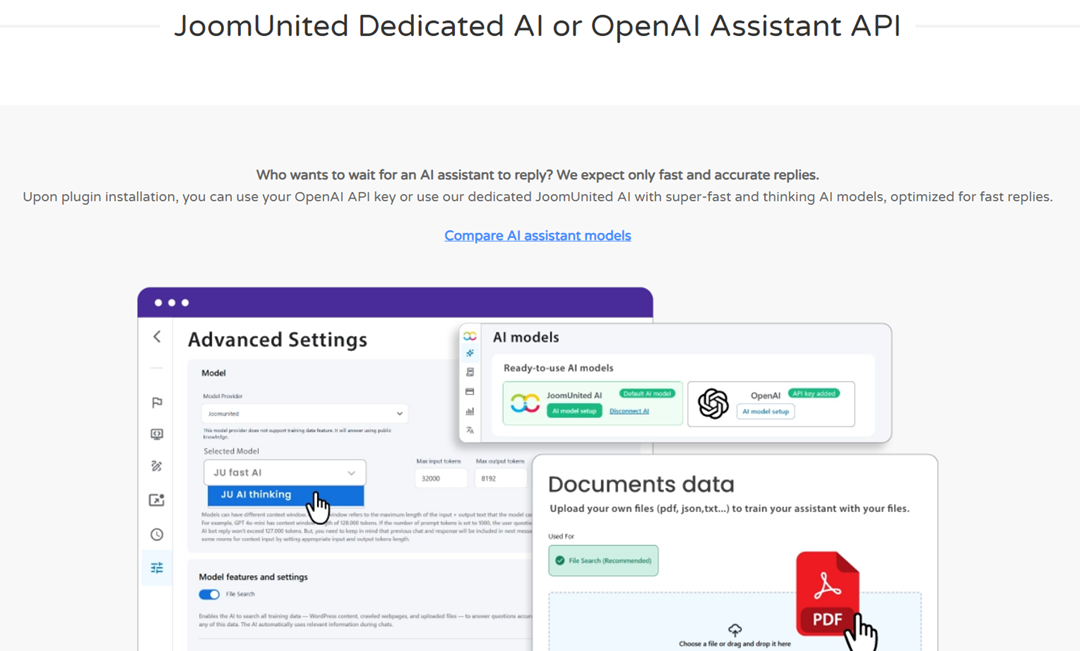
تم تحسين هذه النماذج لأداء ووردبريس، وتوفر إجابات موثوقة، وتحافظ على خصوصية البيانات بالكامل، ويمكنها حتى تقليل التكاليف التشغيلية.
حالات استخدام AI العملية لمواقع WordPress

أصبح الذكاء الاصطناعي أداة عملية لتحسين تفاعل المستخدمين مع الذكاء الاصطناعي في بيئات ووردبريس. بدلاً من مجرد إضافة الأتمتة، يمكن للذكاء الاصطناعي تعزيز طريقة بحث الزوار عن المعلومات، وطرح الأسئلة، وتصفح الموقع. من خلال دمج الذكاء الاصطناعي في نقاط التفاعل الرئيسية، يمكن لمواقع ووردبريس تقديم مساعدة أسرع وتجربة مستخدم أكثر استجابة.
روبوتات محادثة AI
روبوتات الدردشة الذكية هي واحدة من أكثر الطرق شيوعًا التي تستخدمها المواقع لتفاعل الذكاء الاصطناعي مع الزوار. بدلاً من الانتظار للحصول على دعم بشري، يمكن للمستخدمين طرح الأسئلة مباشرةً عبر واجهة الدردشة وتلقي ردود فورية. يساعد ذلك المواقع على معالجة الاستفسارات الشائعة، مثل تفاصيل المنتج، الأسعار، أو المساعدة في التنقل.
لمواقع WordPress، يتم عادةً تنفيذ هذه الروبوتات الذكية مع ملحق الروبوت، مما يتيح لأصحاب المواقع إضافة واجهة دردشة مدعومة بالذكاء الاصطناعي بسهولة دون تطوير معقد. مع الملحق المناسب للروبوت، يمكن للمواقع تقليل عبء الدعم مع الحفاظ على التوفر المستمر. يمكن للزوار الحصول على المساعدة في أي وقت، مما يحسن التجربة العامة ويُبقي المستخدمين متفاعلين مع الموقع.
بحث مدعوم بالذكاء الاصطناعي
غالبًا ما يعتمد البحث التقليدي في المواقع على مطابقة الكلمات المفتاحية، مما يجعل من الصعب على المستخدمين العثور على المعلومات الصحيحة إذا تم صياغة استفسارهم بشكل مختلف. يحسن البحث المدعوم بالذكاء الاصطناعي ذلك من خلال فهم نية استفسار المستخدم بدلاً من الاعتماد فقط على الكلمات الدقيقة المستخدمة.
مع البحث المدعوم بالذكاء الاصطناعي، يمكن للمستخدمين طرح أسئلة طبيعية والحصول على نتائج أكثر صلة. هذا يجعل من السهل على الزوار العثور على المقالات أو الوثائق أو صفحات المنتجات، خاصةً في مواقع ووردبريس التي تحتوي على محتوى كثيف.
مساعدات AI
يتجاوز المساعدون الذكيون الدردشة البسيطة أو أدوات البحث من خلال عملهم كمساعد ذكي عبر الموقع بأكمله. يمكنهم إرشاد المستخدمين عبر المحتوى، وتقديم التوصيات، والإجابة على الأسئلة، ومساعدة في الطلبات الأكثر تعقيدًا.
في مواقع ووردبريس، يمكن للمساعدين الذكيين دعم أنواع متعددة من التفاعلات في آن واحد—مساعدة المستخدمين على اكتشاف المحتوى، حل المشكلات، أو الحصول على شروحات سريعة دون الانتقال عبر صفحات متعددة. يخلق ذلك تجربة تصفح أكثر سلاسة وتفاعلية مع تحسين المشاركة العامة.
تُسهل الأدوات WP AI Assistant بناء مساعد ذكاء اصطناعي مباشرة داخل ووردبريس. مع دعم نماذج JoomUnited AI، يمكن لأصحاب المواقع الاختيار بين JU Fast AI للحصول على ردود سريعة أو JU AI Thinking للحصول على تفكير أعمق عند التعامل مع مطالبات أكثر تعقيدًا.
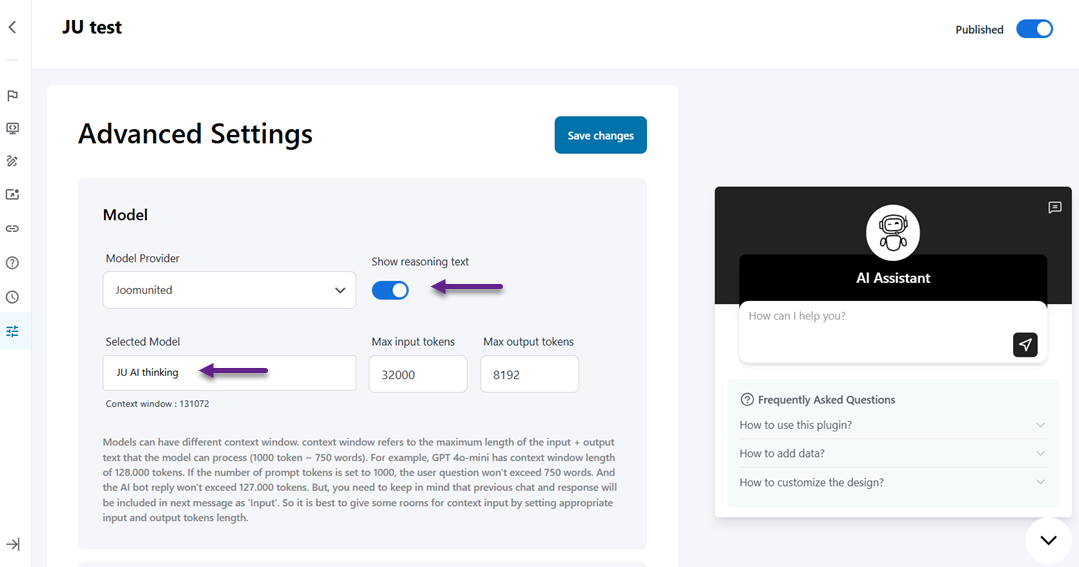
في إعدادات WP AI Assistant ، يمكن للمستخدمين اختيار نموذج JU AI وضبط سلوك المساعد وفقًا لنمط الاستجابة المطلوب. عند استخدام نموذج التفكير، يمكن للمستخدمين أيضًا تمكين خيار إظهار نص السبب لعرض كيفية معالجة الذكاء الاصطناعي وإيضاح إجاباته، مما يخلق تفاعلات أكثر شفافية وإفادة.
نداء إلى جميع مشرفي المواقع & الوكالات!
نشر روبوتات محادثة ذكية مدربة مخصصًا لعملائك في دقائق. الاتصال مباشرةً بـ OpenAI، إدارة مساعدين متعددين، وتقديم حل دعم مميز على مدار 24/7 يحول محادثات الزوار إلى عملاء محتملين.
أنشئ مواقع عملاء أذكى على الفور!
تحسين أداء وتكلفة AI في WordPress
إن تنفيذ الذكاء الاصطناعي على موقع ووردبريس لا يقتصر فقط على إضافة ميزات جديدة بل يشمل أيضًا الحفاظ على التوازن الصحيح بين الأداء والدقة وتكلفة التشغيل. اختيار الاستراتيجية المناسبة للذكاء الاصطناعي يساعد المواقع على تقديم ردود مفيدة للمستخدمين مع ضمان بقاء النظام فعالًا وقابلًا للتوسع مع زيادة حركة المرور.
موازنة السرعة والدقة
أحد التحديات الرئيسية في تنفيذ الذكاء الاصطناعي هو موازنة سرعة الاستجابة مع جودة الإجابة. نماذج الذكاء الاصطناعي السريعة مثالية للتفاعلات في الوقت الحقيقي مثل ردود الدردشة، الأسئلة المتكررة السريعة، أو اقتراحات البحث حيث يتوقع المستخدمون استجابات فورية.
مع ذلك، تتطلب بعض التفاعلات تفكيرًا أعمق لإنتاج إجابات دقيقة. في هذه الحالات، يمكن لاستخدام نماذج الذكاء الاصطناعي التي تعطي الأولوية للسياق والتحليل أن يوفر ردودًا أكثر موثوقية. تسمح استراتيجية متوازنة لمواقع WordPress بتقديم ردود سريعة عندما يكون ذلك ممكنًا مع الاستمرار في دعم الطلبات الأكثر تعقيدًا عند الحاجة.
تقليل تكاليف AI على نطاق واسع
مع زيادة تفاعلات الذكاء الاصطناعي، يمكن أن تتزايد التكاليف التشغيلية—خاصةً للمواقع ذات الحركة المرورية العالية أو الاستفسارات المتكررة من المستخدمين. تشغيل طلبات الذكاء الاصطناعي بشكل مستمر يتطلب موارد حوسبة، والتي قد تصبح مكلفة إذا لم يتم تحسينها بشكل صحيح.
لإدارة ذلك، تُدمج العديد من مواقع WordPress نماذج الذكاء الاصطناعي الفعّالة مع استراتيجيات استخدام أذكى. يساعد استخدام نماذج أسرع للطلبات البسيطة وحجز نماذج التفكير الأعمق للاستفسارات المعقدة على تقليل المعالجة غير الضرورية مع الحفاظ على جودة الاستجابة.
اختيار نموذج AI المناسب لموقعك
كل موقع ويب لديه احتياجات تفاعل مختلفة تعتمد على جمهوره ومحتواه. قد يُعطي المدونة أولوية لاستجابات الذكاء الاصطناعي السريعة لاكتشاف المحتوى، بينما قد يتطلب موقع الوثائق التقنية تفكيرًا أكثر تقدمًا للإجابة على أسئلة المستخدمين التفصيلية.
أدوات مثل WP AI Assistant تجعل هذا أسهل من خلال السماح لمالكي المواقع باختيار بين نماذج الذكاء الاصطناعي السريعة للتفاعلات الفورية ونماذج الذكاء الاصطناعي التفكيرية للتفكير العميق والطلبات المعقدة. مع تقديم JoomUnited نماذج الذكاء الاصطناعي يمكن لمواقع WordPress تقديم ردود أذكى، أداء محسن، وحتى تقليل تكاليف تشغيل الذكاء الاصطناعي مع الحفاظ على سلاسة وموثوقية التفاعلات.
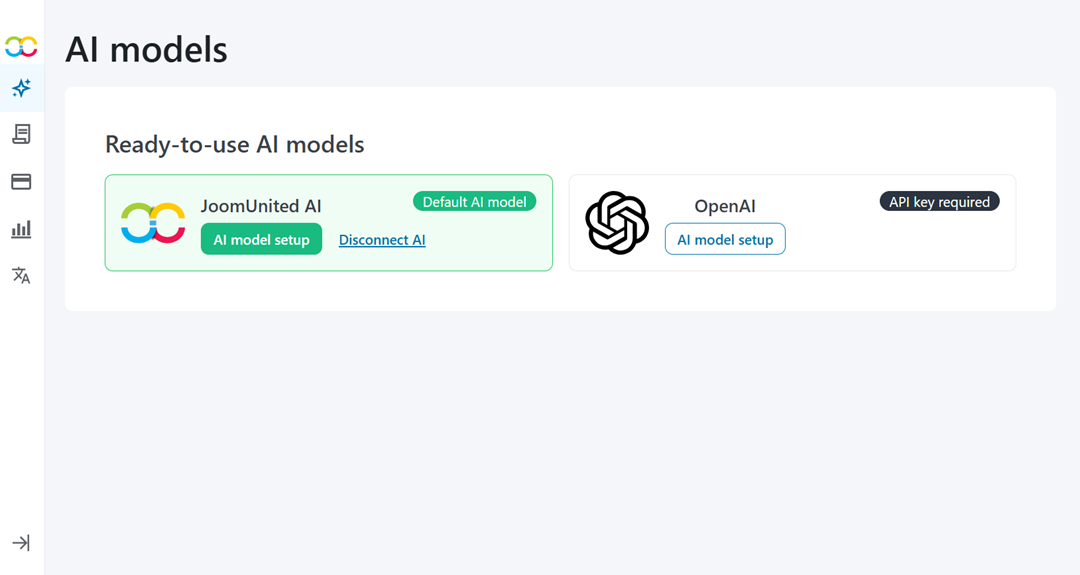
الجدول أدناه يقارن نماذج JoomUnited AI وواجهة برمجة تطبيقات OpenAI، مسلطاً الضوء على الميزات الرئيسية والفوائد المتاحة عند استخدامها مع WP AI Assistant.
| ميزة / ميزة | نماذج JoomUnited AI | واجهة برمجة تطبيقات OpenAI |
| تدريب مخصص من محتوى الموقع | ✓ | ✓ |
| رفع المستندات لتدريب الذكاء الاصطناعي | ✓ | ✓ |
| روبوت الدردشة UI مدمج بالكامل في WordPress | ✓ | ✓ |
| لا حاجة للبرمجة | ✓ | ✓ |
| مساعدات ذكاء اصطناعي متعددة لكل موقع | ✓ | ✓ |
| تصميم مخصص & العلامة التجارية | ✓ | ✓ |
| الجدولة / التحكم في الظهور | ✓ | ✓ |
| التقاط العملاء المحتملين (البريد الإلكتروني من الدردشة) | ✓ | ✓ |
| تكامل WordPress & WooCommerce | ✓ | ✓ |
| التحكم في السلوك & الردود | ✓ | ✓ |
| ردود سريعة جداً | ✓ | X |
| نماذج ذكاء اصطناعي متخصصة | ✓ | X |
| خصوصية البيانات المحلية (بدون تخزين طويل الأمد) | ✓ | X |
| كفاءة التكلفة | ✓ | X |
| أرصدة قابلة للنقل عبر منتجات الذكاء الاصطناعي | ✓ | X |
| التحكم في حصة الائتمان & الاستخدام | ✓ | X |
الاستنتاج
نماذج الذكاء الاصطناعي لـ WordPress تُعيد تشكيل طريقة تفاعل المواقع مع الزوار، مما يتيح استجابات أسرع، وتجارب بحث أذكى، ومساعدة أكثر فائدة عبر صفحات مختلفة. باستخدام التركيبة المناسبة من نماذج الذكاء الاصطناعي، يمكن لأصحاب المواقع تحسين التفاعل، والإجابة على أسئلة المستخدمين بشكل أكثر كفاءة، وإنشاء تفاعلات مدعومة بالذكاء الاصطناعي أكثر سلاسة وتشعر بالطبيعية والاستجابة.
By balancing response speed, reasoning capability, and operational cost, WordPress websites can build AI interactions that are both efficient and scalable. To bring these capabilities directly into your site, start using WP AI Assistant and take advantage of fast responses, advanced reasoning, and smarter AI interactions inside WordPress.
عندما تشترك في المدونة، سنرسل لك رسالة بريد إلكتروني عند وجود تحديثات جديدة على الموقع حتى لا تفوتك.